
1. はじめに
ご購入ありがとうございますasing the Caliber HPG415BT/B Portable Bluetooth Speaker. This manual provides important information regarding the safe and efficient operation of your device. Please read it thoroughly before use and retain it for future reference.
パッケージ内容
- Caliber HPG415BT/B Portable Bluetooth Speaker
- USB to Mini USB Charging Cable
- 3.5mmオーディオケーブル
- リモートコントロール
- 取扱説明書
2. 安全情報
安全な操作を確保し、損傷を防ぐために、次の安全ガイドラインを守ってください。
- デバイスを雨、湿気、または極端な温度にさらさないでください。
- ラジエーター、ストーブ、その他の熱を発生する器具などの熱源の近くにスピーカーを置かないでください。
- ご自身でユニットを分解、修理、改造しないでください。すべてのメンテナンスは資格を持った専門家にお任せください。
- Use only the specified charging cable and power adapter (5V USB) to charge the battery.
- デバイスを強い磁場から遠ざけてください。
- デバイスのクリーニングは、乾いた柔らかい布のみを使用してください。液体クリーナーは使用しないでください。
3 製品の特徴
The Caliber HPG415BT/B speaker offers a range of features for versatile audio playback:
- ワイヤレス Bluetooth テクノロジー: Connect wirelessly to compatible devices within a 10-meter range (Bluetooth version 2.1, supports A2DP and AVRCP profiles)。
- 複数の再生オプション: Play audio from USB drives and SD cards (up to 32GB).
- FMラジオ: Enjoy your favorite radio stations with automatic search and storage functions.
- LEDディスプレイ: Provides clear information on current mode and status.
- High Power Sound: Equipped with 2x 3W speakers for a total of 6W RMS output.
- 内蔵充電式バッテリー: Offers up to 5 hours of continuous playback.
- 直感的なコントロール: Features buttons for previous/next track, play/pause, mode selection, EQ adjustment, and volume control.
- 3.5mmオーディオ入力: Connect external audio devices via the included audio cable.
- リモートコントロール: Conveniently operate the speaker from a distance.
4. コントロールと接続
スピーカーのコントロールと接続ポートについて理解しておきましょう。
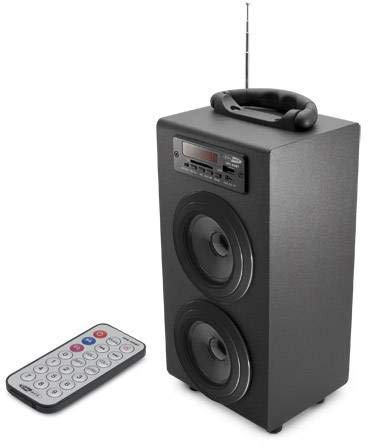
Image 1: Caliber HPG415BT/B Portable Bluetooth Speaker. This image shows the overall design of the speaker, featuring a tubular shape, front-facing speakers, and a control panel on the top or front.
コントロールパネル(標準レイアウト)
- モードボタン: Bluetooth、FM ラジオ、USB、SD、AUX モードを切り替えます。
- 再生/一時停止ボタン: 再生を開始または一時停止します。
- 前へ/次へボタン: Skips tracks in media modes or changes radio stations in FM mode.
- 音量+/-ボタン: 音声出力レベルを調整します。
- EQボタン: イコライザーのプリセットを切り替えます。
- 電源ON / OFFスイッチ: Located typically on the rear or side.
Connection Ports (Typical Layout)
- USBポート: USB フラッシュドライブを接続します。
- SDカードスロット: SDメモリーカードを挿入します。
- AUX入力(3.5mm): ケーブルを介して外部オーディオデバイスを接続します。
- ミニUSB充電ポート: 充電ケーブルを接続します。
5. セットアップ
5.1 初期充電
- 初めて使用する前に、スピーカーの内蔵バッテリーを完全に充電してください。
- Connect the supplied Mini USB cable to the speaker's charging port.
- Connect the other end of the USB cable to a 5V USB power source (e.g., a computer USB port or a USB wall adapter, not included).
- The LED indicator will show charging status. Once fully charged, the indicator may change color or turn off.
5.2 電源のオン/オフ
- To power on, slide the Power ON/OFF switch to the 'ON' position. The LED display will light up.
- 電源を切るには、電源オン/オフスイッチを「オフ」の位置にスライドします。
6. 操作手順
6.1Bluetoothモード
- スピーカーの電源を入れます。自動的にBluetoothペアリングモードになり、LEDディスプレイのBluetoothアイコンが点滅します。
- スマートフォン、タブレット、その他の Bluetooth 対応デバイスで Bluetooth を有効にします。
- 検索する available Bluetooth devices and select "HPG415BT" from the list.
- ペアリングされると、スピーカーから確認音が鳴り、ディスプレイ上の Bluetooth アイコンの点滅が停止します。
- You can now play audio from your connected device through the speaker. Use the PLAY/PAUSE and PREVIOUS/NEXT buttons on the speaker or remote to control playback.
6.2 FMラジオモード
- を押す モード LEDディスプレイに「FM」が表示されるまでボタンを繰り返し押します。
- To perform an automatic station scan, press and hold the 再生/一時停止 ボタンを押します。スピーカーが利用可能なFM放送局をスキャンして保存します。
- 使用 前/次 保存したステーション間を移動するためのボタン。
6.3 USB/SDカード再生
- USB フラッシュ ドライブを USB ポートに挿入するか、SD カードを SD カード スロットに挿入します。
- スピーカーは自動的にUSBまたはSDモードに切り替わり、オーディオの再生を開始します。 fileそうでない場合は、 モード ボタンを押して正しいソースを選択します。
- 使用 再生/一時停止 そして 前/次 再生を制御するボタン。
6.4 AUX入力モード
- Connect one end of the supplied 3.5mm audio cable to the speaker's AUX input port.
- ケーブルのもう一方の端を外部オーディオ デバイスのヘッドフォン ジャックまたはオーディオ出力に接続します。
- を押す モード LEDディスプレイに「AUX」が表示されるまでボタンを繰り返し押します。
- 外部オーディオ デバイスから再生と音量を直接制御します。
7. バッテリーの充電
When the battery is low, the speaker may emit an audible warning or the LED indicator will show a low battery status. To charge:
- Connect the Mini USB charging cable to the speaker's charging port.
- Connect the USB end to a 5V USB power source.
- The charging indicator will illuminate. Charging typically takes several hours.
- Once fully charged, the indicator will change or turn off. Disconnect the charging cable.
8. メンテナンス
- クリーニング: スピーカーの外側は、柔らかく乾いた布で拭いてください。研磨剤入りの洗剤、ワックス、溶剤は使用しないでください。
- ストレージ: 長期間使用しない場合は、スピーカーを直射日光や極端な温度を避け、涼しく乾燥した場所に保管してください。
- バッテリーのケア: バッテリーの寿命を延ばすには、バッテリーを頻繁に完全に放電させないでください。使用していない場合でも、定期的に充電してください。
9。 トラブルシューティング
| 問題 | 考えられる原因 | 解決 |
|---|---|---|
| 電源なし | バッテリーが放電しています。電源スイッチはオフになっています。 | バッテリーを充電します。電源スイッチをオンにします。 |
| 音が出ない | 音量が低すぎます。間違ったモードが選択されています。デバイスが正しく接続されていません。 | Increase volume; Press MODE to select correct source; Reconnect device. |
| Bluetoothが接続されない | スピーカーがペアリング モードになっていません。デバイスの Bluetooth がオフになっています。スピーカーがデバイスから離れすぎています。 | Ensure speaker is in Bluetooth mode and flashing; Enable Bluetooth on your device; Move devices closer (within 10m). |
| FMラジオの雑音 | 信号が弱い; 干渉。 | Relocate the speaker for better reception; Perform an auto-scan again. |
10. 仕様
- モデル: HPG415BT/B
- 出力: 6W RMS(2x 3W)
- Bluetoothバージョン: 2.1
- Bluetooth 動作範囲: 最大10メートル
- 接続性: Bluetooth, USB, SD Card, 3.5mm AUX Input
- サポートされているメディア: USB drives, SD cards (up to 32GB)
- FMラジオ: Yes, with auto-scan
- 画面: 導かれた
- 電池のタイプ: Integrated Rechargeable
- バッテリー寿命: 最大5時間
- 充電: USB5V
- 寸法(長さ×幅×高さ): 140 x 120 x 280 ミリメートル
- 重さ: 約1.04kg(2.29ポンド)
- コントロールタイプ: ボタン、リモコン
11. 保証とサポート
Caliber products are designed and manufactured to the highest quality standards. For warranty information or technical support, please refer to the warranty card included with your product or visit the official Caliber web連絡先の詳細についてはサイト。