
1. はじめに
ご購入ありがとうございますasing the COBY DTV-700 Digital to Analog TV Converter. This device allows you to receive digital broadcast television signals and convert them for display on older analog televisions. It also functions as a multimedia player, supporting various audio, video, and image formats via its USB port, and offers recording capabilities. Please read this manual thoroughly before operating the device to ensure proper use and to maximize your viewing の経験。
2. パッケージ内容
以下の項目のボックスにチェックを入れてください。
- COBY DTV-700 Digital to Analog TV Converter
- リモートコントロール
- AC/DC電源アダプター
- AVケーブル(RCA)
- ユーザーマニュアル(このドキュメント)
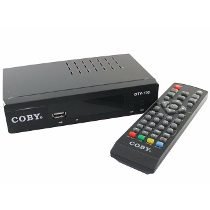
Image 2.1: The COBY DTV-700 Digital to Analog TV Converter. This image shows the compact design of the converter unit, typically black with various ports and indicators.
3. 安全情報
安全な操作を確保し、損傷を防ぐために、次の注意事項を守ってください。
- ユニットを雨、湿気、または極端な温度にさらさないでください。
- cを開けないでくださいasing; すべてのサービスは資格を持った担当者に依頼してください。
- 過熱を防ぐために、ユニットの周囲に適切な換気を確保してください。
- 付属の電源アダプターのみを使用してください。
- ユニットを直射日光、熱源、強い磁場から遠ざけてください。
- 電池や電子廃棄物は、地域の規制に従って責任を持って処分してください。
4.製品オーバーview
4.1フロントパネル
フロント パネルには通常、次のものが含まれます。
- 電源インジケーター: ユニットの電源がオンのときに点灯します。
- チャンネルアップ/ダウンボタン: For changing channels.
- メニューボタン: メインメニューにアクセスします。
- USBポート: For connecting USB storage devices for media playback and recording.
4.2 背面パネル
背面パネルには必要な接続ポートがすべてあります。
- ANT IN: Connects to your antenna for receiving digital signals.
- HDMI出力: Connects to an HDMI-compatible TV for high-definition output.
- AV OUT (RCA): Connects to older analog TVs using composite video (yellow) and stereo audio (red/white) cables.
- 同軸出力: Digital audio output (if available).
- DC IN: Connects to the provided AC/DC power adapter.
5. セットアップ
5.1 コンバータの接続
- アンテナを接続する: Connect your digital antenna to the アリイン port on the rear of the DTV-700.
- テレビに接続する:
- For Analog TVs: Use the supplied AV cable. Connect the yellow plug to the video input of your TV, and the red/white plugs to the corresponding audio inputs. Connect the other end to the OUT AV ports on the DTV-700.
- For Digital/HDTVs: Use an HDMI cable (not included). Connect one end to the HDMI出力 port on the DTV-700 and the other end to an available HDMI input on your TV.
- 接続電源: Plug the AC/DC power adapter into the DC入力 port on the DTV-700, then plug the adapter into a wall outlet.
5.2 初期設定とチャンネルスキャン
- Turn on your TV and select the correct input source (e.g., AV1, HDMI1) that corresponds to your connection.
- Power on the DTV-700 using the remote control or the power button on the front panel.
- The first time you power on, an initial setup wizard may appear. Follow the on-screen prompts to select your language and country.
- Initiate an automatic channel scan. This will search for all available digital channels in your area. This process may take several minutes. Do not interrupt the scan.
- Once the scan is complete, the converter will tune to the first available channel.
6. 操作手順
6.1リモコン機能
The remote control provides full functionality for your DTV-700. Ensure two AAA batteries are inserted correctly (batteries not included).
- 力: ユニットの電源をオンまたはオフにします。
- CH +/-: チャンネルを上または下に変更します。
- VOL +/-: 音量を調整します。
- メニュー: メインメニューにアクセスします。
- EXIT: 現在のメニューまたは機能を終了します。
- 情報: 現在のチャンネル情報を表示します。
- OK / ナビゲーション ボタン: Confirms selections and navigates menus.
- REC: Starts recording the current program.
- PLAY/PAUSE, STOP, FF, REW: メディア再生コントロール。
- USB: Switches to USB media playback mode.
6.2 チャンネルナビゲーション
使用 チャンネル +/- buttons on the remote or front panel to browse channels. You can also directly enter a channel number using the numeric keypad on the remote.
6.3 メインメニュー
を押す メニュー button to access settings for Program, Picture, Sound, Time, Option, and System. Use the navigation buttons to select options and OK 確認します。
7. メディアの再生
The DTV-700 supports media playback from a USB storage device (e.g., USB flash drive, external hard drive). Insert your USB device into the USB port on the front panel.
7.1 サポートされている形式
- 音楽: MP3、WMA
- 写真: JPG、BMP、PNG
- ビデオ: MKV, AVI, DIVX, XVID, MOV, VOB, FLV, DAT, MPEG, MP4, TS
7.2 メディアの再生
- USB ストレージ デバイスを USB ポートに挿入します。
- を押す USB button on the remote control or navigate to the 'Multimedia' section in the main menu.
- Select the desired media type (Music, Photo, Video) and browse your files.
- ナビゲーションボタンを使用して、 file を押して OK 遊ぶ。
8. 録音機能
The DTV-700 allows you to record live TV programs to a connected USB storage device.
8.1 インスタントレコーディング
番組を視聴中に、 記録 button on the remote control to start recording. Press 停止 録音を終了します。
8.2 Scheduled Recording (PVR)
Access the PVR (Personal Video Recorder) or Schedule menu via the main menu to set up timed recordings. You will need to specify the channel, start time, end time, and date for the recording.
9。 トラブルシューティング
| 問題 | 考えられる原因 / 解決策 |
|---|---|
| 画像も音声も出ない |
|
| Poor picture quality / No channels |
|
| リモコンが動作しない |
|
| USBメディアが再生されない |
|
10. 仕様
- モデル: DTV-700
- ブランド: コビー
- 入力: Digital TV Antenna (ATSC/DVB-T/T2 compatible, depending on region)
- 出力: HDMI, AV (RCA Composite Video/Audio)
- USBポート: Yes (for media playback and PVR)
- サポートされているメディア形式:
- Music: MP3, WMA
- 写真: JPG、BMP、PNG
- Video: MKV, AVI, DIVX, XVID, MOV, VOB, FLV, DAT, MPEG, MP4, TS
- 力: AC/DC Adapter (Input: 100-240V ~ 50/60Hz, Output: typically 5V-12V DC)
- 寸法: Approximately 20 x 15.6 x 6.2 cm (Package dimensions)
- 重さ: Approximately 490 g (Package weight)
- リモコン電池: 2 x AAA(含まれません)
11. メンテナンス
To ensure the longevity and optimal performance of your DTV-700 converter:
- クリーニング: 本体の外装を清掃する際は、柔らかく乾いた布をご使用ください。液体クリーナーや研磨剤は使用しないでください。
- 換気: 過熱を防ぐために通気口が塞がれていないことを確認してください。
- ストレージ: ユニットを長期間保管する場合は、電源を外して涼しく乾燥した場所に保管してください。
12. 保証とサポート
For warranty information and technical support, please refer to the warranty card included with your product or visit the official Coby webサイトでご確認ください。保証請求の際は購入証明として領収書を保管してください。
Coby is committed to providing quality products and customer satisfaction. If you encounter any issues not covered in this manual, please contact Coby customer service for assistance.