
1. はじめに
The Aduro Amplify LED Wireless Speaker, model BSP15, is a portable audio device designed for wireless music playback and hands-free calling. It features integrated LED lighting with multiple settings to enhance the audio experience. This manual provides instructions for the proper setup, operation, and maintenance of your speaker.
箱の中身:
- アデューロ Amplify LED Wireless Speaker (BSP15)
- 充電ケーブル
2. 安全情報
- Do not expose the speaker to water or moisture. This product is not water-resistant.
- Avoid extreme temperatures. Do not place near heat sources or in direct sunlight for extended periods.
- スピーカーを分解したり改造したりしないでください。保証が無効になり、損傷の原因となる可能性があります。
- 付属の充電ケーブルまたは認定された同等品のみを使用してください。
- お子様の手の届かない場所に保管してください。
3 製品の特徴
- ワイヤレス接続: スマートフォン、タブレット、その他の Bluetooth 対応デバイスに接続します。
- Easy-Touch Pairing: Simplifies the process of connecting to your device.
- 統合マイク: Allows for hands-free phone calls.
- 高品質のサウンド出力: クリアで大音量の音声を配信します。
- 複数の LED 設定: Offers various light modes to complement your audio experience.
4. コントロールview
The Aduro Amplify speaker features intuitive controls located on the top panel for easy access to functions.
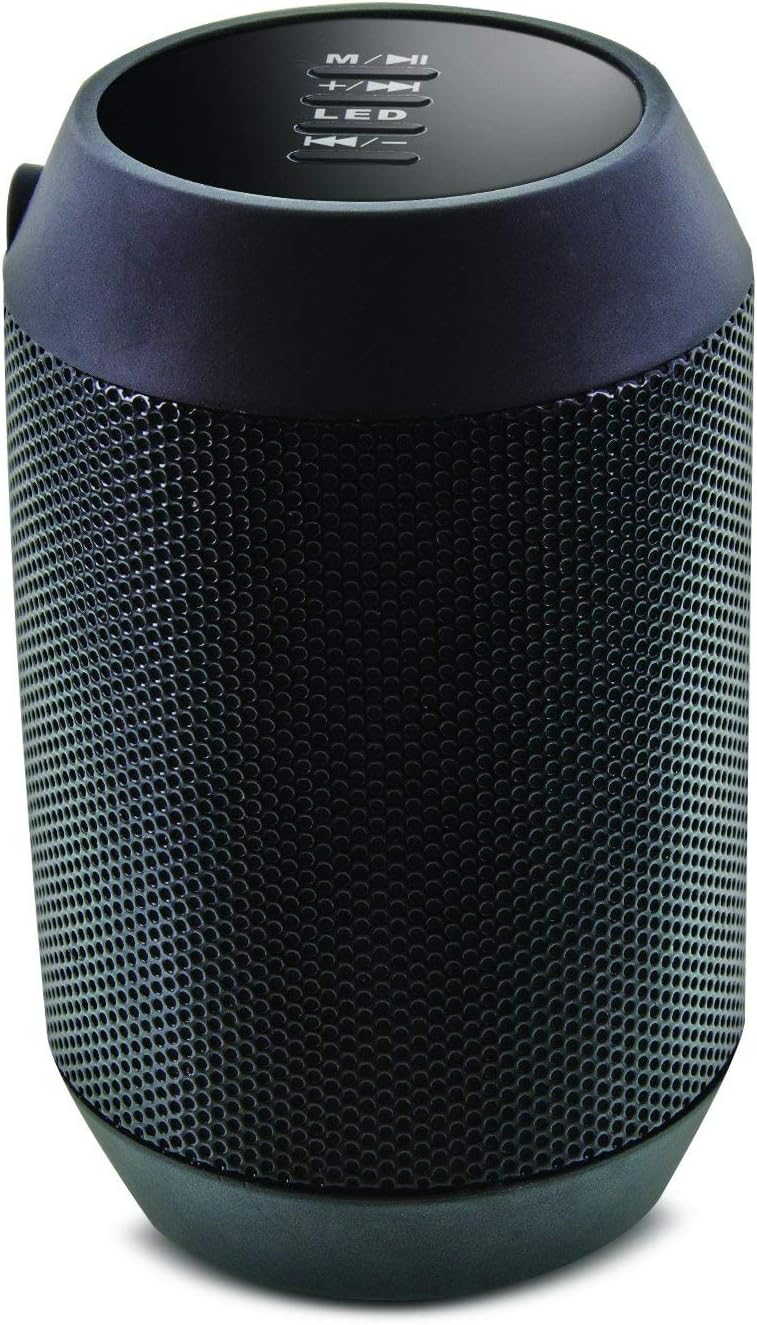
画像: 上 view of the Aduro Amplify speaker, highlighting the control panel. From top to bottom, buttons include: M/▶█ (Mode/Play/Pause), +/▶▶ (Volume Up/Next Track), LED (LED Mode Control), ◀◀/- (Volume Down/Previous Track).
- M/▶█ Button: Press to switch between modes (e.g., Bluetooth, AUX). Press and hold to power on/off. Short press to Play/Pause music.
- +/▶▶ Button: Short press to increase volume. Press and hold to skip to the next track.
- LEDボタン: 押すと、さまざまな LED ライト モードが切り替わります。
- ◀◀/- Button: Short press to decrease volume. Press and hold to go to the previous track.
5. セットアップ手順
5.1 スピーカーの充電
Before first use, fully charge the speaker. Connect the provided charging cable to the speaker's charging port and the other end to a USB power source (e.g., computer USB port, USB wall adapter). The LED indicator will show charging status and turn off or change color when fully charged.
5.2 電源のオン/オフ
- 電源を入れるには: を押し続けます M/▶█ button for approximately 3 seconds until you hear an audible prompt or see the LED indicator light up.
- 電源を切るには: を押し続けます M/▶█ button for approximately 3 seconds until you hear an audible prompt or the LED indicator turns off.
5.3Bluetoothペアリング
スピーカーを Bluetooth 対応デバイスに接続するには:
- Ensure the speaker is powered on and in Bluetooth pairing mode. The LED indicator will typically flash rapidly, indicating it is ready to pair.
- On your smartphone, tablet, or other device, navigate to the Bluetooth settings.
- Bluetoothを有効にして、利用可能なデバイスを検索します。
- Select "Aduro BSP15" (or similar name) from the list of found devices.
- Once paired, the speaker will emit an audible confirmation, and the LED indicator will typically stop flashing and remain solid.
- スピーカーは、電源を入れると、最後にペアリングしたデバイスに自動的に再接続しようとします。
5.4 有線接続(AUX)
For devices without Bluetooth, you can use a 3.5mm audio cable (not included) to connect to the speaker's AUX input port. Once connected, the speaker should automatically switch to AUX mode. If not, press the M/▶█ AUX モードに切り替えるボタン。
6. 操作手順
6.1 オーディオの再生
- 再生/一時停止: を短く押す M/▶█ ボタン。
- ボリュームアップ: を短く押す +/▶▶ ボタン。
- ボリュームダウン: を短く押す ◀◀/- ボタン。
- 次のトラック: を押し続けます +/▶▶ ボタン。
- 前のトラック: を押し続けます ◀◀/- ボタン。
6.2 ハンズフリー通話
Bluetooth 経由で接続すると、スピーカーの内蔵マイクを使用してハンズフリー通話が可能になります。
- 通話に応答: を短く押す M/▶█ 着信が鳴ったらボタンを押します。
- 通話終了: を短く押す M/▶█ 通話中のボタン。
- 通話を拒否: を押し続けます M/▶█ 着信が鳴ったらボタンを押します。
6.3 LEDライトの設定
を押す 導かれた button to cycle through the available light modes. The speaker offers various visual effects, including pulsating lights that react to music.
7. メンテナンス
7.1 クリーニング
スピーカーは柔らかく乾いた布で拭いてください。研磨剤入りの洗剤、アルコール、その他の化学溶剤は表面を傷つける可能性があるため、使用しないでください。
7.2 ストレージ
長期間使用しない場合は、直射日光や極端な温度を避け、涼しく乾燥した場所に保管してください。バッテリーの寿命を維持するために、定期的に充電することをお勧めします。
8。 トラブルシューティング
- スピーカーの電源が入らない:
バッテリーが充電されていることを確認してください。充電ケーブルを接続し、数分後にもう一度お試しください。 - Bluetoothデバイスとペアリングできません:
Ensure the speaker is in pairing mode (LED flashing). Make sure Bluetooth is enabled on your device and it is within range (typically 10 meters/30 feet). Turn both devices off and on again, then try pairing. Ensure no other devices are currently connected to the speaker. - 音が出ない、または音量が低い:
Check the volume levels on both the speaker and your connected device. Ensure the speaker is correctly paired or the AUX cable is fully inserted. If using AUX, ensure the correct mode is selected. - LEDライトが動作しない:
Press the LED button to cycle through modes. If still unresponsive, power cycle the speaker.
9. 仕様

画像: サイド view of the Aduro Amplify LED Wireless Speaker, showing its cylindrical design and speaker grille.
| モデル名 | BS15 ... |
| 商品型番 | LU4-01-BSP15 |
| ブランド | アデューロ |
| 材料 | プラスチック |
| スピーカータイプ | サブウーファー |
| 特集 | Built-in Microphone, Portable |
| 接続技術 | ワイヤレス(Bluetooth) |
| 無線通信 | ブルートゥース |
| オーディオ出力モード | ステレオ |
| スピーカー最大出力 | 5ワット |
| 制御方法 | 触る |
| 製品寸法 | 奥行き6インチ x 幅3.8インチ x 高さ3.5インチ |
| アイテム重量 | 6.7オンス |
| 耐水性レベル | 耐水性はありません |
| 電源 | コード式電気(充電用) |
10. 保証とサポート
10.1 限定保証
This Aduro product is covered by a limited warranty against defects in materials and workmanship under normal use. The duration and terms of the warranty may vary. Please refer to the warranty card included with your purchase or contact Aduro customer support for specific details.
10.2 カスタマーサポート
For technical assistance, warranty claims, or product inquiries, please contact Aduro customer support. Contact information can typically be found on the manufacturer's official webサイトまたは製品パッケージに記載されています。
Manufacturer: Aduro

