1. はじめに
This manual provides essential information for the safe and effective operation of your OWON SDS6062 Digital Storage Oscilloscope. Please read this manual thoroughly before using the device to ensure proper setup, operation, and maintenance. The SDS6062 is a 2-channel oscilloscope featuring a 60 MHz bandwidth, 500 MS/s sample rate, and a 10M record length, designed for precise electrical signal analysis.
2. 安全情報
Always observe the following safety precautions to prevent injury and avoid damage to the instrument or any connected products. Read these instructions carefully before operation.
- 電源: Use only the power adapter supplied with the instrument. Ensure the voltage はお住まいの地域の電源に適合します。
- 接地: The oscilloscope must be properly grounded to prevent electric shock.
- プローブの安全性: Do not connect the probe ground lead to a point where a voltage greater than 30V RMS or 42.4V peak is present.
- 環境: Operate the device in a well-ventilated area, away from moisture, dust, and direct sunlight. Avoid operating in explosive atmospheres.
- メンテナンス: すべての修理は資格を持ったサービス担当者にお任せください。ご自身でユニットを修理しようとしないでください。
3. パッケージ内容
Verify that all items listed below are present in your package. If any items are missing or damaged, contact your supplier.
- OWON SDS6062 Digital Storage Oscilloscope Unit
- オシロスコーププローブ2個
- 1 x電源コード
- 1 x Probe Adjust Pen
- 1 x USBデータケーブル
- ソフトウェアCD x 1
- ユーザーマニュアル (本書) x 1
4.製品オーバーview
The OWON SDS6062 is a compact and powerful digital storage oscilloscope. It features an 8-inch (800x600) color TFT-LCD screen for clear waveform display and an intuitive control panel for easy operation. Key features include its 60 MHz bandwidth, 500 MS/s real-time sample rate, and 10M record length, making it suitable for a wide range of applications.
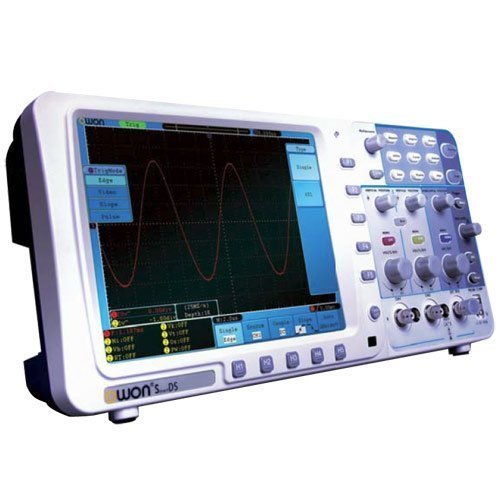
図4.1: 前面 view of the OWON SDS6062 Digital Storage Oscilloscope, showing the display, control knobs, and function buttons.
4.1 フロントパネルコントロール
The front panel includes the main display, vertical controls (VOLTS/DIV, position), horizontal controls (SEC/DIV, position), trigger controls, and various function buttons for menu navigation, measurement, and utility settings.
4.2 リアパネルの接続
The rear panel provides connectivity options including the power input, USB host and device ports, LAN port for network connectivity, and a VGA port for external display output.
5. セットアップ
Follow these steps to set up your OWON SDS6062 oscilloscope for initial use.
5.1 電源の接続
- Ensure the oscilloscope is turned off.
- Connect the supplied power cord to the power input on the rear panel of the oscilloscope.
- 電源コードのもう一方の端をアース付き AC 電源コンセントに差し込みます。
5.2 プローブの接続
- Align the BNC connector of the probe with the CH1 or CH2 input on the front panel.
- Push and twist the connector clockwise until it locks into place.
- Attach the probe ground clip to the ground terminal of the circuit under test.
- Set the probe attenuation switch (e.g., 1X or 10X) to match the setting on the oscilloscope's input channel menu.
5.3 初回電源投入
- フロントパネルにある電源ボタンを押します。
- The oscilloscope will perform a self-test and display the startup screen.
- After startup, it is recommended to perform a probe compensation adjustment (refer to Section 7.3).
6. オシロスコープの操作
This section covers basic operation and common functions of the SDS6062.
6.1 基本的な測定
To display a signal:
- Connect a signal source to CH1 or CH2 using a probe.
- を押す 自動設定 button. The oscilloscope will automatically adjust vertical, horizontal, and trigger settings to display a stable waveform.
- 調整する ボルト/ DIV knob to change the vertical scale (voltage/部門あたり)。
- 調整する SEC/DIV knob to change the horizontal scale (time per division).
- Use the vertical and horizontal 位置 knobs to move the waveform on the screen.
6.2 トリガーシステム
トリガー システムは、反復波形を安定させ、単発イベントをキャプチャします。
- トリガーレベル: 使用 トリガーレベル ボリュームを設定するノブtagトリガーが発生するレベル。
- トリガーモード: Access the trigger menu to select modes like Edge, Pulse, Video, or Slope.
- トリガーソース: Select the input channel (CH1, CH2, EXT, AC Line) that will be used for triggering.
6.3 測定関数
The SDS6062 offers various automatic measurement functions.
- を押す 測定 button to display the measurement menu.
- Select desired measurements such as Vpp, Vmax, Vmin, Freq, Period, Rise Time, etc.
6.4 Connectivity (LAN and VGA)
- LAN: Connect an Ethernet cable to the LAN port on the rear panel to connect the oscilloscope to a network. This allows for remote control and data transfer using compatible software.
- VGA: Use the VGA port to connect an external monitor or projector for larger display of waveforms, useful for presentations or collaborative work.
7. メンテナンス
適切なメンテナンスを行うことで、オシロスコープの寿命と精度が確保されます。
7.1 クリーニング
定期的に柔らかい布で器具を清掃してください。amp 布で拭いてください。研磨剤入りの洗剤や溶剤は使用しないでください。asingまたは画面。清掃する前に、デバイスの電源がオフになっており、プラグが抜かれていることを確認してください。
7.2 ストレージ
When not in use, store the oscilloscope in a dry, dust-free environment, away from extreme temperatures and direct sunlight. Use the original packaging or a suitable carrying case for protection during transport.
7.3 プローブ補正調整
Probe compensation should be adjusted to match the oscilloscope's input characteristics. This ensures accurate measurements.
- Connect the probe to CH1 and attach the probe tip to the probe compensation output (usually a square wave test point on the front panel).
- Attach the probe ground clip to the ground terminal.
- プレス 自動設定.
- Use the supplied probe adjust pen to turn the trimmer screw on the probe until the square wave displayed on the screen has flat top and bottom edges (no overshoot or undershoot).
8。 トラブルシューティング
このセクションでは、発生する可能性のある一般的な問題に対する解決策を示します。
- 表示なし: Check power connection, ensure the power button is pressed. Adjust screen brightness if necessary.
- No Waveform: Verify probe connection to the input channel and the circuit under test. Ensure the signal source is active. Press 自動設定. Check vertical and horizontal scale settings.
- 不安定な波形: Adjust the trigger level. Check trigger mode and source settings. Ensure the signal is within the oscilloscope's bandwidth.
- 不正確な測定: Perform probe compensation adjustment (Section 7.3). Ensure probe attenuation settings match the oscilloscope.
- デバイスが応答しない: Try restarting the oscilloscope. If the issue persists, contact technical support.
9. 仕様
Technical specifications for the OWON SDS6062 Digital Storage Oscilloscope.
| パラメータ | 仕様 |
|---|---|
| モデル番号 | SDS6062 |
| 帯域幅 | 60 MHz |
| チャンネル | 2 + 1 (External Trigger) |
| Sample Rate (Real-time) | 500MS/秒 |
| レコード長 | 10万ポイント |
| 画面 | 8-inch Color TFT-LCD (800x600) |
| インタフェース | USB Host, USB Device, LAN, VGA |
| AutoScale Function | はい |
| メーカー | オウォン |
10. 保証とサポート
OWON products are designed for reliability and performance. For warranty information, please refer to the warranty card included with your product or visit the official OWON website. For technical support, troubleshooting assistance, or service inquiries, please contact your local OWON distributor or the OWON customer service department. Keep your purchase receipt as proof of purchase for warranty claims.