
1. はじめに
ご購入ありがとうございますasing the ipega PG-9057 Wireless Game Controller. This manual provides detailed instructions for setting up, operating, and maintaining your device. Please read this manual carefully before use to ensure optimal performance and longevity of your controller.
2 製品の特徴
- ワイヤレス接続: Enjoy gaming freedom with wireless connection technology.
- マルチプラットフォーム互換性: Supports Android devices (smartphones, tablets, TV boxes) and Windows PCs.
- 高耐久性ボタン: Equipped with high-quality, durable buttons for extended gaming sessions.
- 精密制御: Features a D-pad with pressure sensitivity and a 360-degree joystick with no dead zone for accurate input.
- 人間工学に基づいたデザイン: Designed for comfortable grip and prolonged use.
- 一体型電話ホルダー: Conveniently mount your smartphone for mobile gaming.
3. パッケージ内容
開封したらパッケージの内容を確認してください:
- ipega PG-9057 ワイヤレス ゲーム コントローラー
- USB充電ケーブル
- ユーザーマニュアル(日本語版付属)
4. セットアップ
4.1. コントローラーの充電
Before first use, fully charge the controller using the provided USB cable. Connect the small end of the USB cable to the controller's charging port and the other end to a USB power source (e.g., PC, USB wall adapter).
4.2. デバイスの互換性view
The ipega PG-9057 controller supports various devices and connection methods as shown below:

This image displays the ipega PG-9057 Wireless Game Controller, highlighting its compatibility with various devices including smartphones, tablets, personal computers, and VR headsets.
4.3. Connection Methods and System Environment
The controller offers multiple connection options depending on your device and operating system. Refer to the table below for detailed compatibility.

This table outlines the system requirements and connection methods for the ipega PG-9057 controller, detailing compatibility with Android smartphones, tablets, and TV boxes via Bluetooth 4.0 or USB, and PCs via USB.
4.3.1. Bluetooth Connection (Android Devices)
- コントローラーが充電されていることを確認してください。
- を押し続けます 家 ボタンと A button simultaneously until the indicator light flashes rapidly. This puts the controller into pairing mode.
- Android デバイスで Bluetooth 設定に移動し、Bluetooth をオンにします。
- 検索する available devices and select "ipega PG-9057" (or similar name) from the list.
- ペアリングされると、コントローラーのインジケーター ライトが点灯します。
4.3.2. USB Wired Connection (Windows PC / Android Devices)
- Connect the controller to your Windows PC or Android device using the USB cable.
- The device should automatically recognize the controller. No special drivers are usually required for basic functionality.
5. 操作手順
5.1. 基本的な操作
The ipega PG-9057 features standard gamepad controls for intuitive gaming.

詳細な view of the ipega PG-9057 controller's D-pad, joystick, and A/B/X/Y buttons, illustrating their high sensitivity and precise input capabilities.
- 十字キー: For directional input, offering pressure sensitivity.
- 左/右ジョイスティック: 360-degree movement with no dead zone for precise control.
- A/B/X/Y ボタン: Standard action buttons with zero delay response.
- L1/R1, L2/R2 Triggers: ゲーム内のさまざまなアクションを実行するためのショルダーボタンとトリガー。
- SELECT/STARTボタン: ゲーム内のメニューナビゲーションとアクション用。
- ホームボタン: To power on/off the controller or return to the main menu.
5.2. Using with a Smartphone
The controller includes an integrated holder for smartphones, allowing for a portable gaming experience.
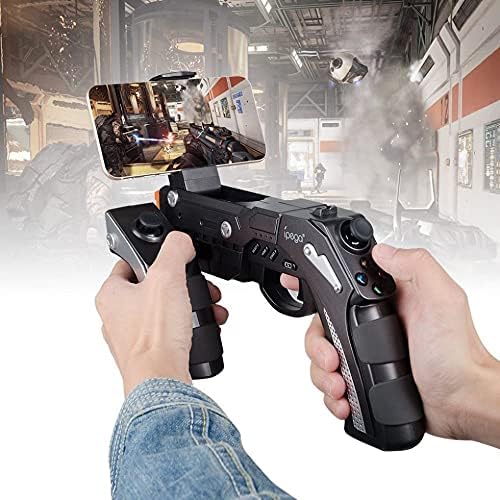
A user is shown holding the ipega PG-9057 Wireless Game Controller with a smartphone securely attached, actively engaged in mobile gaming.
- Extend the phone holder located on the top of the controller.
- スマートフォンをホルダーに慎重に置き、しっかりと固定されていることを確認します。
- Connect the controller to your smartphone via Bluetooth as described in Section 4.3.1.
- Launch your desired game and configure controller settings if necessary.
6. メンテナンス
ipega PG-9057 コントローラーの寿命を延ばし、最適なパフォーマンスを確保するには、次のメンテナンス ガイドラインに従ってください。
- クリーニング: Use a soft, dry cloth to wipe the surface of the controller. Do not use harsh chemicals or abrasive cleaners.
- ストレージ: コントローラーは、直射日光や極端な温度を避け、涼しく乾燥した場所に保管してください。
- ドロップを避ける: 内部コンポーネントが損傷する可能性があるため、コントローラーを落下や衝撃から保護してください。
- 充電: バッテリーを過充電しないでください。コントローラーが完全に充電されたら、充電ケーブルを外してください。

The ipega PG-9057 Wireless Game Controller is shown, emphasizing its construction from high-quality, durable ABS material.
7。 トラブルシューティング
コントローラーで問題が発生した場合は、次の一般的な解決策を参照してください。
- コントローラーが接続されていません:
- コントローラーが完全に充電されていることを確認してください。
- デバイスで Bluetooth が有効になっており、コントローラーがペアリング モードになっていることを確認します。
- コントローラーとデバイスの両方を再起動してみてください。
- If using USB, ensure the cable is securely connected and try a different USB port.
- ボタンまたはジョイスティックが反応しない:
- コントローラーがデバイスに正しく接続されているかどうかを確認してください。
- コントローラーを再起動して再接続します。
- プレイしているゲームが外部コントローラーをサポートしていることを確認してください。
- ラグまたは入力遅延:
- Ensure there are no obstructions or excessive distance between the controller and your device.
- 他のワイヤレス デバイスからの干渉を最小限に抑えます。
- For critical gaming, consider using a wired USB connection if supported by your device.
8. 仕様
| 仕様 | 価値 |
|---|---|
| ブランド | イフェガ |
| モデル | PG-9057 |
| 対応デバイス | Android、Windows |
| コントローラータイプ | ゲームパッド |
| 接続技術 | 無線 |
| 特徴 | 無線 |
| 対応アイテム | Android、Windows |
| 接続方法 | 無線 |
| 特集 | 無線 |
| ハードウェアプラットフォーム | セットトップボックス |
| 電源 | 電池駆動 |
| Number of Package Items | 1 |
| 欧州連合 | 602747571722 |
| ASIN | B018TSBFE4 |
| GTIN | 602747571722 |
9. 保証とサポート
For warranty information and customer support, please refer to the documentation provided with your purchase or visit the official ipega webサイトでご確認ください。保証請求に備えて購入証明書を保管してください。


