
1. はじめに
This manual provides essential instructions for the installation, operation, maintenance, and troubleshooting of the APC Smart-UPS SRT3000RMXLT 3kVA 208V Rackmount Uninterruptible Power Supply (UPS). Please read this manual thoroughly before installing or operating the equipment to ensure proper usage and safety.
2. 安全情報
Observe all warnings and operating instructions in this manual. Failure to do so may result in injury or equipment damage.
- 電気安全: このユニットには危険な量が含まれていますtages. Do not attempt to disassemble the UPS. Servicing should only be performed by qualified personnel.
- バッテリーの安全性: 電池は感電や高電流の短絡を引き起こす危険性があります。電池を取り扱う前に、時計、指輪、その他の金属類を外してください。絶縁ハンドル付きの工具を使用してください。
- 重さ: The UPS is heavy. Use proper lifting techniques and ensure adequate support during installation.
- 環境: Install the UPS indoors in a controlled environment, free from excessive dust, moisture, and extreme temperatures.
3. パッケージ内容
Carefully unpack the UPS and inspect for shipping damage. The package should contain the following items:
- APC Smart-UPS SRT3000RMXLT Unit
- Power Supply (Built-In)
- ラックマウントハードウェア
- ドキュメンテーションCD
- USBケーブル
- シリアルケーブル
4. セットアップ
4.1物理的な設置
The SRT3000RMXLT is designed for rack installation. Ensure the rack is stable and capable of supporting the UPS weight (approximately 69 pounds).
- Mount the UPS into a standard 19-inch rack using the provided rack-mounting hardware.
- ユニット周囲に十分な空気の流れを確保してください。通気口を塞がないでください。

図4.1: 前面 view of the APC Smart-UPS SRT3000RMXLT. This image shows the front panel with the display and ventilation grille.
4.2 UPSの接続
Connect the UPS to the utility power and your equipment.
- Connect the UPS input power cord to a dedicated 208V AC outlet. The UPS uses a Type B - 3 pin (North American) power plug.
- Connect your equipment to the output receptacles on the rear of the UPS. The unit provides 12 IEC 320 C13/C14 outlets.
- For communication, connect the USB cable or serial cable from the UPS to your computer or network management card.
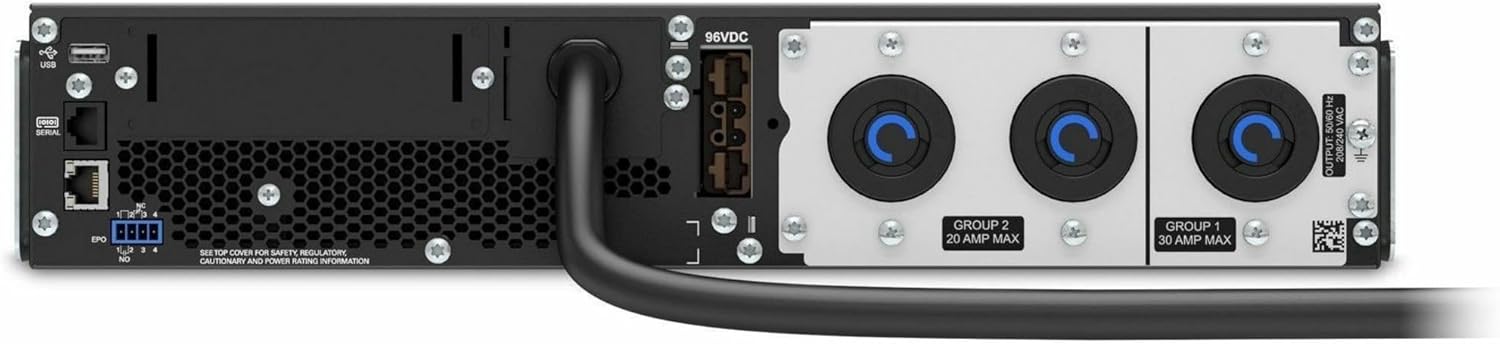
図4.2:背面 view of the APC Smart-UPS SRT3000RMXLT. This image displays the various input and output ports, including USB, serial, EPO, and the 12 output receptacles, along with the main power input.
4.3 初期電源投入
After all connections are secure:
- 前面パネルの電源ボタンを押して、UPS の電源をオンにします。
- The UPS will perform a self-test and the display will show the current status.
- Allow the batteries to charge for at least 6 hours before relying on them for extended backup time.
5. UPSの操作
5.1 フロントパネルのディスプレイとコントロール
The front panel features an LCD display and control buttons for monitoring and configuring the UPS.
- LCDディスプレイ: Shows real-time status, load, battery charge, input/output voltage, and event logs.
- ESCボタン: 現在のメニューを終了するか、操作をキャンセルします。
- OKボタン: 選択を確認するか、メニューに入ります。
- 上/下矢印: メニュー オプションを移動したり、設定を調整したりします。
5.2 基本操作
- 電源オン: ディスプレイが点灯するまで電源ボタンを押し続けます。
- 電源をオフにする: Press and hold the power button until the UPS powers down. Ensure all connected equipment is safely shut down first.
- バッテリーモード: 停電の場合tage, the UPS will automatically switch to battery power. The display will indicate 'On Battery'.
- セルフテスト: Initiate a manual self-test through the front panel menu to verify battery and UPS functionality.
6. メンテナンス
6.1 電池の交換
The UPS uses sealed lead-acid batteries. Battery life is typically 3-5 years, depending on environmental conditions and usage. Replace batteries when the UPS indicates a 'Battery Fault' or 'Replace Battery' warning.
- Contact APC support or a certified service technician for battery replacement.
- 互換性と最適なパフォーマンスを確保するには、常に純正の APC 交換用バッテリー カートリッジ (RBC) を使用してください。
- 古い電池は責任を持ってリサイクルしてください。
6.2 クリーニング
Keep the UPS free from dust and debris to ensure proper ventilation.
- Use a soft, dry cloth to clean the exterior of the UPS.
- 液体クリーナーや溶剤は使用しないでください。
- 換気口に障害物がないことを確認してください。
7。 トラブルシューティング
このセクションでは、一般的な問題に対する解決策を紹介します。より複雑な問題については、テクニカルサポートにお問い合わせください。
| 問題 | 考えられる原因 | 解決 |
|---|---|---|
| UPSが起動しない | No input power; Battery disconnected or discharged | Check power cord connection; Ensure utility power is present; Allow batteries to charge. |
| UPSがビープ音を連続して鳴らす | On battery power; Overload condition | Check utility power; Reduce connected load. |
| 'Replace Battery' indicator | バッテリーの寿命が近づいています | Order and replace the battery cartridge. |
| UPS not providing power to outlets | Output circuit breaker tripped; UPS in fault mode | Reset circuit breaker; Check display for fault codes and consult manual. |
8. 仕様
Key technical specifications for the APC Smart-UPS SRT3000RMXLT.
| 特徴 | 仕様 |
|---|---|
| モデル番号 | SRT3000RMXLT |
| ブランド | 航空宇宙 |
| 出力電力容量 | 3000VA / 2700ワット |
| 公称出力Voltage | 208V 交流 |
| 公称入力ボリュームtage | 208V AC / 230V AC |
| 入力周波数 | 60Hz |
| 出力接続 | 12 x IEC 320 C13/C14 |
| 電池のタイプ | 鉛蓄電池 |
| 通常の充電時間 | 6時間 |
| 標準的なバックアップ時間(フルロード) | 4 minutes |
| フォームファクター | ラック |
| 寸法(高さ×幅×奥行き) | 9 x 23 x 34インチ |
| 重さ | 69 ポンド |
| 動作温度 | 0~40℃(32~104℉) |
9. 保証とサポート
9.1 保証情報
APC provides a standard warranty for this product. Please refer to the warranty card included with your product or visit the official APC webお住まいの地域に固有の詳細な保証条件については、こちらのサイトをご覧ください。
9.2 テクニカルサポート
For technical assistance, product information, or troubleshooting beyond the scope of this manual, please contact APC customer support. Have your model number (SRT3000RMXLT) and serial number ready when contacting support.
- 公式APCをご覧ください webサポート リソース、FAQ、および連絡先情報に関するサイト。
- Online resources often include updated manuals, firmware, and diagnostic tools.