
1.製品オーバーview
The Grandstream GXP1630 is a powerful Gigabit IP phone designed for small businesses. This Linux-based, 3-line IP Phone model includes 8 BLF keys and 4-way conferencing. It features a 132x64 backlit LCD screen for clear display, dual HD audio, multi-language support, integrated Power over Ethernet (PoE), and 3 XML programmable soft keys. The GXP1630 incorporates state-of-the-art security encryption technology (SRTP and TLS) and supports various automated provisioning options for easy mass deployment.
主な特徴:
- 3 SIP accounts, 3 line keys, 4-way conferencing
- 3つのXMLプログラム可能なコンテキスト依存ソフトキー
- スピーカーフォンと受話器のHDオーディオ
- 最大1000件の連絡先、最大200件の通話履歴
- デュアルスイッチギガビットポート、統合PoE
- 8 つの 2 色 BLF/スピードダイヤル キー
- Plantronics ヘッドセットの EHS サポート
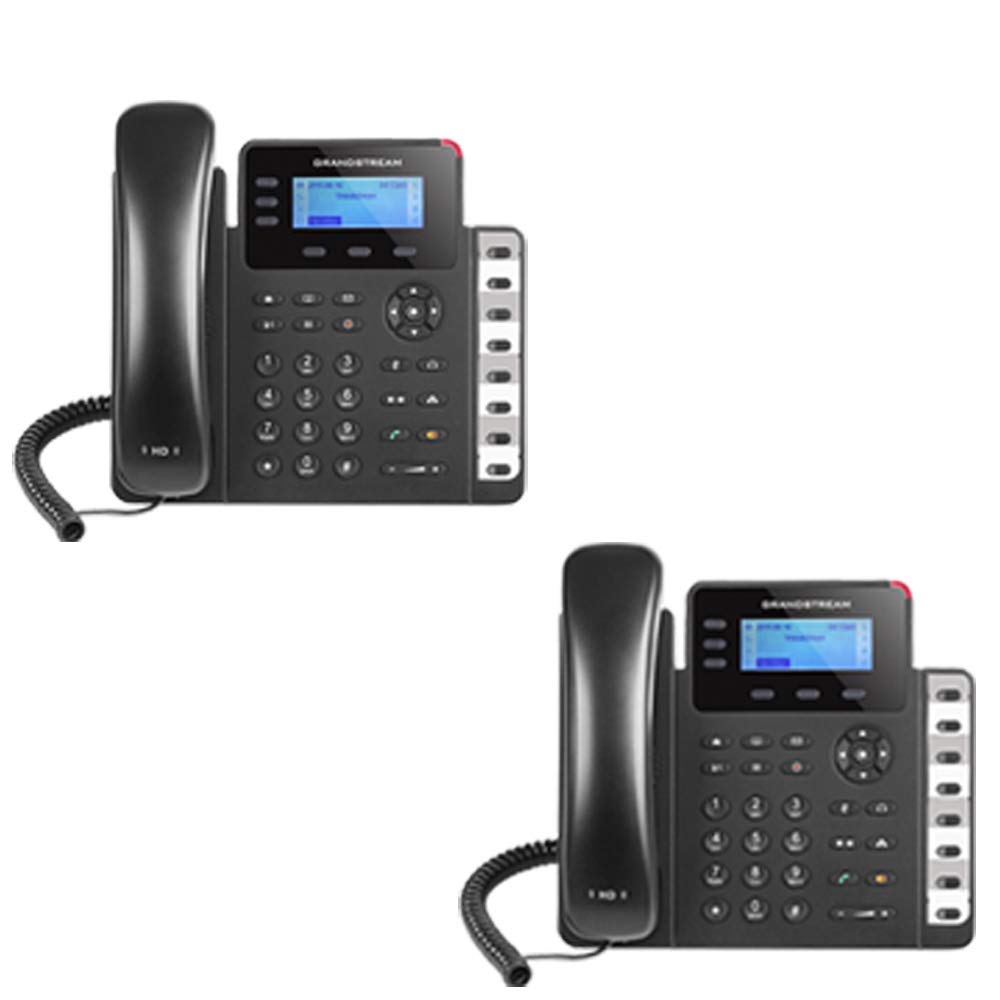
Figure 1: Grandstream GXP1630 Gigabit IP Phone
2. セットアップとインストール
2.1 パッケージ内容
すべてのコンポーネントが揃っていることを確認します。
- Grandstream GXP1630 IP電話ユニット
- 受話器とコイルコード
- イーサネットケーブル
- 電源アダプタ(PoEを使用しない場合)
- 電話スタンド
2.2 電話の接続
- Connect the coiled cord to the handset and the handset port on the phone base.
- Connect the Ethernet cable from your network switch (with PoE) or router to the LAN port on the phone. If not using PoE, connect the power adapter to the phone and a power outlet.
- Optionally, connect a headset to the headset port.
- Attach the phone stand to the base unit.
2.3 初期電源投入とプロビジョニング
Once connected, the phone will power on and begin the boot-up sequence. The LCD screen will display status information. The GXP1630 supports automated provisioning options, including zero-configuration with Grandstream’s UCM series IP PBXs, encrypted XML files, and TR-069, to facilitate easy mass deployment and configuration.
3. 電話の操作
3.1 Using the Headset or Speaker
- To turn the speaker on or off during a call, press the スピーカー ボタン。
- 接続されたヘッドセットを使用するには、 ヘッドセット ボタン。
ビデオ1: 終了view of using headset and speaker functions on Grandstream GXP1600 series IP phones.
3.2電話をかける
通話を開始するには、主に次の 3 つの方法があります。
- ハンドセット/ヘッドセット: 受話器を持ち上げるか、 ヘッドセット ボタン。
- スピーカーフォン: を押す スピーカー ボタン。
- 回線キーの選択: Press an available line key.
Once you hear a dial tone (the corresponding line key will turn green), enter the phone number using the keypad. Then, press the 送信 ボタンまたは # key to place the call. To use a different SIP account, simply press a different line key before dialing.
3.3 番号のリダイヤル
最後にかけた番号をリダイヤルするには:
- 受話器を持ち上げるか、 スピーカー ボタン。
- を押す 送信 ボタンまたは リダイヤルする soft key displayed on the phone screen.
The phone will redial using the same SIP account as the previous call.
3.4 電話に出る
着信が鳴ったとき:
- 単一の着信: 受話器を上げて、 スピーカー button, or press the corresponding flashing line key.
- 複数の着信(通話待ち): If you are on an active call and another call comes in, you will hear a call waiting tone. The new incoming call's line key will flash red. Press the flashing red line key to answer the new call. Your current call will be placed on hold. You can toggle between calls by pressing the line key corresponding to each call.
3.5 通話を終了する
アクティブな通話を終了するには:
- 受話器を置きます。
- を押す 通話終了 soft key on the phone screen.
3.6 Hold and Resume a Call
- アクティブな通話を保留にするには、 所有 button. The line key will typically flash.
- 保留中の通話を再開するには、対応する点滅している回線キーを押します。
3.7 Volume Adjustment and Mute
- 電話がアイドル状態のときは、 音量 着信音量を調整するボタン。
- 通話中に、 音量 button to adjust the call volume for the handset, headset, or speaker.
- To mute or unmute your microphone during a call, press the ミュート ボタン。
4. メンテナンス
To ensure optimal performance and longevity of your Grandstream GXP1630 IP Phone, consider the following maintenance tips:
- クリーニング: 携帯電話の表面を拭く際は、柔らかく乾いた布をご使用ください。研磨剤入りの洗剤や溶剤は使用しないでください。
- ファームウェアの更新: Regularly check for and apply firmware updates provided by Grandstream. Keeping the firmware up to date can improve performance, add new features, and address security vulnerabilities.
- 環境条件: Operate the phone within recommended temperature and humidity ranges to prevent damage.
5。 トラブルシューティング
If you encounter issues with your GXP1630 IP Phone, try the following basic troubleshooting steps:
- ダイヤルトーンが聞こえない/電話をかけられない: Check all cable connections (Ethernet, handset, power). Ensure the phone is properly registered with your SIP server.
- 電源なし: Verify the power adapter is securely connected to both the phone and a working power outlet, or that your network switch is providing Power over Ethernet (PoE).
- 音質が悪い: Check network connectivity. Ensure the handset/headset cord is properly connected. Adjust the call volume using the volume buttons.
- 電話が応答しません: As with any electronic device, occasional reboots can resolve minor issues. Disconnect the power for a few seconds and then reconnect it.
- 表示の問題: If the screen is blank or frozen, try rebooting the phone.
For more advanced issues, consult your IT administrator or Grandstream's official support resources.
6. 仕様
| 特徴 | 説明 |
|---|---|
| SIP アカウント | 3 |
| ラインキー | 3 |
| 会議 | 4ウェイ |
| BLF/スピードダイヤルキー | 8つのデュアルカラー |
| オーディオ | スピーカーフォンと受話器のHDオーディオ |
| ネットワーク·インタフェース | デュアルスイッチギガビットポート |
| PoE対応 | Integrated Power over Ethernet |
| 画面 | 132x64 バックライト付き LCD |
| 寸法 | 8 x 12 x 6インチ |
| 重さ | 6 ポンド |
| 色 | 黒 |
| 材料 | プラスチック |
| 対応デバイス | Grandstream IP phones, Plantronics headsets with EHS feature, devices supporting TR-069 and XML config files |
7. 保証とサポート
7.1 製造元の保証
The Grandstream GXP1630 IP Phone comes with a 1年間のメーカー保証保証請求のために購入証明書を保管してください。
7.2 テクニカルサポート
For technical assistance, product registration, or to access additional resources, please visit the official Grandstream website or contact your product vendor. Support resources often include FAQs, knowledge bases, and community forums.