
1. はじめに
The Vivanco PAU 1501 is a versatile universal power supply designed for operating and charging a wide range of electronic devices, including both USB and non-USB compatible equipment. This manual provides essential information for the safe and efficient use of your power supply.
2. 安全に関する注意事項
Please read these safety instructions carefully before using the device. Failure to follow these instructions may result in electric shock, fire, or damage to the product.
- Do not expose the power supply to rain, moisture, or extreme temperatures.
- Ensure the power supply is disconnected from the mains before cleaning or if it will not be used for an extended period.
- cを開けないでくださいasin電源装置のg。内部にはユーザーが修理できる部品はありません。
- Use only the provided or approved connectors.
- ボリュームを確認するtage and polarity requirements of your device before connecting it to the power supply. Incorrect settings can damage your device.
- お子様の手の届かない場所に保管してください。
3. パッケージ内容
The Vivanco PAU 1501 package typically includes:
- 1x Vivanco PAU 1501 Universal Power Supply Unit
- 8x Non-USB Output Connectors (various sizes)
- 3x USB Output Connectors (USB A, Mini USB, Micro USB)
- 取扱説明書 x 1
4.製品オーバーview
The Vivanco PAU 1501 features a compact design with a selectable voltage switch and multiple interchangeable output connectors to ensure compatibility with a wide range of devices.
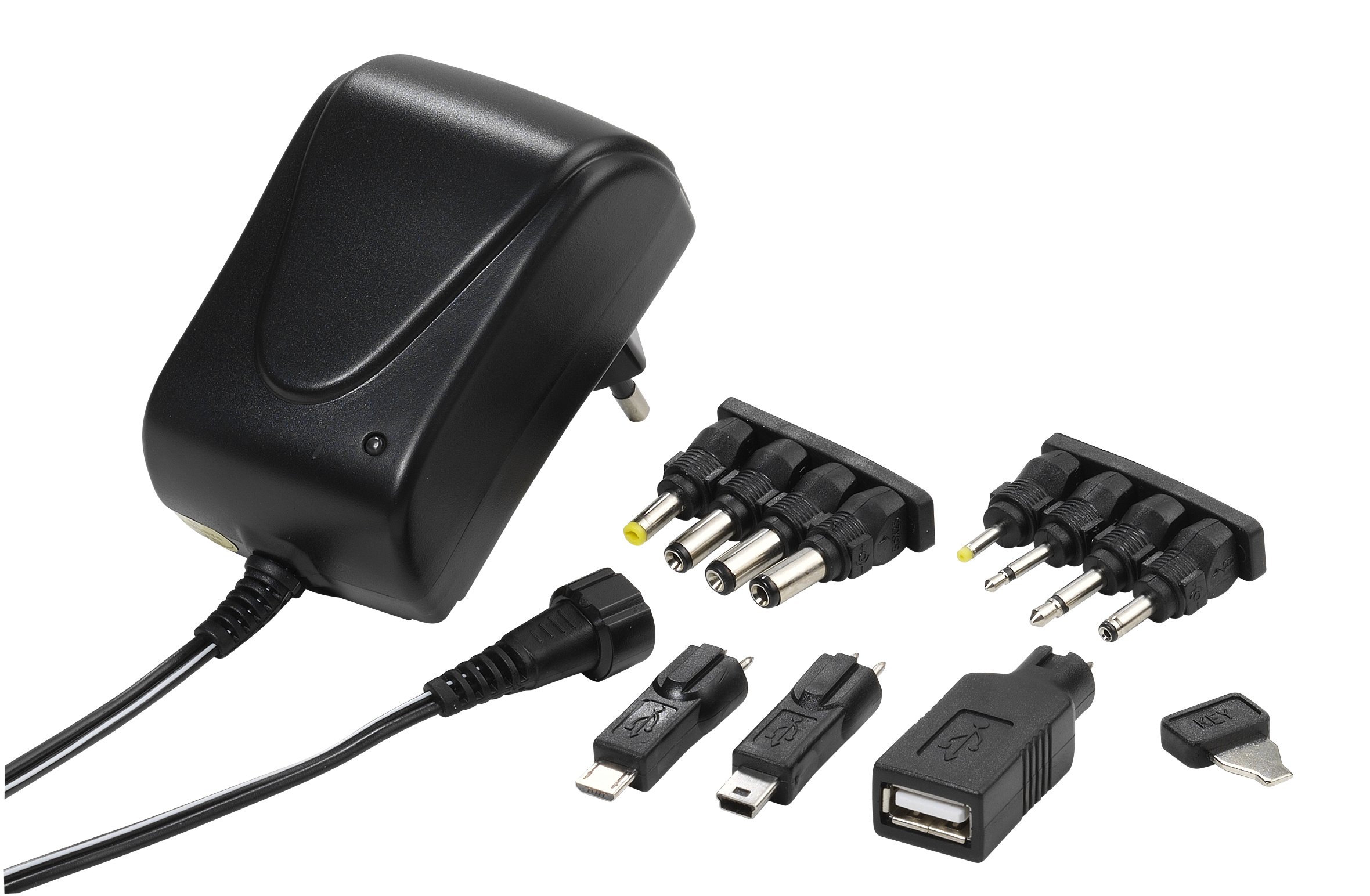
Image 1: The Vivanco PAU 1501 universal power supply unit shown with a selection of its interchangeable output connectors. The main unit features a voltage selector switch and an input for the AC power cable.
主要コンポーネント:
- 本体: Contains the transformer, voltage selector, and output port.
- 巻tageセレクタースイッチ: Allows selection of output voltages (3.0V, 4.5V, 5.0V, 6.0V, 7.5V, 9.0V, 12V DC).
- 出力ケーブル: Connects to the interchangeable tips.
- 交換可能なコネクタ: A variety of tips for different devices, including USB A, Mini USB, Micro USB, and 8 non-USB tips (2.5mm, 3.5mm, 5.5x2.1mm, 5.5x2.5mm, 3.5x1.35mm, 4.0x1.7mm, 5.5x1.5mm, 2.35x0.75mm).
- 電源プラグ: Type C/EF – 2 pins (European/hybrid FR-DE plug) for mains connection.
5. セットアップ
Before connecting the power supply to your device, follow these steps:
- デバイス要件を特定する: Check your device's manual or specifications for its required input voltage (V) and current (mA or A). Also, determine the correct connector type and polarity (usually indicated by a diagram).
- Select Correct Voltage: 巻を探すtage selector switch on the Vivanco PAU 1501. Using a small tool (e.g., a coin or screwdriver), carefully rotate the switch to match your device's required voltage (例: 5.0V、9.0V、12V)。
- Choose Correct Connector: Select the appropriate output connector tip that fits your device's power input port. For USB devices, choose USB A, Mini USB, or Micro USB. For non-USB devices, select one of the 8 barrel or jack connectors.
- コネクタを取り付けます: Firmly attach the chosen connector tip to the output cable of the power supply. Ensure it is securely seated.
6. 操作手順
Once setup is complete, you can begin using your universal power supply:
- デバイスに接続します: Plug the selected connector tip into your electronic device's power input port.
- 電源に接続します: Insert the power supply's main plug into a suitable wall socket (100-240V AC, 50/60Hz).
- 電源オン: Your device should now receive power or begin charging. Some devices may have an indicator light.
- 切断: To disconnect, first unplug the power supply from the wall socket, then remove the connector from your device.
Important: Always ensure the correct voltage and connector are selected before plugging into your device to prevent damage.
7. メンテナンス
To ensure the longevity and proper functioning of your Vivanco PAU 1501 power supply, follow these maintenance guidelines:
- クリーニング: 清掃する前に、電源プラグをコンセントから抜いてください。表面は柔らかく乾いた布で拭いてください。液体クリーナーや溶剤は使用しないでください。
- ストレージ: Store the power supply and its connectors in a cool, dry place away from direct sunlight and moisture when not in use.
- ケーブルのお手入れ: Avoid bending or kinking the power cable excessively. Do not place heavy objects on the cable.
- 検査: Periodically inspect the power supply and cables for any signs of damage, such as frayed wires or cracked casings. If damage is found, discontinue use immediately.
8。 トラブルシューティング
If you encounter issues with your Vivanco PAU 1501, refer to the following common problems and solutions:
| 問題 | 考えられる原因 | 解決 |
|---|---|---|
| デバイスの電源が入らない/充電されない。 | 間違ったボリュームtageが選択されました。 Incorrect connector tip. 接続が緩んでいます。 Wall socket not active. デバイスの障害。 |
ボリュームを確認するtage setting matches your device's requirements. Ensure the correct connector tip is used and securely attached. Check all connections are firm. Test the wall socket with another appliance. Test the device with its original power supply, if available. |
| 電源が熱く感じます。 | 負荷がかかっても正常に動作します。 オーバーロード。 換気が悪い。 |
わずかに温かくなる程度は正常です。過度に熱い場合は、すぐに取り外してください。 Ensure the device's current draw does not exceed 1500mA (1.5A). 電源が換気の良い場所にあることを確認してください。 |
| Sparking when plugging into wall socket. | Normal inrush current. Faulty socket or plug. |
Minor sparking is common. If it's excessive or persistent, discontinue use. Check the wall socket and power supply plug for damage. Consult a qualified electrician if necessary. |
If the problem persists after trying these solutions, please contact Vivanco customer support.
9. 仕様
| 特徴 | 詳細 |
|---|---|
| モデル番号 | PAU 1501 |
| 入力ボリュームtage | 100-240 V AC ~ 50/60 Hz, 0.35 A max. |
| 出力巻tages(DC) | 3.0V、4.5V、5.0V、6.0V、7.5V、9.0V、12V(選択可能) |
| 最大出力電流 | 1500 mA (1.5 A) max. |
| 最大出力 | 18ワット |
| 無負荷電力消費 | < 0.3W |
| 効率 | 最大83% |
| 出力コネクタ | 8 non-USB tips (2.5mm, 3.5mm, 5.5x2.1mm, 5.5x2.5mm, 3.5x1.35mm, 4.0x1.7mm, 5.5x1.5mm, 2.35x0.75mm), 3 USB tips (USB A, Mini USB, Micro USB) |
| プラグタイプ | Type C/EF – 2 pins (European/hybrid FR-DE) |
| 色 | 黒 |
| 特集 | 持ち運びやすく、旅行に便利 |
10. 保証とサポート
Specific warranty information for the Vivanco PAU 1501 is not provided in the product details. Please refer to the warranty card included with your purchase or contact your retailer for details regarding warranty terms and conditions.
For technical support or further inquiries, please visit the official Vivanco webサイトまたは顧客サービス部門に連絡してください。
メーカー: Vivanco