
M-AUDIO Code 25
M-Audio Code 25 USB MIDI Keyboard Controller Instruction Manual
Model: Code 25 | Brand: M-AUDIO
1.製品オーバーview
The M-Audio Code 25 is a 25-key USB MIDI Keyboard Controller designed to provide extensive control over music software and MIDI hardware. It features velocity- and pressure-sensitive keys with aftertouch, 16 assignable velocity-sensitive pads, 5 assignable faders, 4 assignable 360° encoders, and an X/Y Touchpad for dynamic parameter control. The controller supports four assignable zones for flexible instrument triggering and includes an LCD for instant parameter feedback. Power is supplied via USB or an optional 9VDC power adapter.
2. 主な特徴
- 25 full-size, velocity-sensitive keys with aftertouch, powered by USB connection to computer.
- 16 fully assignable velocity-sensitive trigger pads for beat production, clip launching, and more.
- 5 assignable faders for controlling your DAW, virtual instruments, and plugins.
- LCD provides instant parameter feedback.
- X/Y Touchpad for additional and direct interaction with effects and instrument plugin parameters.
- Four assignable keyboard zones for maximizing flexibility.
- Includes Ableton Live Lite software.
3. セットアップ
3.1 開梱と初期検査
Carefully remove the M-Audio Code 25 from its packaging. Inspect the unit for any signs of damage that may have occurred during shipping. Ensure all included accessories are present: USB Cable, Software Installation Card, Quickstart Guide, and Safety & Warranty Manual.
3.2コンピューターへの接続
- Connect the included USB cable from the Code 25's USB port to an available USB port on your computer. The Code 25 is USB-powered and typically does not require an external power adapter when connected to a computer.
- Your computer should automatically detect the Code 25 as a MIDI device. For Windows systems, drivers may be automatically installed. For macOS, it is generally class-compliant and requires no additional drivers.
- If prompted, follow any on-screen instructions for driver installation. It is recommended to visit the M-Audio web最新のドライバーとソフトウェア アップデートのサイト。
3.3 ソフトウェアのインストール
- Use the provided Software Download Cards to register your product and download the included software, such as Ableton Live Lite.
- Install the software according to the instructions provided by the software manufacturer.
- Configure your Digital Audio Workstation (DAW) to recognize the M-Audio Code 25 as a MIDI input device. Refer to your DAW's user manual for specific instructions on MIDI device setup.
4. Operating the Code 25
4.1 Keys and Aftertouch
The Code 25 features 25 full-size, velocity-sensitive keys with aftertouch. Velocity sensitivity means the volume or intensity of a note changes based on how hard you press the key. Aftertouch allows for additional expressive control by applying pressure to a key after it has been pressed, which can be assigned to parameters like vibrato or filter cutoff in your software.
4.2 パッド
The 16 velocity-sensitive pads are ideal for triggering samples, playing drums, or launching clips. They are multicolor-backlit, providing visual feedback. Pads can be assigned to different MIDI notes or functions within your DAW.
4.3 Faders and Encoders
The Code 25 includes 5 assignable 30mm faders and 4 assignable 360° encoders. These controls can be mapped to various parameters in your software, such as volume levels, pan, filter cutoff, resonance, or effect sends. Multiple banks are accessible via dedicated left/right buttons, expanding the number of parameters you can control.
4.4 X/Y Touchpad
The 55mm x 55mm touch-sensitive X/Y Touchpad allows for intuitive and simultaneous control of two parameters (one along the X-axis and one along the Y-axis). This is particularly useful for manipulating effects or instrument parameters in real-time, adding dynamic expression to your music.
4.5 Assignable Zones
The keyboard can be split into four assignable zones. This feature allows you to control different instruments or sounds from different sections of the keyboard simultaneously. For example, you could trigger a bass sound from the lower keys and a lead synth from the upper keys, or layer multiple sounds in a single zone.
5. メディアリソース
5.1 製品画像
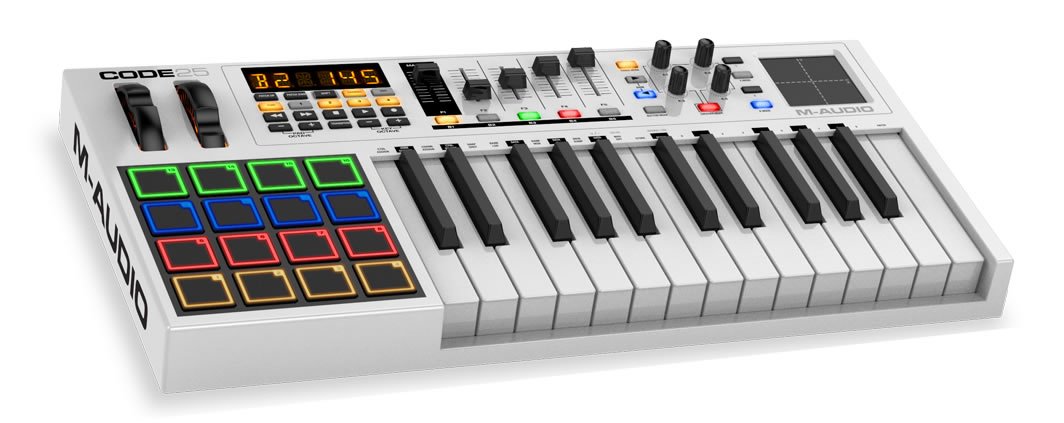


5.2 公式製品ビデオ
M-Audio Code 25 | 25-Key USB MIDI Keyboard Controller with X/Y Touch Pad (16 Drum Pads / 5 Faders...
このビデオはオーバーを提供しますview of the M-Audio Code 25, demonstrating its key features including the 25-key keyboard, 16 drum pads, 5 faders, and the X/Y touchpad. It highlights the controller's versatility for music production and performance.
M-Audio || Introduction & Overview on the Code Series
An in-depth introduction and overview of the M-Audio Code Series, detailing the design philosophy and comprehensive features across the range of keyboard controllers.
M-Audio Code Series Keyboards // Software Preset Editor
This video demonstrates the software preset editor for the M-Audio Code Series keyboards, showing how users can customize and manage their controller settings efficiently from a computer interface.
6. 仕様
| 仕様 | 価値 |
|---|---|
| アイテム重量 | 6.83ポンド |
| 製品寸法 | 10 x 20.9 x 2.8インチ |
| ASIN | B016ZNYPBA |
| 初回利用可能日 | 29年2015月XNUMX日 |
| 色名 | 白 |
| 対応デバイス | Windows desktop and laptop computers, possibly Windows tablets |
| コネクタタイプ | USB |
| ハードウェアインターフェイス | USB |
| サポートされているソフトウェア | VIP3.0 |
| ミュージカルスタイル | 電子 |
| 楽器キー | どれでも |
| キーボードキーの数 | 25 |
| ミキサーチャンネル数 | 5 |
| サイズ | 25 |
| 熟練度レベル | 全て |
| ハードウェアプラットフォーム | ウィンドウズ |
| スタンディングスクリーンの表示サイズ | 4.3 |
| ブランド | M-オーディオ |
| キーの数 | 25 |
| 接続技術 | USB |
| 特集 | バックライト付きドラムパッド |
| モデル名 | コード 25 |
7。 トラブルシューティング
7.1 No Power/Not Responding
- Ensure the USB cable is securely connected to both the Code 25 and your computer.
- コンピューターの別のUSBポートに接続してみてください。
- USB ハブを使用する場合は、電源付きハブであることを確認してください。
- If available, try using an optional 9VDC, 1A, center-positive power adapter (not included) to power the unit.
7.2 Not Recognized by DAW
- Verify that the Code 25 is listed and enabled as a MIDI input device in your DAW's preferences or settings.
- Check the M-Audio website for the latest drivers or firmware updates for your operating system.
- コンピュータとDAWを再起動します。
7.3 コントロールが期待どおりに動作しない
- Ensure the correct preset is loaded on the Code 25 for your specific software or setup.
- Check MIDI mapping settings within your DAW to confirm that faders, encoders, pads, and the X/Y touchpad are correctly assigned to the desired parameters.
- Perform a factory reset if custom settings are causing issues (refer to the full user manual for instructions).
8. メンテナンス
- クリーニング: Use a soft, dry cloth to clean the surface of the Code 25. Do not use abrasive cleaners, solvents, or strong detergents.
- ストレージ: 直射日光、極端な温度、高湿度を避け、涼しく乾燥した場所に保管してください。
- 取り扱い: 本体を落としたり、強い衝撃を与えたりしないでください。コントローラーの上に重い物を置かないでください。
9. 保証とサポート
For detailed warranty information and technical support, please refer to the Safety & Warranty Manual included with your product or visit the official M-Audio webサイト。通常、サポート リソース、FAQ、カスタマー サービスの連絡先情報がここにあります。
Product registration is recommended to ensure you receive the latest updates and support from M-Audio.