
1.製品オーバーview
The NVX VUBT2 is a universal waterproof Bluetooth 4.0 audio receiver designed to add wireless audio streaming capabilities to various vehicles and vessels, including marine, boats, cars, and ATVs. It features a robust, water-resistant design and provides high-quality stereo audio output.
主な特徴:
- Bluetoothプロfile: A2DP (高品質、ステレオ オーディオ)
- Bluetooth Core Specification: Version 4.0 with aptX
- 出力: One Stereo Pair, Low-Level RCA Plugs
- 出力巻tage: 2V RMS
- 信号対雑音比: 93 dB (20 Hz - 20 kHz)
- 耐水性: IPX67 rated for protection against dust and water immersion.
- 接続性: 3.5mmオーディオ入力/出力。
- リモート電源オン: Amplifier remote turn-on feature.
2. 安全情報
設置およびご使用の前に、すべての説明書をよくお読みください。説明書に従わない場合、製品の損傷、物的損害、または人身傷害が発生する可能性があります。
- Ensure the vehicle's power is disconnected before installation to prevent electrical shorts.
- Use appropriate wiring gauges and fuses as recommended.
- Mount the device securely to prevent movement during operation.
- Do not expose the device to extreme temperatures or direct flame.
- While the device is waterproof (IPX67), ensure all connections are properly sealed and protected from direct water exposure to maintain integrity.
3. パッケージ内容
パッケージにすべてのアイテムが含まれていることを確認します。
- NVX VUBT2 Bluetooth Audio Receiver
- Power/Ground/Remote Wiring Harness with In-line Fuse
- 3.5mmからRCAオーディオケーブル
- Mounting Hardware (screws or adhesive pads)
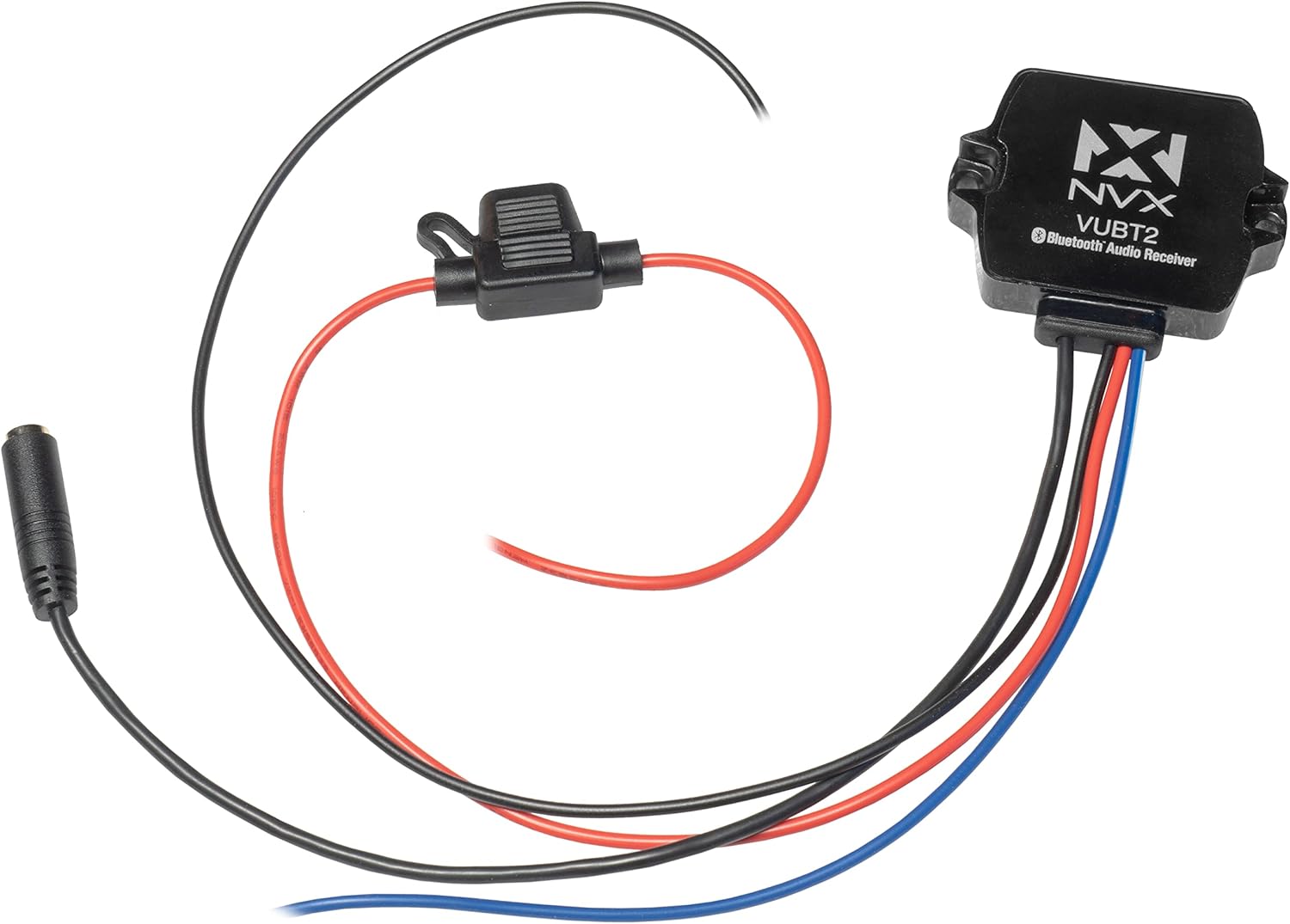
Image: The NVX VUBT2 Bluetooth Audio Receiver shown with its power/ground/remote wiring harness, in-line fuse, and 3.5mm to RCA audio cable.
4. セットアップとインストール
4.1配線接続
The VUBT2 requires power, ground, and a remote turn-on connection. It outputs audio via RCA connections.
- 電源(赤線): Connect the red wire to a switched 12V power source. This can be the accessory wire from your vehicle's ignition or a dedicated switch. The in-line fuse should be installed close to the power source.
- アース(黒線): Connect the black wire to a solid chassis ground point. Ensure a clean, secure connection for optimal performance.
- リモート電源オン(青いワイヤー): Connect the blue wire to the remote turn-on input of your amplifier or other audio components. This will power on the VUBT2 when your system is activated.
- Audio Output (3.5mm to RCA): Connect the 3.5mm jack from the VUBT2 to the included 3.5mm to RCA cable. Then, connect the RCA plugs (red for right, white for left) to the audio input of your ampリファイアまたはヘッドユニット。

Image: The NVX VUBT2 Bluetooth receiver wired to an amplifier, demonstrating the remote turn-on and RCA audio connections.

Image: Close-up of the 3.5mm audio output connected to RCA cables, ready for connection to an audio system.
4.2 取り付け
The compact design of the VUBT2 allows for flexible mounting options. It can be mounted using screws through its integrated tabs or with adhesive pads (if included).
- Choose a location that is dry, secure, and allows for proper cable routing.
- Ensure the mounting surface is clean and flat if using adhesive.
- The device is IPX67 rated, making it suitable for exposed locations, but protecting connections is still recommended.

Image: The underside of the NVX VUBT2 unit, displaying the 3M adhesive backing for secure mounting in various applications.
5. 操作手順
5.1Bluetoothペアリング
- Ensure the VUBT2 is powered on (your audio system is active).
- モバイル デバイス (スマートフォン、タブレットなど) で、Bluetooth 設定に移動します。
- Scan for available Bluetooth devices. The VUBT2 will appear as "NVX VUBT2" or similar.
- Select the VUBT2 to pair. A confirmation tone or LED indicator may signal a successful connection.
- Once paired, your device will typically reconnect automatically when in range and the VUBT2 is powered on.
5.2 オーディオ再生
After successful pairing, you can stream audio from your mobile device to your connected audio system. Control playback (play/pause, skip tracks, volume) directly from your paired device.

Image: A smartphone screen displaying music controls, illustrating how users can manage audio playback through the NVX VUBT2.
ビデオ: オーバーview of the NVX VUBT2 Universal Waterproof Bluetooth 4.0 Audio Receiver, demonstrating its features and applications in various environments.
6. メンテナンス
The NVX VUBT2 is designed for durability and minimal maintenance. Follow these guidelines to ensure longevity:
- クリーニング: 柔らかくてamp cloth to wipe the exterior of the unit. Avoid harsh chemicals or abrasive cleaners.
- 耐水性: While IPX67 rated, avoid prolonged submersion or high-pressure water jets directly on the unit or its connections. Regularly inspect wiring and connections for any signs of wear or damage that could compromise water resistance.
- 接続: すべての配線接続が安全で腐食がないことを定期的に確認してください。

Image: The NVX VUBT2 unit covered in water droplets, illustrating its IPX67 water-resistance rating for use in challenging environments.
7。 トラブルシューティング
| 問題 | 考えられる原因 | 解決 |
|---|---|---|
| No power to the VUBT2. |
|
|
| Bluetooth デバイスとペアリングできません。 |
|
|
| オーディオ出力がない、またはオーディオが歪んでいます。 |
|
|
| Bluetooth connection drops intermittently. |
|
|
8. 仕様
| 特徴 | 詳細 |
|---|---|
| ブランド | NVX |
| モデル番号 | VUBT2 (4326582821) |
| 接続技術 | ブルートゥース |
| Bluetooth Core Specification | Version 4.0 with aptX |
| Bluetoothプロfile | A2DP (高品質、ステレオ オーディオ) |
| 耐水性評価 | IPX67 |
| オーディオ出力タイプ | RCA (Stereo Pair) |
| 出力巻tage | 2V RMS |
| 信号対雑音比 | 93 dB (20 Hz - 20 kHz) |
| チャンネル数 | 2(ステレオ) |
| 対応デバイス | 講演者、 Ampリファイアー |
| 欧州連合 | 818060013812 |
| ASIN | B015XLMA08 |
9. 保証情報
NVX products are designed and manufactured to the highest quality standards. For specific warranty details, including coverage period and terms, please refer to the warranty card included with your product or visit the official NVX webサイトでご確認ください。保証請求に備えて購入証明書を保管してください。
10. カスタマーサポート
If you encounter any issues or have questions regarding your NVX VUBT2 Bluetooth Audio Receiver that are not covered in this manual, please contact NVX customer support for assistance.
- オンラインサポート: Visit the official NVX webFAQ、サポート リソース、連絡先情報が記載されたサイトです。
- 販売者サポート: For purchase-related inquiries, contact the seller directly.