
Fatek FBs-20MAT2-AC (FBs-20MAT)
Fatek FBs-20MAT2-AC PLC Controller User Manual
Model: FBs-20MAT2-AC (FBs-20MAT)
1. はじめに
The Fatek FBs-20MAT2-AC Programmable Logic Controller (PLC) is an advanced industrial control device designed for automation tasks. It features a user-friendly and readable multi-input/multi-output function structure, allowing for complex functionalities with fewer instructions compared to other PLC brands. This manual provides essential information for the proper installation, operation, and maintenance of your FBs-20MAT2-AC controller.
2.製品オーバーview
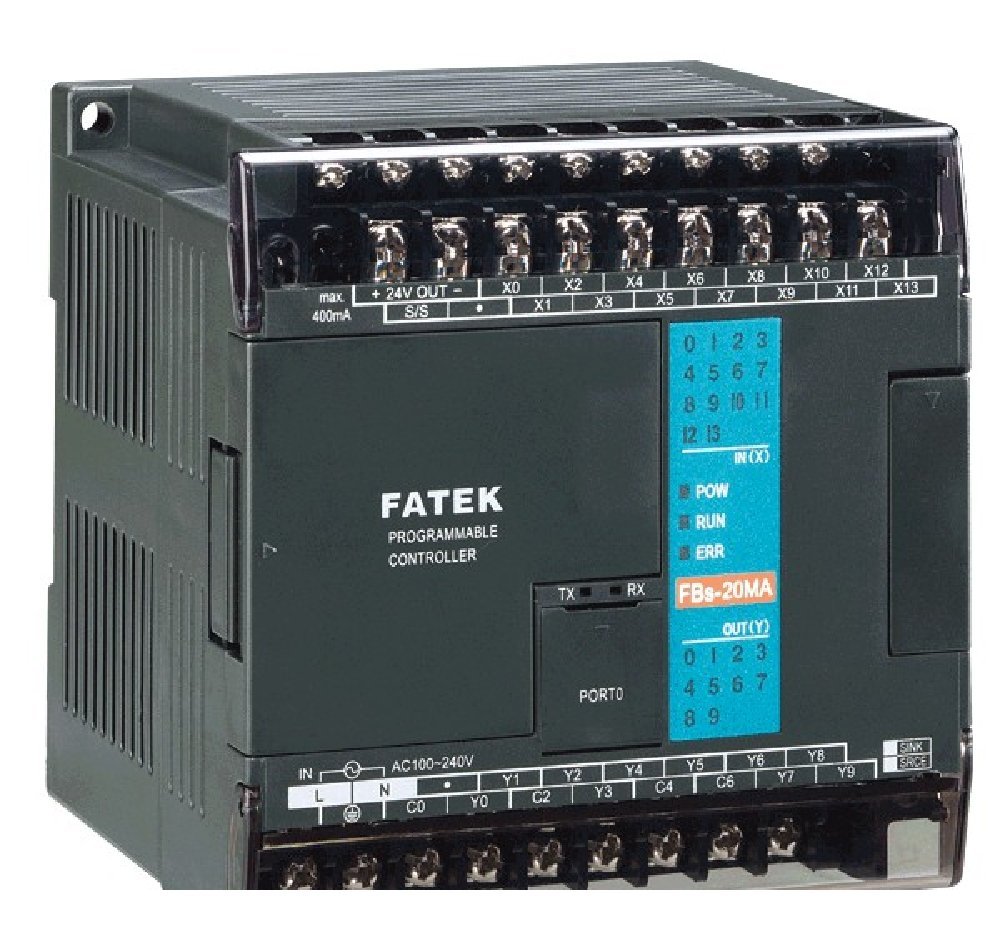
This image displays the Fatek FBs-20MAT2-AC Programmable Logic Controller. It features clearly labeled input (X) and output (Y) terminals, power input (AC100-240V), and status indicator LEDs for Power, Run, and Error. The model number FBs-20MA is visible on the front panel, along with TX/RX indicators for communication.
3. セットアップとインストール
3.1 電源接続
The FBs-20MAT2-AC controller operates on a 100〜240VAC power supply. Ensure the power source matches these specifications before connecting. Connect the AC power lines to the designated 'L' and 'N' terminals on the controller. Always ensure power is disconnected during wiring to prevent electrical shock.
3.2 Digital Input/Output Wiring
The controller features 12 points of 24VDC digital input (up to 10KHz in 4 points) and 8 points of Sink (NPN) transistor digital output (4 points 10KHz output). Refer to the terminal labels (X0-X13 for inputs, Y0-Y9 for outputs) for correct wiring. Ensure all connections are secure and follow industrial wiring standards.
3.3 通信ポート
The FBs-20MAT2-AC includes 1 built-in RS-232 port, which can be expanded up to 3 ports. This port is used for programming and communication with other devices. Connect your programming cable or communication device to the RS-232 port (labeled 'PORTO').
3.4 取り付け
Mount the PLC in a stable, well-ventilated enclosure, away from excessive heat, moisture, and electromagnetic interference. Ensure adequate space for wiring and heat dissipation.
4. 操作手順
4.1 プログラミングソフトウェア
The PLC is programmed using the WinProladder ladder programming tool. This software can be downloaded from the official Fatek website at no extra charge. Install the software on your computer and connect to the PLC via the RS-232 port to upload or download programs.
4.2 基本操作
- 電源オン: After connecting the power supply, the 'POW' indicator LED should illuminate.
- 実行モード: Once a program is loaded and the PLC is set to run mode, the 'RUN' indicator LED will illuminate, indicating active program execution.
- エラー表示: If an error occurs, the 'ERR' indicator LED will illuminate. Refer to the troubleshooting section for common error resolutions.
- コミュニケーション: The 'TX' and 'RX' LEDs indicate data transmission and reception activity on the communication port.
5. メンテナンス
Regular maintenance ensures the longevity and reliable operation of your PLC. Always disconnect power before performing any maintenance.
- クリーニング: Keep the PLC and its enclosure clean and free from dust and debris. Use a soft, dry cloth for cleaning. Avoid using liquid cleaners or solvents.
- 環境制御: Ensure the operating environment adheres to the specified temperature and humidity ranges. Protect the unit from excessive vibrations and corrosive gases.
- 接続チェック: すべての配線接続部の締め付け具合や腐食や損傷の兆候がないか定期的に点検してください。
- ファームウェアの更新: Check the Fatek webパフォーマンスの向上や問題の解決につながるファームウェア アップデートがないか、サイトを確認してください。
6。 トラブルシューティング
このセクションでは、よくある問題に関するガイダンスを提供します。複雑な問題については、テクニカルサポートにお問い合わせください。
- No Power (POW LED Off):
- Check the AC power supply connection and ensure it is within the 100~240VAC range.
- Verify the power cable is securely connected to the PLC and the power outlet.
- 電源回路のヒューズが切れていないか確認してください。
- PLC Not Running (RUN LED Off, POW LED On):
- Ensure a valid program is loaded into the PLC.
- Check if the PLC is in 'STOP' mode. Use WinProladder to switch to 'RUN' mode.
- Verify there are no critical errors indicated by the 'ERR' LED.
- Error Indication (ERR LED On):
- Connect to the PLC using WinProladder software to view the error code and description.
- Common errors include program syntax errors, I/O module faults, or memory issues.
- Consult the WinProladder software manual for specific error code interpretations.
- Communication Issues (TX/RX LEDs Inactive):
- Verify the RS-232 cable connection is secure and correct.
- Check the communication settings (baud rate, data bits, parity, stop bits) in WinProladder and ensure they match the PLC's settings.
- コンピューターで正しい COM ポートが選択されていることを確認してください。
- Input/Output Malfunction:
- Verify wiring for the specific input/output points.
- Check the status of the input devices (sensors, switches) and output devices (relays, indicators).
- Use WinProladder to monitor the real-time status of I/O points to diagnose the issue.
7. 仕様
| 特徴 | 仕様 |
|---|---|
| モデル番号 | FBs-20MAT2-AC (FBs-20MAT) |
| デジタル入力 | 12 points, 24VDC (up to 10KHz in 4 points) |
| デジタル出力 | 8 points, Sink (NPN) transistor (4 points 10KHz output) |
| 通信ポート | 1 built-in RS-232 (expandable up to 3) |
| 電源 | 100〜240VAC |
| 認定資格 | UL認証 |
| パッケージ寸法 | 4.5 x 4 x 4インチ |
| アイテム重量 | 1.01 ポンド |
| 原産国 | 台湾 |
| 巻tage | 240ボルト(AC) |
| 表示タイプ | LCDまたはLED |
| 動作温度 | 摂氏20度 |
| 欧州連合 | 687965401068 |
8. 保証とサポート
For information regarding product warranty, technical support, or service, please refer to the documentation provided with your purchase or contact the manufacturer directly. The seller for this product is Fatek USA. You may also visit the official Fatek web追加のリソースと連絡先情報のサイト。
Ask a question about this manual
Ask about setup, troubleshooting, compatibility, parts, safety, or missing instructions. Manuals+ will review the question and use this page’s manual context to help answer it.