
導入
This manual provides comprehensive instructions for the safe and efficient operation, maintenance, and troubleshooting of your KitchenAid 2.0 cu. ft. Over-the-Range Microwave with Sensor Cooking. Please read all instructions carefully before using the appliance and retain this manual for future reference.

画像: 正面 view of the KitchenAid 2.0 cu. ft. Over-the-Range Microwave in Stainless Steel.
重要な安全上の注意事項
電気製品を使用するときは、次のような基本的な安全上の注意事項に従う必要があります。
- 機器を使用する前にすべての説明書をお読みください。
- ドアまたはドアシールが破損している場合はオーブンを操作しないでください。
- Do not heat liquids or other foods in closed containers as they are liable to explode.
- しないでくださいampドア、コントロール パネル、安全インターロック スイッチ、またはオーブンのその他の部品の取り扱いや調整、修理は行わないでください。
- 子供がオーブンを安全に使用でき、不適切な使用の危険性を理解できるように適切な指示が与えられた場合にのみ、子供が監督なしでオーブンを使用できるようにします。
- このアプライアンスでは、腐食性の化学物質や蒸気を使用しないでください。
- 操作中は常に適切な換気を確保してください。
設定
開梱と配置
Carefully remove all packaging materials. Ensure the microwave is placed on a flat, stable surface or properly installed over a range. Refer to the separate installation instructions for detailed mounting procedures. Ensure adequate clearance around the appliance for proper ventilation.

Image: KitchenAid microwave installed above a range in a kitchen setting.
ターンテーブルの設置
Place the turntable support ring in the center of the microwave oven cavity. Position the glass turntable plate securely on the support ring. Ensure the turntable rotates freely.
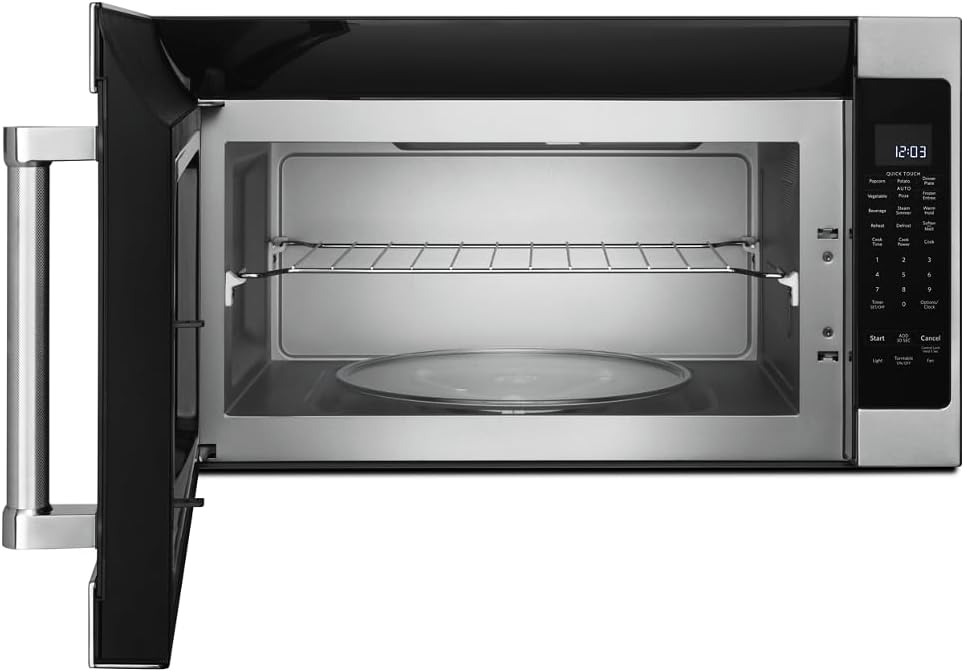
画像: インテリア view of the microwave showing the glass turntable and support ring.
操作手順
基本操作
- 時計の設定: Press 'Options/Clock', then enter the current time using the number pad. Press 'Options/Clock' again to confirm.
- クイックスタート: Press 'Start' to begin cooking immediately for 30 seconds at 100% power. Press 'Add 30 Sec' to add 30 seconds to the cooking time.
- 調理時間: Press 'Cook Time', enter the desired cooking time, then press 'Start'.
- Cook Power: After setting 'Cook Time', press 'Cook Power', enter the desired power level (1-10, 10 being 100%), then press 'Start'.
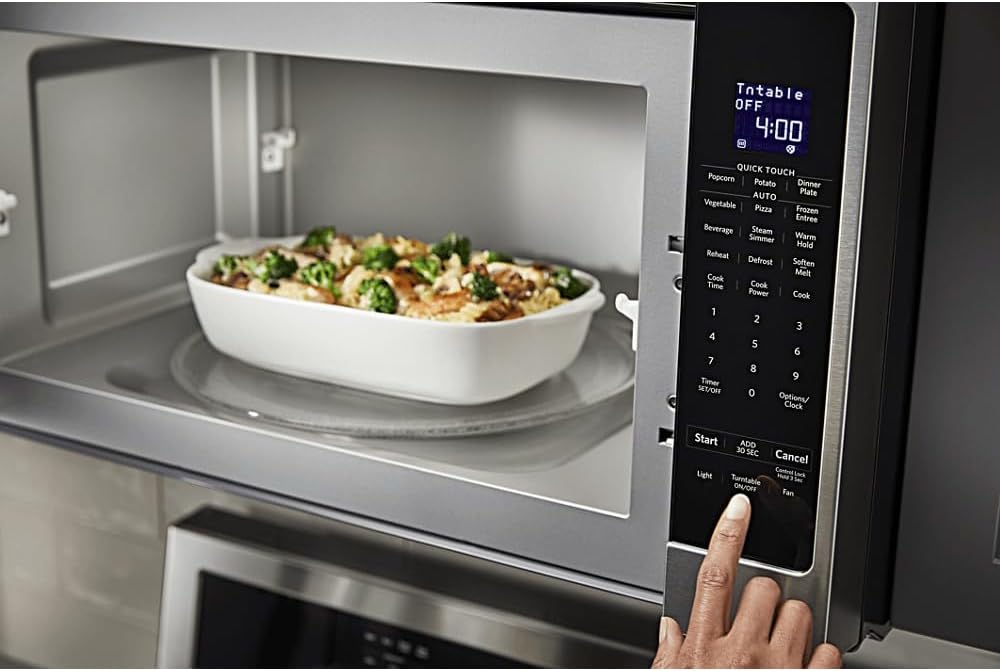
画像: 詳細 view of the microwave's control panel with various cooking options.
Quick Touch Functions
The microwave features several one-touch cooking options:
- ポップコーン: For automatic popcorn popping.
- じゃがいも: ベイクドポテト用。
- ピザ: ピザのスライスを再加熱するため。
- 飲み物: 飲み物を温めるため。
- 再加熱: For reheating various food items.
- 霜取り: 重量または時間で食品を解凍します。
センサークッキング
The sensor cooking feature automatically adjusts cooking time and power levels based on the food's moisture content. Select the desired sensor cooking option (e.g., 'Vegetable', 'Frozen Entree', 'Dinner Plate') and press 'Start'. The microwave will detect when the food is cooked.

Image: Interior of the microwave showing food items on the turntable and a removable rack.
特集
- Steam Simmer: For steaming or simmering foods.
- ウォームホールド: Keeps cooked food warm for an extended period.
- 柔らかくする/溶かす: For softening butter, melting chocolate, or other similar tasks.
- ライト: Controls the under-cabinet light.
- ターンテーブルのオン/オフ: Allows you to stop the turntable rotation for larger dishes.
- ファン: Controls the exhaust fan speed.

Image: A person's hand operating the control panel of the KitchenAid microwave.
メンテナンス
内部の清掃
Clean the interior of the microwave regularly with a mild detergent and a soft cloth. For stubborn food splatters, place a bowl of water with lemon slices inside and microwave for a few minutes to loosen residue, then wipe clean.
外装の清掃
Wipe the exterior surfaces, including the control panel and door, with a soft cloth and mild detergent. For stainless steel surfaces, use a stainless steel cleaner and polish in the direction of the grain.
フィルターのメンテナンス
The microwave is equipped with grease filters and may have a charcoal filter. Clean the grease filters monthly by washing them in hot, soapy water or in a dishwasher. Replace the charcoal filter (if present) approximately every 6 to 12 months, depending on usage.
トラブルシューティング
If you experience issues with your microwave, consult the following common problems and solutions:
| 問題 | 考えられる原因 | 解決 |
|---|---|---|
| 電子レンジが起動しない | ドアがきちんと閉まっていない、電源コードが外れている、ヒューズが切れている、または回路ブレーカーが落ちている。 | Ensure door is securely closed; Check power connection; Reset circuit breaker or replace fuse. |
| 食品が均一に加熱されない | Food not stirred/rotated; Incorrect power level; Turntable not rotating. | Stir or rotate food during cooking; Adjust power level; Ensure turntable is correctly placed and functioning. |
| 動作中に異常な音がする | ターンテーブルが正しく装着されていません。空洞内に異物が入っています。 | Re-seat turntable; Check for and remove any obstructions. |
これらの解決策を試しても問題が解決しない場合は、カスタマー サポートにお問い合わせください。
仕様
| 特徴 | 詳細 |
|---|---|
| ブランド | キッチンエイド |
| モデル番号 | KMHS120ESS |
| 製品寸法(奥行き×幅×高さ) | 16.13インチ x 30インチ x 17.13インチ |
| 容量 | 2.0 立方フィート |
| ワットtage | 1000ワット |
| 材料 | ステンレス鋼 |
| インストールタイプ | 範囲外 |
| 特集 | Turntable, Sensor Cooking |
| コントローラータイプ | ボタン |
| プログラム数 | 10 |
| タイマー機能 | 利用可能 |
| 含まれるコンポーネント | Glass Turntable, Turntable Support Ring, Removable Rack |
保証とサポート
保証情報
This KitchenAid appliance comes with a limited warranty. Please refer to the warranty card included with your product for specific terms, conditions, and duration of coverage. Keep your proof of purchase for warranty claims.
カスタマーサポート
For technical assistance, service, or to order replacement parts, please contact KitchenAid Customer Service. Contact details can typically be found on the manufacturer's webサイトまたは製品登録カードに記載されています。
オンラインサポート: Visit the official KitchenAid website for FAQs, product registration, and service scheduling.
電話サポート: お住まいの地域の適切なカスタマー サービス電話番号については、製品ドキュメントを参照してください。