
1. はじめに
This manual provides detailed instructions for the installation, operation, and maintenance of your Zmodo ZM-KW1001-O4-1TB HD Camera System. Please read this manual thoroughly before using the product to ensure proper setup and functionality. Keep this manual for future reference.
2.製品オーバーview
2.1 主な特徴
- 720p HD video for clear and sharp images.
- Smartlink wireless configuration for quick setup.
- Motion detection alerts to notify you of activity.
- IP66 rated outdoor cameras for weather resistance.
- Infrared night vision for surveillance in low-light conditions.
- Integrated 1TB hard drive for local video storage.
2.2 システムコンポーネント
The Zmodo ZM-KW1001-O4-1TB system typically includes the following components:
- Wireless Network Video Recorder (NVR) with 1TB HDD
- HD Wireless Cameras (quantity may vary, typically 4)
- NVRおよびカメラ用電源アダプター
- イーサネットケーブル
- 取り付けネジとアンカー
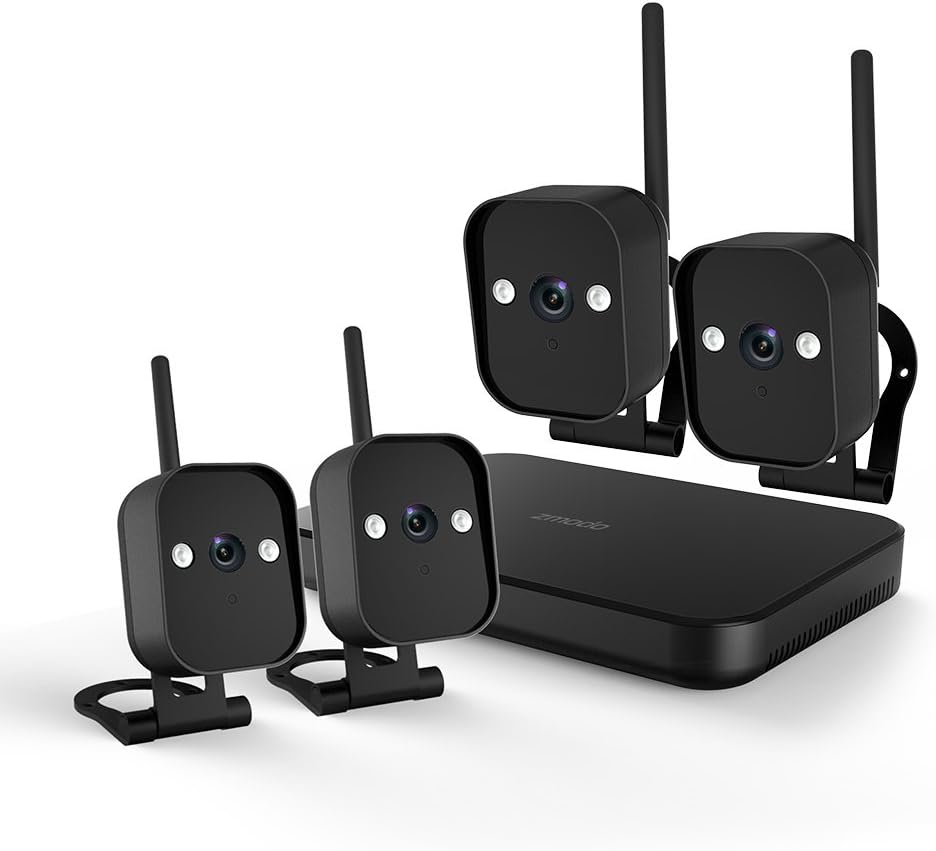
図1: 以上view of the Zmodo ZM-KW1001-O4-1TB HD Camera System, showing the NVR unit and four wireless cameras.
3. セットアップ手順
3.1 開梱と初期検査
Carefully unpack all components and verify that all items listed in Section 2.2 are present and undamaged. If any items are missing or damaged, contact customer support.
3.2 NVR接続
- 付属の電源アダプターを使用して、NVR を電源コンセントに接続します。
- For initial setup and optimal performance, connect the NVR to your router using the supplied Ethernet cable.
- Connect the NVR to a monitor via HDMI or VGA cable (not included) if local viewすることが望まれます。

図2: The Zmodo Network Video Recorder (NVR) unit, which stores recordings and manages camera connections.
3.3 カメラのインストールとペアリング
The cameras are designed for both indoor and outdoor use with an IP66 weather-resistant rating. Ensure cameras are placed within range of the NVR's wireless signal.
- カメラの電源オン: 各カメラをそれぞれの電源アダプタに接続し、電源コンセントに差し込みます。
- Smartlink Pairing: The cameras should automatically attempt to pair with the NVR. Follow the on-screen prompts on the connected monitor or use the Zmodo app for Smartlink setup. If pairing fails, refer to the troubleshooting section.
- 取り付け: Choose suitable locations for your cameras. Use the provided screws and anchors to securely mount the cameras. Ensure a clear line of sight and optimal view角度。

図3: A Zmodo wireless camera shown with its wall-mounting bracket, suitable for outdoor installation.

図4: A Zmodo wireless camera shown with its stand mount, ideal for indoor placement on flat surfaces.
3.4 Mobile App Configuration
- Download the Zmodo app from the App Store (iOS) or Google Play Store (Android).
- 新しいアカウントを作成するか、既存のアカウントにログインしてください。
- Follow the in-app instructions to add your Zmodo NVR system. This typically involves scanning a QR code on the NVR or manually entering device details.
- 追加したら、 view カメラからのライブフィード。
4. 操作手順
4.1 ライブ View
Access the Zmodo app or the NVR's local interface to view live video streams from your cameras. You can typically select individual cameras or view 複数のフィードを同時に送信します。
4.2 動きの検出とアラート
The system is equipped with motion detection capabilities. When motion is detected, the system can record footage and send alerts to your mobile device.
- 構成: In the Zmodo app or NVR settings, navigate to the motion detection section. You can customize detection zones, sensitivity levels, and alert schedules.
- アラート: Ensure push notifications are enabled for the Zmodo app on your mobile device to receive timely alerts.
4.3 録音と再生
The NVR includes a 1TB hard drive for continuous or motion-activated recording.
- 録画設定: Configure recording modes (continuous, scheduled, motion-activated) via the NVR's local interface or the Zmodo app.
- 再生: 再するためにview 記録されたfootage, access the playback feature in the Zmodo app or directly on the NVR. Select the desired date and time to view イベント。
4.4 ナイトビジョン
The cameras feature infrared night vision, allowing them to capture clear video in low-light or complete darkness. The system automatically switches to night vision mode when ambient light levels are insufficient.
5. メンテナンス
- カメラのクリーニング: カメラのレンズは定期的に柔らかくてきれいな布で拭いてください。amp 鮮明な画像を保つために布で拭いてください。研磨剤入りの洗剤は使用しないでください。
- ファームウェアの更新: Check the Zmodo app or website regularly for firmware updates. Keeping your system updated ensures optimal performance and security.
- ハードドライブ管理: 1TBハードドライブは自動的に最も古いファイルを上書きしますtage when full. If you need to preserve specific recordings, back them up to an external device before they are overwritten.
- 電源: すべての電源アダプターがしっかりと接続され、損傷がないことを確認してください。
6。 トラブルシューティング
- ビデオフィードなし:
- Check if the NVR and cameras are powered on.
- Verify network connectivity for the NVR.
- カメラが NVR の無線範囲内にあることを確認します。
- Re-pair cameras if they have lost connection.
- モーションアラートを受信できませんでした:
- アプリ設定でモーション検出が有効になっていることを確認します。
- モーション検出ゾーンと感度を確認します。
- Ensure push notifications are enabled for the Zmodo app on your mobile device.
- 画質が悪い:
- カメラのレンズを掃除してください。
- カメラの視野内に障害物がないことを確認してください view.
- Check for strong interference if using wireless connection.
- Cameras Not Connecting to Wi-Fi:
- Ensure the NVR's Wi-Fi is enabled and functioning.
- Move cameras closer to the NVR to improve signal strength.
- Reset cameras and attempt Smartlink pairing again.
7. 仕様
| 特徴 | 仕様 |
|---|---|
| モデル番号 | ZM-KW1001-O4-1TB |
| ビデオ解像度 | 720p HD |
| 接続技術 | 無線 |
| チャンネル数 | 4 |
| ストレージ容量 | 1 TB(テラバイト) |
| 特集 | Wireless, Motion Detection, Night Vision, IP66 Weatherproof |
| オペレーティングシステムの互換性 | アンドロイド、iOS |
| 電源 | Wireless (Power Adapters for components) |
| 色 | 黒 |
| パッケージ寸法 | 26.8 x 20 x 16 cm |
| アイテム重量 | 1.5キログラム |
8. 保証とサポート
For warranty information and technical support, please refer to the official Zmodo website or contact Zmodo customer service directly. Details regarding warranty periods and service procedures are typically available on the manufacturer's support pages.
オンラインサポート: Visit the Zmodo official webFAQ、トラブルシューティング ガイド、連絡先情報を掲載したサイトです。
サポートへのお問い合わせ: If you require further assistance, please have your product model number (ZM-KW1001-O4-1TB) and purchase details ready when contacting support.