
1. はじめに
ご購入ありがとうございますasing the Gotech GTV-7-TFT 7-inch Portable Color TFT LCD TV. This manual provides essential information for the safe and efficient operation of your device. Please read it thoroughly before use and retain it for future reference.
2. 重要な安全上の注意事項
- 火災や感電を防ぐため、ユニットを雨や湿気にさらさないでください。
- cを開けないでくださいasing. すべての修理は資格を持った担当者に依頼してください。
- ユニットを熱源の近くや直射日光の当たる場所に置かないでください。
- ユニット周囲の適切な換気を確保してください。
- 指定された電源アダプターのみを使用してください。
- ユニットを強い磁場から遠ざけてください。
- 柔らかく乾いた布で本体を拭いてください。液体洗剤は使用しないでください。
3. パッケージ内容
パッケージにすべてのアイテムが揃っていることを確認します。
- Gotech GTV-7-TFT Portable TV Unit
- リモートコントロール
- AC/DCアダプター
- Car Cord (Car Holder not explicitly listed as included, but mentioned as a feature)
- アンテナジャック
- AVケーブル
- 取り外し可能なスタンド

Image 3.1: The retail box for the Gotech GTV-7-TFT Portable TV, showing the product, remote control, and included accessories.
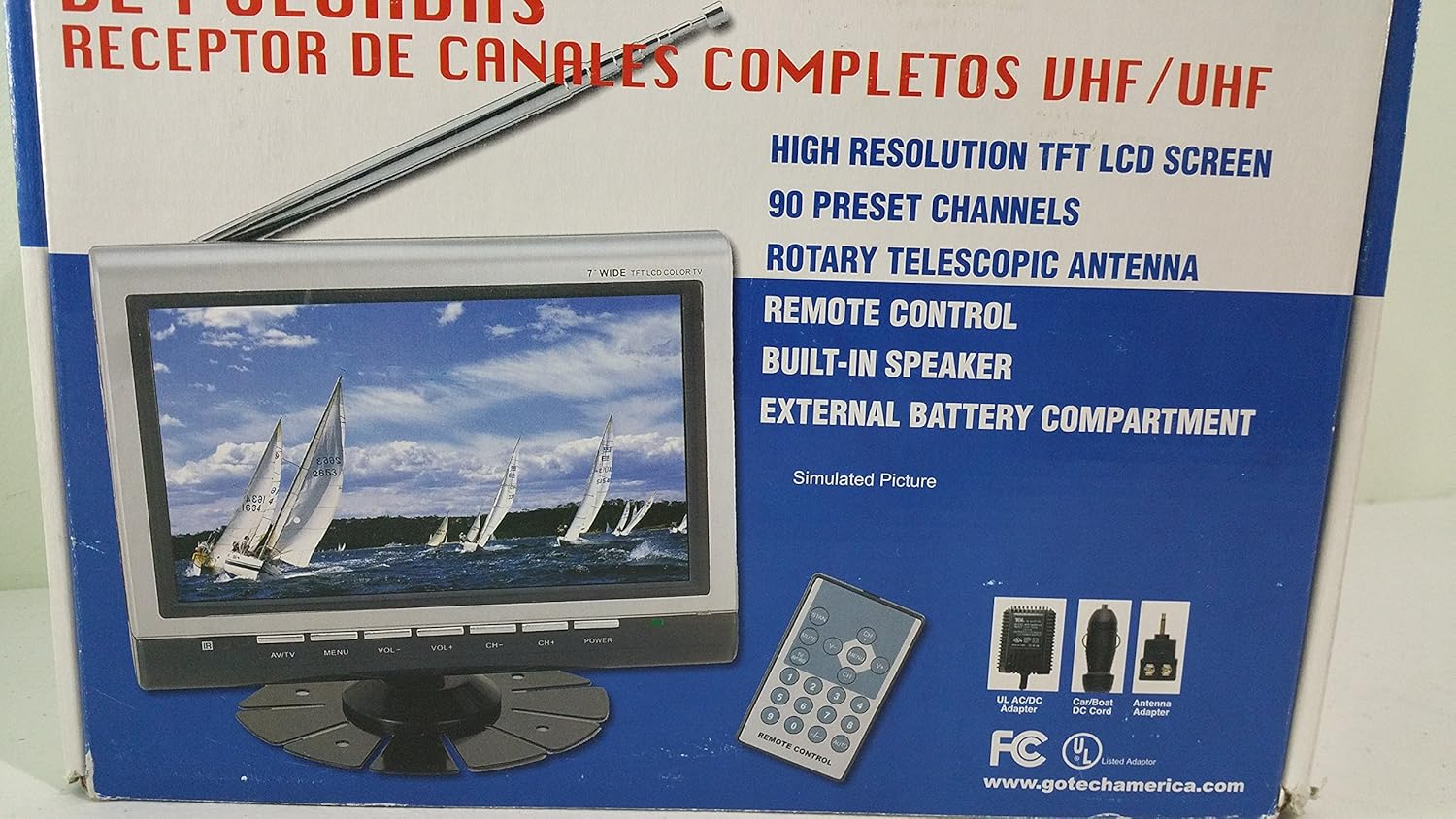
画像3.2: 拡大 view of the Gotech GTV-7-TFT TV screen and the remote control, as depicted on the product packaging.
4.製品オーバーview
4.1 主な特徴
- 7-inch High Resolution TFT LCD Screen
- Full Channel VHF/UHF Receiver
- 90つのプリセットチャンネル
- Digital Up/Down Tuning
- Auto Channel Programming
- ロータリー伸縮アンテナ
- On-Screen Display (OSD) for Picture and Volume Adjustment
- 内蔵スピーカー
- External Battery Compartment (requires 10x AA batteries, not included)
- Remote Control with Button Cell
- New Detachable Stand with Battery

Image 4.1: Side panel of the Gotech GTV-7-TFT packaging, detailing the product's main features.
5. セットアップ
5.1 テレビの電源
The GTV-7-TFT can be powered in several ways:
- AC / DCアダプター: Connect the provided AC/DC adapter to the TV's power input and then to a standard wall outlet.
- Car Cord: For in-vehicle use, connect the car cord to the TV's power input and then to your vehicle's 12V power outlet.
- 外部バッテリー: Open the external battery compartment and insert 10x AA size batteries (UM3) according to the polarity indicators. Ensure the batteries are fresh and correctly oriented.
5.2 アンテナの接続
Extend the rotary telescopic antenna for optimal signal reception. For improved reception, you may connect an external antenna to the antenna jack using the provided antenna jack adapter.
5.3 Connecting External Devices (AV Input)
To connect external devices such as a DVD player or gaming console, use the provided AV cable. Connect one end to the TV's AV input port and the other end to the AV output ports of your external device. Select the AV input source on the TV to view 接続されたデバイスからのコンテンツ。
6. 操作
6.1 電源オン/オフ
を押す 力 button on the TV unit or the remote control to turn the TV on or off.
6.2 チャンネルチューニング
- Auto Channel Programming: It is recommended to perform an auto channel scan upon first use or when moving to a new location. Access the menu, navigate to the channel setup, and select 'Auto Scan' or 'Auto Program'. The TV will search and store available channels.
- Digital Up/Down Tuning: 使用 CH+ そして CH- buttons on the TV or remote control to navigate through the preset channels.
6.3 Volume and Picture Adjustment
使用 巻+ そして vol- buttons on the TV or remote control to adjust the volume. Picture settings (brightness, contrast, color) can be adjusted via the on-screen display (OSD) menu. Press the メニュー button to access these options.
6.4リモコン
The remote control allows convenient operation from a distance. Ensure the button cell battery is correctly inserted. Point the remote control directly at the TV's infrared sensor.
7. メンテナンス
7.1 クリーニング
Wipe the TV screen and casing with a soft, dry, lint-free cloth. Do not use abrasive cleaners, waxes, or solvents as they may damage the finish or screen.
7.2 ストレージ
If the TV will not be used for an extended period, remove the external batteries to prevent leakage. Store the unit in a cool, dry place away from direct sunlight and extreme temperatures.
8。 トラブルシューティング
| 問題 | 考えられる原因 | 解決 |
|---|---|---|
| 電源なし | 電源アダプターが接続されていません。電池が消耗しているか、正しく挿入されていません。 | Check power connections; Replace or correctly insert batteries. |
| 映像も音声も出ない | Incorrect input source; Antenna not connected or extended; No channels scanned. | Select correct input (TV/AV); Extend antenna or connect external one; Perform auto channel scan. |
| 受信状態が悪い | Weak signal; Antenna position. | Adjust antenna position; Try an external antenna; Check for local signal strength. |
| リモコンが動作しない | Battery depleted; Obstruction between remote and TV. | Replace remote control battery; Remove any obstructions. |
9. 仕様
| 特徴 | 詳細 |
|---|---|
| モデル番号 | gtv-7-tft |
| 画面サイズ | 7インチ(17.8 cm) |
| 表示タイプ | TFT LCDカラーディスプレイ |
| チューナータイプ | Full Channel VHF/UHF Receiver |
| プリセットチャンネル | 90 |
| オーディオ出力タイプ | 内蔵スピーカー |
| 制御方法 | リモートコントロール |
| 対応デバイス | テレビ、スピーカー |
| 電源 | AC/DC Adapter, Car Cord, External Battery Compartment (10x AA batteries, not included) |
10. 保証とサポート
Specific warranty information and customer support details are not provided within this manual. Please refer to the product packaging or contact your retailer for warranty claims and technical assistance.