
1. はじめに
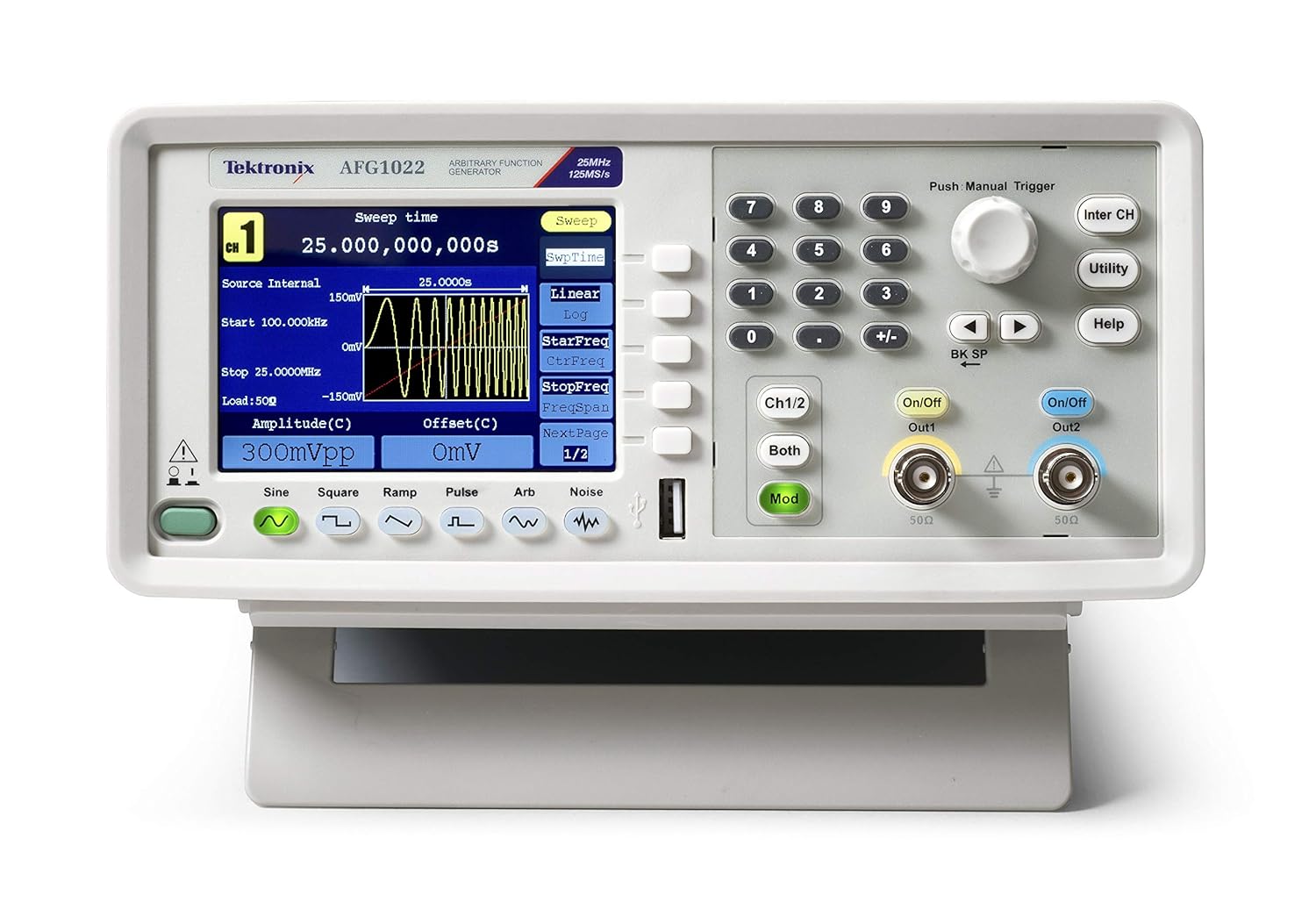
The Tektronix AFG1022 Arbitrary Function Generator is a versatile instrument designed for generating various waveforms required in laboratory and testing environments. With a bandwidth of 25 MHz or 60 MHz and dual output channels, it provides an output amplitude ranging from 1 mVpp to 10 Vpp across its full bandwidth. This device offers a comprehensive set of features for waveform generation, making it a valuable tool for a wide range of applications.
主な機能は次のとおりです。
- Dual-channel operation with 25 MHz bandwidth.
- 出力 amplitude from 1 mVpp to 10 Vpp.
- 14-bit vertical resolution and 1 µHz frequency resolution.
- 50 built-in arbitrary waveforms.
- Support for continuous, modulation, sweep, and burst modes.
- Dedicated 3.95-inch TFT LCD display for clear visualization.
- User-friendly front panel and menu navigation.
2. 安全情報
Before operating the Tektronix AFG1022, please read and understand all safety instructions to prevent injury and avoid damage to the instrument or other connected equipment. This device is designed for use by qualified personnel only.
一般的な安全上の注意:
- 接地: Always ensure the instrument is properly grounded. The power cord provided has a three-prong plug for this purpose. Do not defeat the grounding-type plug.
- 電源: Connect the instrument to a power source that is within the specified voltage range (100-240V AC, 50/60 Hz). Verify the line selector switch on the rear panel is set correctly for your local voltage.
- 換気: Ensure proper ventilation around the instrument. Do not block ventilation openings. Overheating can cause damage.
- 環境: Operate the instrument in a clean, dry environment. Avoid exposure to moisture, extreme temperatures, or corrosive gases.
- サービス: Refer all servicing to qualified service personnel. Do not attempt to service the instrument yourself unless you are qualified to do so.
- ケーブルとコネクタ: Use only specified cables and connectors. Ensure all connections are secure before applying power.
- クリーニング: 清掃する前に電源を切ってください。柔らかく乾いた布を使用してください。液体洗剤やエアゾール洗剤は使用しないでください。
3. 箱の中身
Upon unpacking your Tektronix AFG1022 Arbitrary Function Generator, please verify that all the following items are included:
- Tektronix AFG1022 Arbitrary Function Generator Unit
- コンプライアンス宣言
- CD (containing software and documentation)
- ユーザーマニュアル(このドキュメント)
- Fuse (2 pieces, spare)
- Cables (3 pieces, including USB and BNC cables)
- 校正証明書
- 電源コード
If any items are missing or damaged, please contact your Tektronix supplier or customer support immediately.
4. セットアップ
Follow these steps to set up your AFG1022 Arbitrary Function Generator for initial use.
4.1 開梱と検査
- Carefully remove the instrument and all accessories from the packaging.
- Inspect the instrument for any signs of physical damage that may have occurred during transit. If damage is found, contact your supplier.
- 将来の輸送や保管のために、元の梱包材を保管してください。
4.2電源接続
- Locate the power inlet on the rear panel of the AFG1022.
- 確認する ラインセレクター 背面パネルのスイッチが正しい音量に設定されているtage for your region (110V AC or 220V AC). Adjust if necessary.
- Connect the provided power cord to the instrument's power inlet and then to a grounded AC power outlet.

4.3 出力の接続
- Identify the two output channels (Out1 and Out2) on the front panel. These are BNC connectors.
- Connect appropriate BNC cables from the desired output channel(s) to your test circuit or device under test.
- Ensure the impedance setting on the AFG1022 matches the impedance of your load (typically 50Ω or high impedance).
5. 操作手順
このセクションでは、view of the basic operation of the Tektronix AFG1022. For detailed instructions on specific functions, refer to the comprehensive user manual provided on the included CD.
5.1 電源投入と初期画面
- 前面パネルにある電源ボタンを押して、機器の電源をオンにします。
- The display will show the Tektronix logo and then transition to the main waveform generation interface.
5.2 基本的な波形生成
The AFG1022 can generate various standard waveforms and arbitrary waveforms.
- Selecting Waveform Type: Use the dedicated buttons below the display (Sine, Square, Ramp, Pulse, Arb, Noise) to select the desired waveform.
- 設定頻度: Use the numeric keypad and the rotary knob to input the desired frequency. The display will update in real-time.
- 設定 Amp距離とオフセット: 調整する amplitude (Vpp) and DC offset (V) using the corresponding soft keys and the rotary knob.
- 出力を有効にする: を押す オン/オフ button for Channel 1 (Out1) or Channel 2 (Out2) to enable the waveform output. The button will illuminate when the output is active.

5.3高度な機能
- 変調: を押す モッド button to access modulation settings (AM, FM, PM, FSK, PWM).
- 掃く: Configure frequency sweeps by pressing the スイープ ソフトキー。
- バースト: Generate burst waveforms by pressing the バースト ソフトキー。
- 任意波形: The AFG1022 supports user-defined arbitrary waveforms. Refer to the full manual for instructions on creating and loading custom waveforms.
6. メンテナンス
Proper maintenance ensures the longevity and optimal performance of your Tektronix AFG1022.
6.1 クリーニング
- Always disconnect the power cord before cleaning the instrument.
- Use a soft, dry cloth to wipe the exterior surfaces. For stubborn dirt, a cloth lightly dampened with mild detergent and water may be used.
- Do not use abrasive cleaners, solvents, or strong chemicals, as these can damage the plastic parts and labels.
- 液体を機器に直接吹きかけないでください。
6.2 ヒューズの交換
If the instrument does not power on, check the fuse located in the power inlet on the rear panel. Ensure the replacement fuse matches the specified type and rating (e.g., 250V, 2A). Refer to the full manual for detailed instructions on fuse replacement.
6.3 キャリブレーション
For continued accuracy, periodic calibration by qualified service personnel is recommended. Refer to the calibration certificate for the recommended calibration interval.
7。 トラブルシューティング
This section provides solutions to common issues you might encounter with your AFG1022. If the problem persists, contact Tektronix customer support.
| 問題 | 考えられる原因 | 解決 |
|---|---|---|
| 機器の電源が入りません。 | 電源なし、電源コードに不具合、ヒューズが切れている。 | Check power cord connection. Verify power outlet. Check and replace fuse if necessary. Ensure line selector is correct. |
| 波形出力はありません。 | Output channel not enabled, incorrect amplitude/offset settings, faulty cable, incorrect load impedance. | Press the On/Off button for the desired channel. Verify amplitude and offset settings. Check BNC cable connections. Ensure load impedance matches instrument setting. |
| ディスプレイが空白またはフリーズします。 | Software error, internal fault. | Power cycle the instrument (turn off, wait 10 seconds, turn on). If issue persists, contact support. |
| Incorrect waveform shape/frequency. | Incorrect settings, external interference. | Double-check all waveform parameters (frequency, amplitude, offset, modulation settings). Ensure proper shielding of cables. |
8. 仕様
The following table lists the key specifications for the Tektronix AFG1022 Arbitrary Function Generator. All specifications are typical unless otherwise noted.
| パラメータ | 価値 |
|---|---|
| モデル名 | AFG1022 |
| 帯域幅 | 25 MHz |
| チャンネル | デュアルチャネル |
| 出力 Ampリチュード | 1 mVpp~10 Vpp |
| 分解能 | 14ビット |
| 周波数分解能 | 1 µHz |
| Built-in Waveforms | 50 Arbitrary Waveforms |
| 画面 | 3.95インチTFTLCD |
| 電源 | Electricity Powered |
| 巻tage | 100-240V AC (selectable) |
| アイテム重量 | 4.9キログラム(10.8ポンド) |
| パッケージ寸法 | 17.2 x 14 x 11.4インチ |
| メーカー | テクトロニクス |
| 初回利用可能日 | 15年2015月XNUMX日 |
9.保証とサポート
Tektronix products are designed for reliability and performance. For specific warranty terms and conditions applicable to your AFG1022, please refer to the warranty information provided with your purchase or visit the official Tektronix webサイト。
カスタマーサポート:
If you require technical assistance, have questions about your instrument, or need to arrange for service, please contact Tektronix customer support. Support contact information can typically be found on the Tektronix webサイトまたは製品に付属のドキュメントをご覧ください。
When contacting support, please have your instrument's model number (AFG1022) and serial number ready. The serial number is located on the rear panel of the instrument.
For the latest information, drivers, software, and additional resources, please visit the official Tektronix webサイト: www.tek.com