
Coby CVR-22
Coby CVR-22 Portable Cassette Recorder User Manual
Model: CVR-22
導入
The Coby CVR-22 Portable Cassette Recorder is designed for simple and convenient audio recording and playback. Featuring one-touch recording, a built-in microphone, and a retractable handle, this device offers excellent portability for capturing audio wherever you go. Rediscover your classic tape collection or record new content with ease.
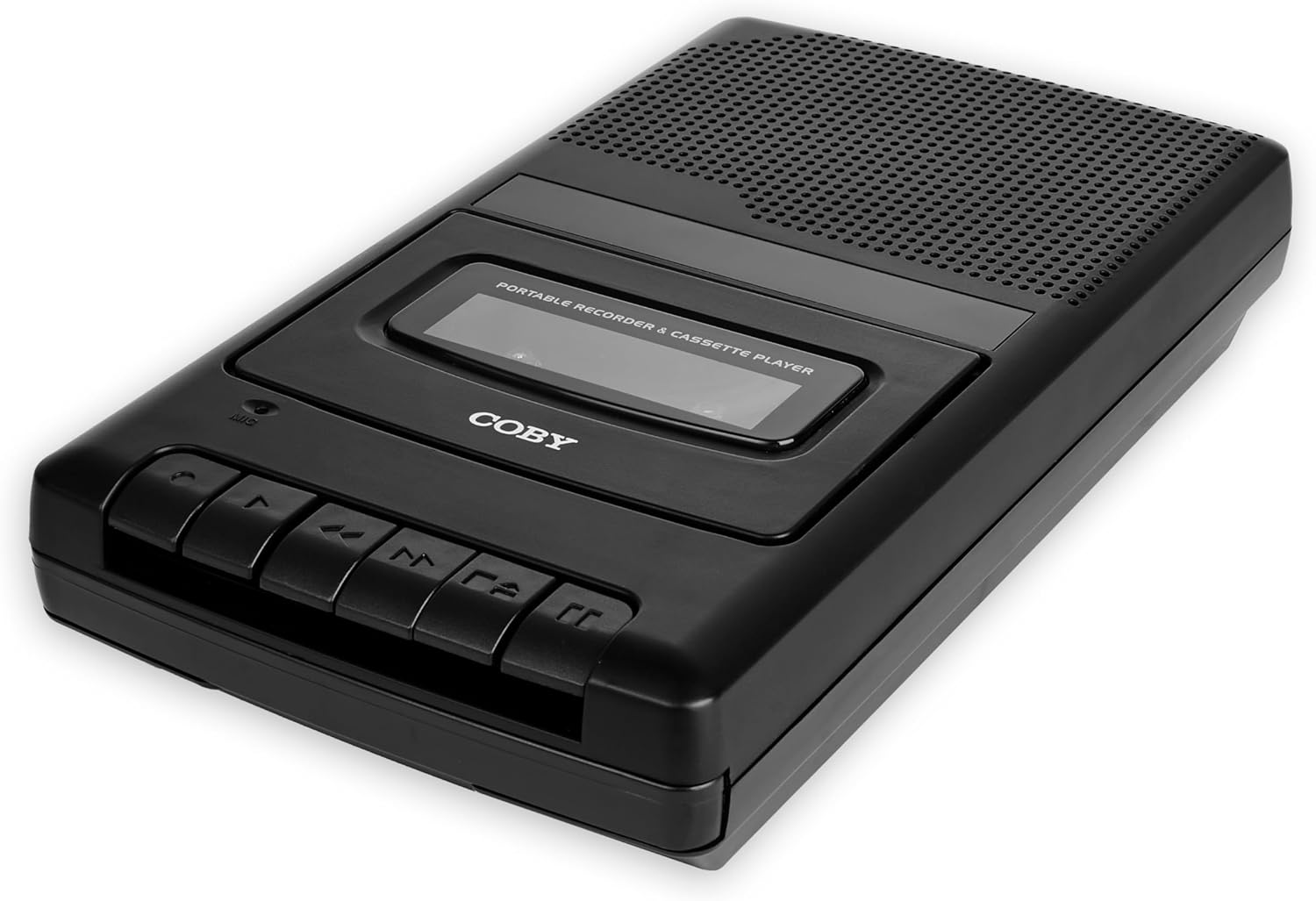
Image: The Coby CVR-22 Portable Cassette Recorder, showcasinコンパクトなデザインとコントロールボタンが特徴です。
設定
デバイスの電源供給
The CVR-22 operates on two (2) AA batteries. Ensure batteries are inserted correctly according to polarity markings inside the battery compartment.
- バッテリー収納部はユニットの下側または背面にあります。
- 電池ボックスのカバーを開きます。
- Insert two AA batteries, matching the positive (+) and negative (-) terminals as indicated.
- 電池カバーをしっかりと閉じてください。

Image: The Coby CVR-22 showing a cassette being inserted and indicating its 2x AA battery power requirement.
操作手順
カセットテープの挿入
- を押す 停止/イジェクト カセットコンパートメントのドアを開くボタン。
- Insert a standard audio cassette tape with the open edge facing upwards and the tape side facing the unit.
- カセットコンパートメントのドアをカチッと音がするまでゆっくり閉じます。
再生
- カセットテープが正しく挿入されていることを確認してください。
- を押す 遊ぶ ボタンを押します。テープの再生が始まります。
- Adjust the volume using the volume control dial, typically located on the side of the unit.
- 再生を停止するには、を押します 停止/イジェクト ボタン。
- 早送りするには、を押します FF(早送り) ボタン。
- 巻き戻すには、を押します REW(巻き戻し) ボタン。

Image: A user holding the Coby CVR-22, illustrating the joy of rediscovering a classic tape collection.
録音
The CVR-22 features one-touch recording and a built-in microphone for convenient audio capture.
- Ensure a blank or recordable cassette tape is inserted.
- を押す 記録 button (usually red). The 遊ぶ ボタンも同時に作動します。
- The built-in microphone will begin recording audio. Position the recorder appropriately for optimal sound capture.
- 録音を停止するには、を押します 停止/イジェクト ボタン。

Image: The Coby CVR-22 being used in a classroom setting, highlighting its utility for recording classes and lectures.

Image: The Coby CVR-22 positioned on a meeting table, demonstrating its suitability for recording meetings with its one-touch record button.
外部接続
The CVR-22 includes a 3.5mm headphone jack for private listening and potentially an external microphone input (check your specific unit for microphone input if needed, as the built-in mic is standard).
- ヘッドフォンジャック: Connect standard 3.5mm headphones for personal audio playback.
- External Microphone Input (if available): For higher quality recordings or specific recording scenarios, an external microphone can be connected to the designated input jack.

Image: The Coby CVR-22 connected to an external microphone setup, illustrating its built-in audio input/output ports for versatile use.
メンテナンス
ユニットのクリーニング
- 本体の外側は、乾いた柔らかい布で拭いてください。
- 仕上げを損傷する可能性があるため、研磨剤入りのクリーナーや溶剤は使用しないでください。
- Periodically clean the tape head and pinch roller using a specialized cassette head cleaner or a cotton swab lightly dampened with isopropyl alcohol. This helps maintain optimal sound quality.
バッテリーケア
- 長期間使用しない場合は、液漏れを防ぐため電池を取り外してください。
- 使用済みバッテリーは地域の規制に従って責任を持って廃棄してください。
トラブルシューティング
| 問題 | 考えられる原因 | 解決 |
|---|---|---|
| ユニットの電源が入りません。 | 電池が切れているか、正しく挿入されていない。 | 正しい極性を確認して、新しい電池と交換してください。 |
| 再生中に音が出ない。 | Volume too low; headphones not connected properly; tape head dirty. | Increase volume; ensure headphones are fully inserted; clean tape head. |
| Recording is distorted or unclear. | Microphone too far from sound source; tape head dirty; faulty tape. | Move closer to sound source; clean tape head; try a different tape. |
| テープが動かない、または詰まる。 | Tape is tangled or damaged; unit mechanism issue. | Carefully remove and inspect tape; try a different tape. If issue persists, contact support. |
仕様
| 特徴 | 詳細 |
|---|---|
| ブランド | コビー |
| モデル番号 | TRC-22 |
| 色 | 黒 |
| 電源 | 2 x AA Batteries (Not rechargeable) |
| 記録媒体 | カセットテープ |
| 録音機能 | One-Touch Recording, Built-in Microphone, Auto-Stop |
| 再生機能 | カーの停留所 |
| オーディオ出力 | 内蔵スピーカー、3.5mmヘッドフォンジャック |
| 寸法(D x W x H) | 14.8 cm x 25.9 cm x 5 cm(約) |
| ハンドル | リトラクタブル |
保証とサポート
Specific warranty information for the Coby CVR-22 Portable Cassette Recorder is not available in this manual. Please refer to the product packaging or the manufacturer's official web詳細な保証条件については、サイトをご覧ください。
For technical support or service inquiries, please contact Coby customer service through their official channels. Keep your purchase receipt as proof of purchase.
Manufacturer: Summit Electronics, US
Ask a question about this manual
Ask about setup, troubleshooting, compatibility, parts, safety, or missing instructions. Manuals+ will review the question and use this page’s manual context to help answer it.