
導入
Thank you for choosing the Wave Monarka 500 External Aquarium Filter. This filter is designed to provide efficient mechanical, chemical, and biological filtration for your aquarium, ensuring a healthy and clear aquatic environment. Its quiet operation and easy maintenance make it an ideal choice for aquarists. Please read this manual thoroughly before installation and operation to ensure proper use and longevity of your filter.
安全に関する注意事項
- フィルターのメンテナンスや取り扱いを行う前に、必ずフィルターやその他の水槽機器の電源を切ってください。
- Ensure your hands are dry before plugging in or unplugging the filter.
- 電源コードやプラグが損傷している場合は、フィルターを操作しないでください。
- This filter is designed for indoor use with aquariums only. Do not use it for any other purpose.
- フィルターは子供やペットの手の届かないところに保管してください。
- Ensure the filter is securely placed and stable to prevent accidental spills or damage.
パッケージ内容
インストールを続行する前に、すべてのコンポーネントが揃っていて損傷がないことを確認してください。
- Wave Monarka 500 Filter Unit
- Inlet and Outlet Tubes
- 吸盤とクリップ
- Filter Media Baskets (pre-installed with mechanical, chemical, and biological media)
- 取扱説明書(本書)
設定
Follow these steps to properly install your Wave Monarka 500 filter.
- フィルターを開梱します。 すべての部品をパッケージから慎重に取り出し、損傷がないか確認してください。
- フィルターメディアを準備する: The filter comes with pre-installed media baskets. Ensure they are correctly seated within the filter unit. Rinse any new filter media (if replacing) under tap water to remove dust.
- Attach Inlet and Outlet Tubes: Connect the inlet tube (water intake) and outlet tube (water return) to the designated ports on the filter unit. Ensure a secure fit to prevent leaks.
- フィルターの位置: The Monarka 500 is a hang-on filter. Hang the filter unit securely on the rim of your aquarium. Ensure the water level in the aquarium is above the minimum operating level indicated on the filter.
- Install Suction Cups/Clips: Use the provided suction cups or clips to secure the inlet and outlet tubes inside the aquarium, ensuring they are positioned correctly for optimal water circulation. The inlet should be near the bottom, and the outlet near the surface.
- フィルターの準備: Before plugging in, fill the filter unit with aquarium water. This helps to remove air and ensures the pump starts correctly.
- 接続電源: Once the filter is filled with water and all connections are secure, plug the power cord into a grounded electrical outlet. The pump should start, and water should begin flowing through the filter.
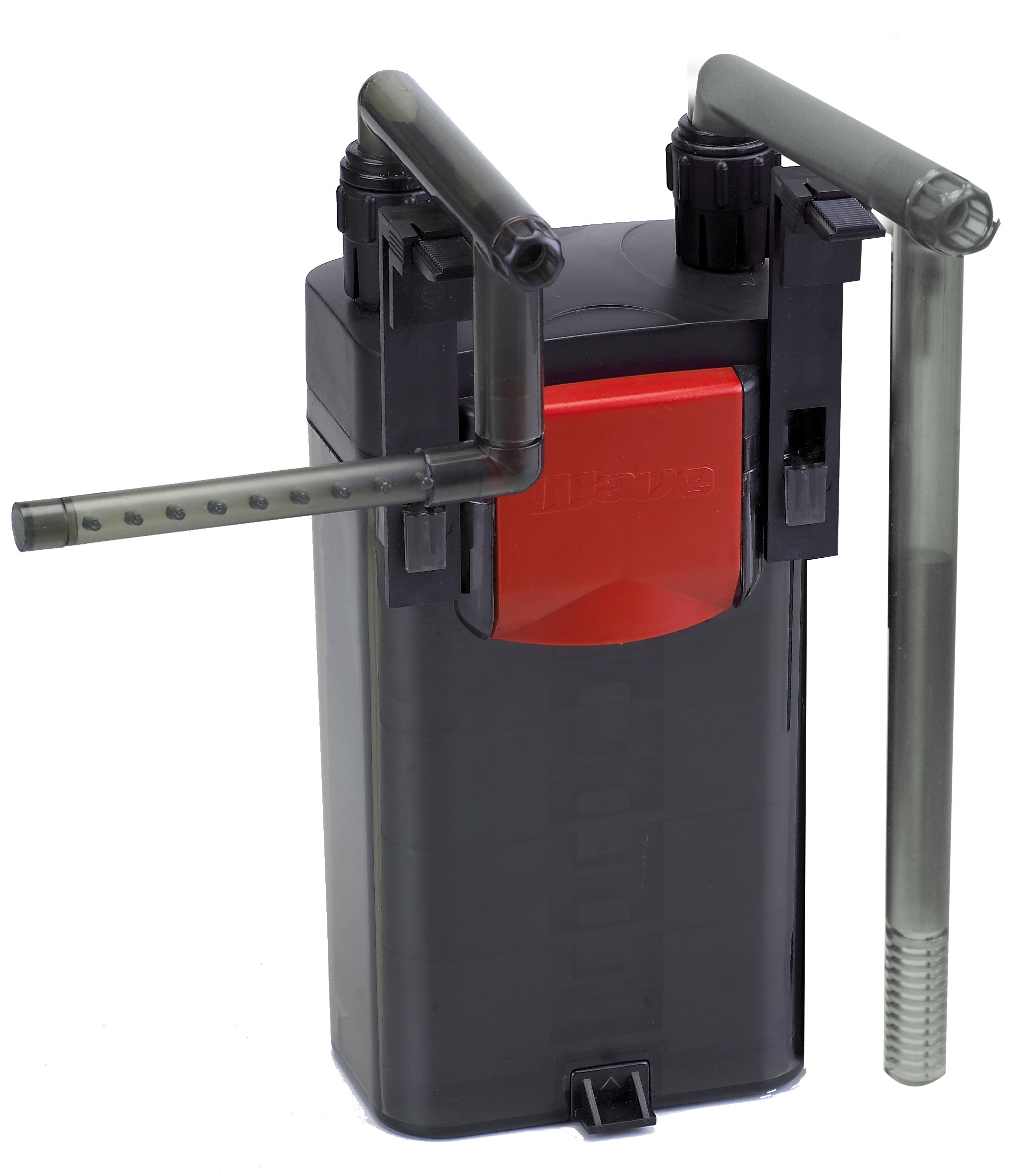
Image: The Wave Monarka 500 External Aquarium Filter shown installed on the side of an aquarium. The filter unit hangs on the rim, with inlet and outlet tubes extending into the water.
操作手順
The Wave Monarka 500 filter is designed for continuous operation. Once properly set up and primed, it will continuously circulate and filter your aquarium water.
- 連続運転: For optimal water quality, the filter should run 24 hours a day, 7 days a week.
- 流量調整: If your model includes a flow adjustment feature, you can regulate the water flow rate to suit your aquarium's needs. Refer to the specific control knob or lever on your unit.
- 監視: Regularly observe the water flow from the outlet to ensure the filter is operating effectively. A reduced flow rate may indicate a need for maintenance.
メンテナンス
Regular maintenance is crucial for the efficient operation and longevity of your filter. Perform maintenance at least once a month, or more frequently if water flow decreases significantly.
- 電源を切る: Always unplug the filter from the electrical outlet before beginning any maintenance.
- フィルターユニットを取り外す: Carefully lift the filter unit from the aquarium rim.
- 分解: Open the filter unit and remove the filter media baskets.
- Clean Mechanical Media: Rinse mechanical filter media (e.g., sponges, filter floss) in old aquarium water (from a water change) to preserve beneficial bacteria. Replace if heavily clogged or deteriorated.
- Replace Chemical Media: Chemical filter media (e.g., activated carbon) should be replaced every 2-4 weeks as per manufacturer recommendations, as its effectiveness diminishes over time.
- Clean Biological Media: Biological media (e.g., ceramic rings, bio-balls) should only be gently rinsed in old aquarium water if heavily fouled, to avoid destroying beneficial bacteria.
- クリーンインペラー: Remove the impeller cover and clean the impeller and its housing. Hair or debris can accumulate here and reduce performance.
- 再組み立てと再起動: Reassemble the filter, ensuring all media baskets are correctly seated and the lid is securely closed. Reinstall the filter on the aquarium, prime it with water, and plug it back in.
トラブルシューティング
| 問題 | 考えられる原因 | 解決 |
|---|---|---|
| Filter not starting or no water flow |
|
|
| 水の流れが減少 |
|
|
| 過度の騒音 |
|
|
| 水漏れ |
|
|
仕様
| 特徴 | 詳細 |
|---|---|
| モデル | Monarka 500 (A6076490) |
| フィルタータイプ | External Hang-on Filter |
| 流量 | 500 L/h (Liters per hour) |
| ろ過Stages | Mechanical, Chemical, Biological |
| 消費電力 | (特定のワットtage not provided in source data) |
| 寸法 | (Specific dimensions not provided in source data) |
| メーカー | 波 |
保証とサポート
Wave products are manufactured to high-quality standards. For warranty information, technical support, or to purchase replacement parts, please contact your local Wave dealer or visit the official Wave webサイトでご確認ください。保証請求の際は購入証明として領収書を保管してください。
注: 具体的な保証条件は地域によって異なる場合があります。