
1. はじめに
Thank you for choosing the Baseus Time Desktop Evaporative Cooler. This device is designed to provide instant cooling and humidification, enhancing comfort in various environments such as offices, dormitories, and bedrooms. Please read this manual carefully before use to ensure proper operation and maintenance.
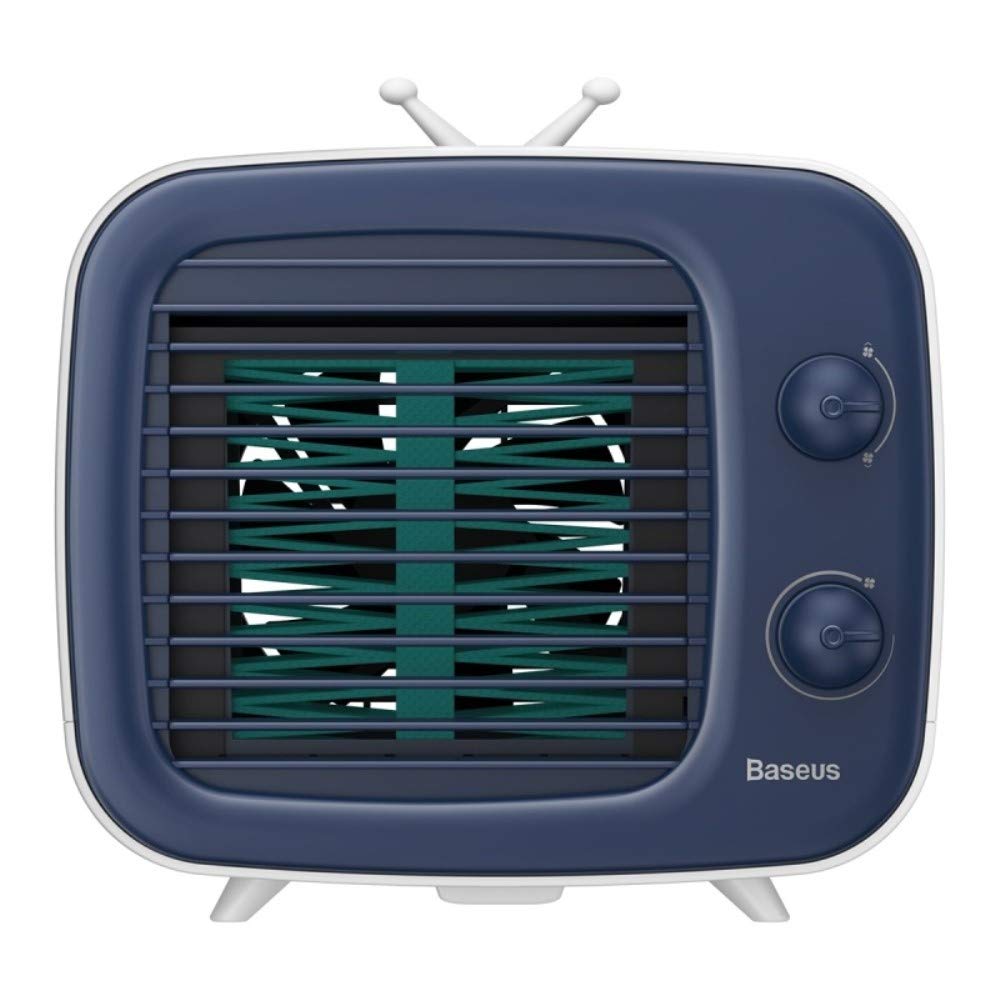
画像: 正面 view of the Baseus Time Desktop Evaporative Cooler.
2. 重要な安全上の注意事項
- Always place the cooler on a stable, flat surface to prevent tipping.
- デバイスを水やその他の液体に浸さないでください。
- 電源コードが損傷しておらず、適切な電源に正しく接続されていることを確認してください。
- お子様やペットの手の届かない場所に保管してください。
- Unplug the cooler before cleaning, refilling, or when not in use for extended periods.
- 空気の入口や出口をふさがないでください。
- Use only clean water. For enhanced cooling, ice cubes may be added.
3. パッケージ内容
パッケージにすべてのアイテムが揃っていることを確認します。
- エアクーラーユニット
- USBケーブル

Image: The Baseus Time Desktop Evaporative Cooler and its included accessories, such as the USB cable.
4.製品オーバーview
The Baseus Time Desktop Evaporative Cooler features a compact design with intuitive controls. It operates by drawing in hot air, passing it through a water-soaked curtain for purification and humidification, and then releasing cool, moist air. The device is designed for quiet operation, making it suitable for various personal spaces.
主な特徴:
- 蒸発冷却: Utilizes water evaporation to cool and humidify the air.
- 調整可能なエアフロー: Offers 3 fan speeds and adjustable air supply angles (45° upward, 45° downward, and vertical 90°).
- 静かな動作: Engineered for low noise levels, comparable to a gentle breeze.
- 加湿機能: Adds moisture to the air, beneficial for skin hydration.
- ポータブルデザイン: Compact and lightweight for easy placement and movement.

Image: Diagram illustrating the operating principle of the cold fan, showing air intake, water curtain, and cool air output.
5. セットアップ
Follow these steps to set up your Baseus Time Desktop Evaporative Cooler:
- Place the Cooler: Position the cooler on a flat, stable surface in your desired location.
- 水タンクを満たします:
- Open the top water injection cap.
- Pour clean water into the tank. The maximum capacity is 320ml. Observe the water level bar to avoid overfilling.
- 冷却効果を高めるには、水タンクに氷を入れてください。
- Optionally, add spray or aromatherapy liquids for a different environment.

Image: A hand pouring water into the top-fill water tank of the cooler, showing the water level bar.
- 接続電源:
- Connect the provided USB cable to the cooler's power input port.
- Plug the other end of the USB cable into a compatible power source such as a USB charger, computer, power bank, or vehicle USB port.

Image: Illustration of various power supply options including USB charger, computer, power bank, and vehicle USB.

Image: A visual guide demonstrating the setup steps: 1. Open water injection cap, 2. Insert ice water or ice, 3. Plug in power supply, 4. Turn on and adjust wind.
6. 操作手順
Once the cooler is set up and powered, you can begin operation:
- 電源オン: Turn the lower rotary knob to power on the device.
- ファン速度を調整します: Use the lower rotary knob to select one of the three fan speeds:
- スピード1: Soft wind for a comfortable breeze.
- スピード2: Medium-speed wind for moderate cooling.
- スピード3: Strong wind for rapid cooling.
- 風向を調整する: The cooler offers three air supply angles:
- 45度上向き
- 45度下向き
- 垂直90度
- 加湿: The device automatically humidifies the air as it cools. If you added aromatherapy liquids, the scent will also be diffused.

Image: A woman relaxing near the cooler, highlighting the spray humidification feature.
- Enhanced Cooling with Ice: If ice cubes were added to the water tank during setup, the cooling effect will be stronger and more immediate.

Image: A hand adding ice cubes to the cooler, demonstrating how to enhance the cooling effect.
7. メンテナンス
Regular cleaning ensures optimal performance and longevity of your cooler.
- 水タンクのクリーニング: Regularly empty and clean the water tank to prevent mold or mildew buildup. Use a soft cloth and mild detergent if necessary, then rinse thoroughly.
- Cleaning the Water Curtain: The water curtain is removable for cleaning. Carefully remove it and rinse under running water to clean any dust or debris. Ensure it is dry before reinserting.

画像: クローズアップ view of the removable water curtain, indicating it can be easily cleaned to remove dust.
- 外装清掃: クーラーの外側を柔らかくて乾いた布で拭いてください。amp 布で拭いてください。研磨剤や溶剤は使用しないでください。
- ストレージ: If storing the cooler for an extended period, ensure the water tank and water curtain are completely dry. Store in a cool, dry place.
8。 トラブルシューティング
| 問題 | 考えられる原因 | 解決 |
|---|---|---|
| 電源なし | Power cable not connected; Power source faulty | Ensure USB cable is securely connected; Try a different USB port or power adapter. |
| 風量が弱い | Fan speed set too low; Air inlets/outlets blocked | Increase fan speed using the rotary knob; Clear any obstructions from air inlets/outlets. |
| 冷却効果なし | Water tank empty; Water curtain dry | Refill the water tank with clean water; Ensure the water curtain is properly saturated. |
| 異常なノイズ | Device not on a flat surface; Foreign object inside | Place the cooler on a stable, flat surface; Unplug and check for any foreign objects. |
9. 仕様
| 特徴 | 詳細 |
|---|---|
| ブランド | ベースス |
| モデル番号 | TW-Sony Xperia E4g |
| 製品寸法(長さx幅x高さ) | 18 x 16.4 x 15.8 センチメートル |
| アイテム重量 | 960グラム |
| 材料 | アブソリュート |
| 定格巻tage | DC 5V 0.84A |
| 定格出力 | 4.2W |
| ファン速度 | 3000 回転 |
| 水タンク容量 | 320mL |
| 特集 | ポータブル |
| 色 | 白 |

Image: Visual representation of the cooler's dimensions (180mm x 164mm x 158mm) and key technical specifications.
10. 保証とサポート
For warranty information or technical support, please refer to the documentation provided with your purchase or contact Baseus customer service through their official webサイトでご確認ください。保証請求に備えて購入証明書を保管してください。