
導入
This manual provides detailed instructions for the QIACHIP WL101 Superheterodyne Receiver and WL102 Transmitter 433MHz RF Wireless Module Kit. This kit is designed for various DIY projects, including remote control applications with platforms like Arduino UNO. It operates on the 433MHz frequency band and supports ASK/OOK modulation.
パッケージ内容:
- 1 x WL101 Superheterodyne Receiver Module
- 1 x WL102 Transmitter Module
- 2 x Antennas (for receiver and transmitter)
安全情報
Handle batteries with care. Avoid extreme temperatures. Do not interfere with other wireless devices.
製品の特徴
- 頻度: 433MHz RF
- 変調モード: Supports ASK/OOK modulation
- 送信電力: Greater than 11dBm (for WL102 Transmitter)
- 受信機タイプ: Superheterodyne (for WL101 Receiver)
- 応用: Suitable for motorcycles, automobile anti-theft products, home security systems, electric doors, remote control sockets, LED lighting, garage door openers, and various remote control applications.
仕様
WL101 Receiver Module
- モデル: WL101
- 営業巻tage: Typically 3.3V - 5V (refer to specific datasheet for exact range)
- 動作電流: 低消費電力
- 頻度: 433MHz
- 寸法: Approximately 1.18 inches x 0.35 inches (30mm x 9mm)
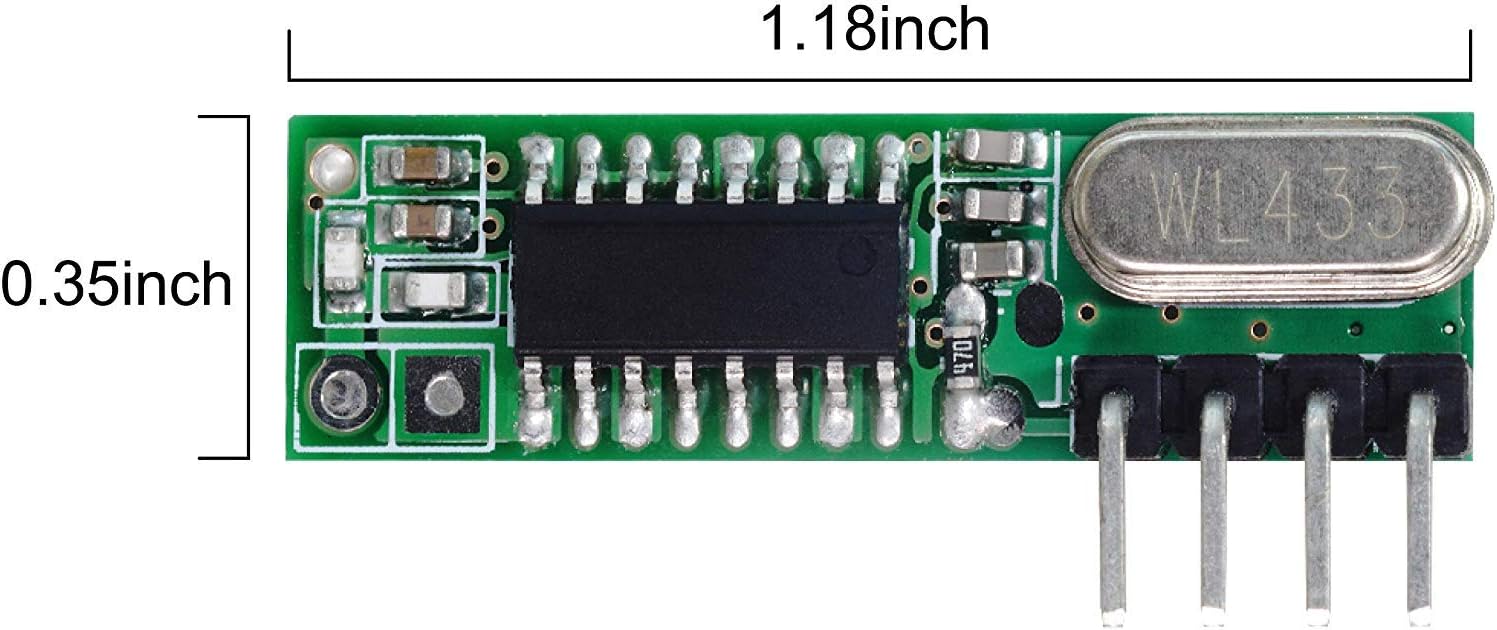
画像の説明: A green circuit board showing the WL101 receiver module with dimensions indicated. The length is approximately 1.18 inches and the width is 0.35 inches.
WL102 Transmitter Module
- モデル: WL102
- 営業巻tage: Typically 3.3V - 12V (refer to specific datasheet for exact range)
- 動作電流: Varies with transmit power
- 頻度: 433MHz
- 送信電力: >11dBm
- 寸法: 約13mm x 13mm

画像の説明: A small blue circuit board showing the WL102 transmitter module with a ruler indicating its size, approximately 13 mm.
Pinout and Connections
WL101 Superheterodyne Receiver Pinout
The WL101 receiver module features six pins for power, ground, data output, and antenna connection. Refer to the diagram below for pin identification.
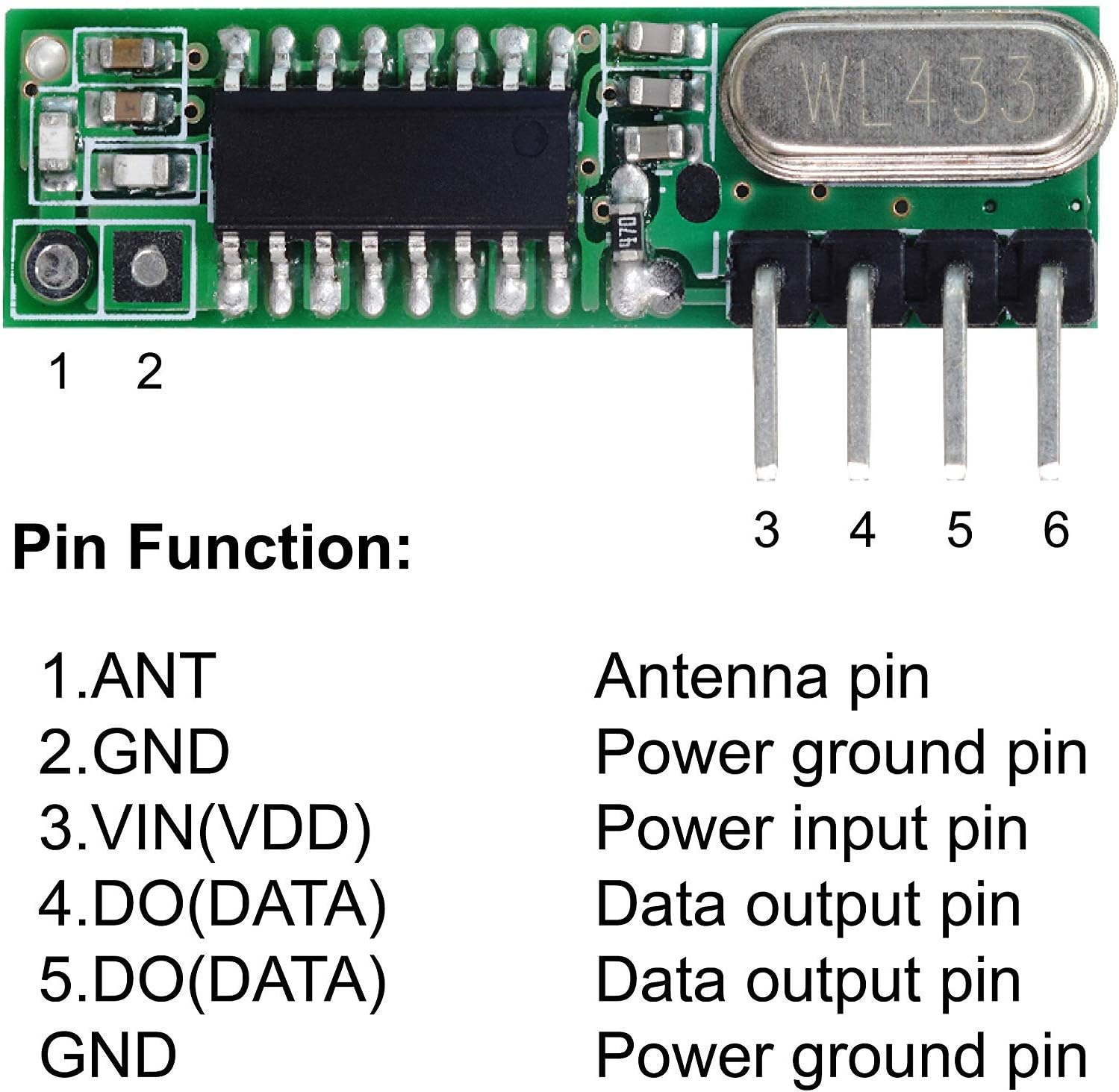
画像の説明: A green circuit board showing the WL101 receiver module. Six pins are labeled 1 through 6. Pin 1 is ANT (Antenna), Pin 2 is GND (Power ground), Pin 3 is VIN(VDD) (Power input), Pin 4 is DO(DATA) (Data output), Pin 5 is DO(DATA) (Data output), and Pin 6 is GND (Power ground).
| ピン番号 | ラベル | 関数 |
|---|---|---|
| 1 | アリ | アンテナピン |
| 2 | グランド | 電源グランドピン |
| 3 | VIN(VDD) | 電源入力ピン |
| 4 | DO(DATA) | データ出力ピン |
| 5 | DO(DATA) | データ出力ピン |
| 6 | グランド | 電源グランドピン |
WL102 Transmitter Pinout
The WL102 transmitter module has pins for power, ground, data input, and antenna. Note that the EN (Enable) pin is internally connected to the power supply and has no external function.

画像の説明: A small green circuit board showing the WL102 transmitter module. It has four pins at the bottom. The text indicates 'DAT - Wave signal input', 'OUT - Antenna pin', 'EN - Enable Pin (connected to power supply, no function)', '-' Power ground Pin, '+' Power supply pin.
| ラベル | 関数 |
|---|---|
| ダット | Wave signal input |
| 外 | Antenna pin (RF signal output) |
| EN | Enable Pin (internally connected to power, no external function) |
| - (GND) | 電源グランドピン |
| + (VCC) | 電源ピン |
Example Connection to Arduino UNO (WL101 Receiver)
This diagram illustrates a typical connection of the WL101 receiver module to an Arduino UNO board. Ensure correct voltage and data pin connections.

画像の説明: A circuit diagram showing a QIACHIP WL101-341 Superheterodyne 433MHz Receiver connected to an Arduino UNO board. The receiver's VDD pin is connected to Arduino's 5V, GND to GND, and one of the DO(DATA) pins to a digital input pin (e.g., D2) on the Arduino. The antenna is shown connected to the ANT pin.
設定
アンテナ接続
For optimal performance, connect the supplied helical antenna to the ANT pin of the WL101 receiver and the OUT pin of the WL102 transmitter. The length of the antenna is critical for 433MHz operation; a quarter-wavelength antenna (approximately 17.3 cm or 6.8 inches for 433MHz) is recommended for best range, though the provided coiled antennas are suitable for shorter distances.
電源
- WL101 Receiver: Connect the VIN(VDD) pin to a stable power source (e.g., 5V from Arduino) and GND to ground.
- WL102 Transmitter: Connect the '+' pin to a stable power source (e.g., 3.3V to 12V, depending on desired range and power) and '-' to ground.
データ接続
- WL101 Receiver: Connect one of the DO(DATA) pins to a digital input pin on your microcontroller (e.g., Arduino).
- WL102 Transmitter: Connect the DAT pin to a digital output pin on your microcontroller.
操作手順
基本動作原理
The WL102 transmitter sends data using Amplitude Shift Keying (ASK) or On-Off Keying (OOK) modulation at 433MHz. The WL101 superheterodyne receiver is designed to efficiently detect and demodulate these signals.
Microcontroller Programming (e.g., Arduino)
- Transmitter (WL102): Program your microcontroller to send digital data (e.g., ON/OFF pulses) to the DAT pin of the WL102. Libraries like "RCSwitch" or "VirtualWire" are commonly used for encoding and transmitting data.
- Receiver (WL101): Program your microcontroller to read digital data from the DO(DATA) pin of the WL101. The same libraries (e.g., "RCSwitch", "VirtualWire") can be used to decode the received signals.
- データプロトコル: Ensure that the data encoding and decoding protocols used by the transmitter and receiver microcontrollers are compatible.
範囲の考慮
The effective range of the modules depends on several factors, including antenna quality, power supply voltage (for transmitter), environmental interference, and line of sight. Optimal antenna tuning and clear line of sight will maximize range.
メンテナンス
- 乾燥を保つ: Protect the modules from moisture and humidity to prevent corrosion and damage.
- クリーンな接続: Ensure all pin connections are clean and secure.
- 身体的ストレスを避ける: Handle the modules carefully to prevent bending pins or damaging components.
- アンテナのケア: Ensure antennas are not bent or damaged, as this can significantly impact performance.
トラブルシューティング
- 信号受信なし:
- Verify power connections to both modules.
- Check antenna connections and ensure they are properly sized for 433MHz.
- Confirm that the transmitter and receiver are operating on the same frequency (433MHz).
- Ensure the data encoding/decoding libraries and protocols are correctly implemented.
- Reduce distance between modules and check for obstructions or sources of interference.
- 短距離:
- Improve antenna quality (e.g., use a proper quarter-wavelength wire antenna).
- Increase transmitter power supply voltage (within specified limits).
- Minimize environmental interference (e.g., other 433MHz devices, Wi-Fi routers).
- 送信機と受信機の間の見通しが良好であることを確認してください。
- 断続動作:
- 緩んだ接続部や冷えたはんだ接合部がないか確認してください。
- Ensure stable power supply to both modules.
- Consider adding decoupling capacitors near power pins if experiencing noise issues.
- Module Appears Damaged:
- Inspect for visible signs of corrosion or physical damage. If found, replacement may be necessary.
保証とサポート
QIACHIP products are designed for reliability. For technical support or inquiries regarding your WL101/WL102 module kit, please refer to the seller's support channels or the QIACHIP official webサイトをご覧ください。具体的な保証内容は地域や販売店によって異なる場合があります。