
導入
This manual provides comprehensive instructions for the Excelvan HD 720P 5MP Video Recorder Eyewear. This device combines a camera and eyewear, allowing for discreet video recording and photo capture. It supports up to a 32GB TF card for storage and can function as a PC camera or a U-disk. Please read this manual carefully before use to ensure proper operation and to maximize the product's lifespan.
パッケージ内容
開梱したら、以下にリストされているすべてのアイテムが揃っていて良好な状態であることを確認してください。
- 1 x Eyewear (Glasses)
- 1 x Black Pouch
- クリーニングクロス1枚
- USBケーブル1本
- ユーザーマニュアル x 1

Image: Contents of the Excelvan HD 720P 5MP Video Recorder Eyewear package.
製品終了view
Familiarize yourself with the components and dimensions of your Excelvan Video Recorder Eyewear.

Image: Labeled components of the eyewear, indicating the USB port, TF memory slot, reset button, camera lens, and ON/OFF record button.
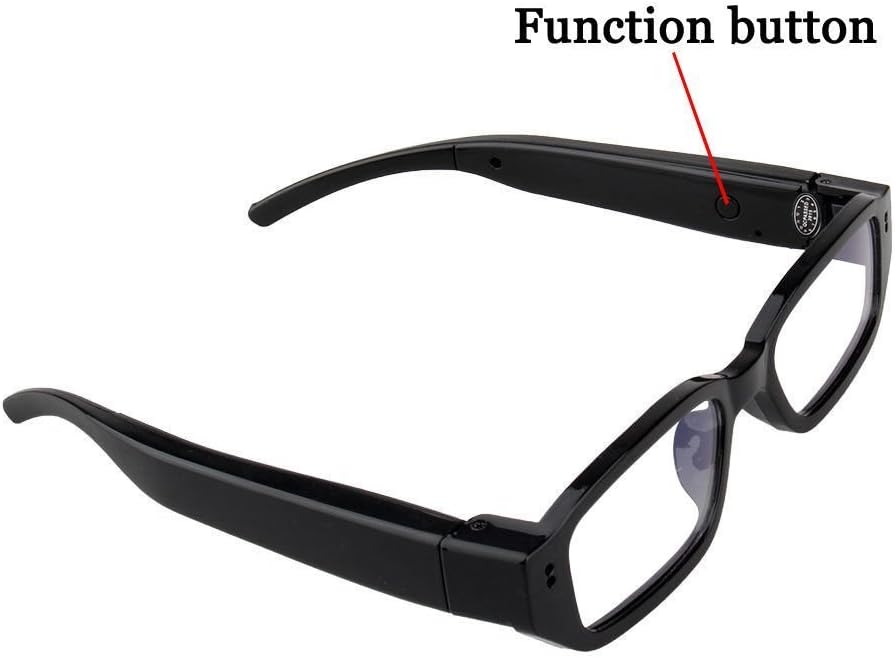
Image: Location of the function button on the eyewear arm.
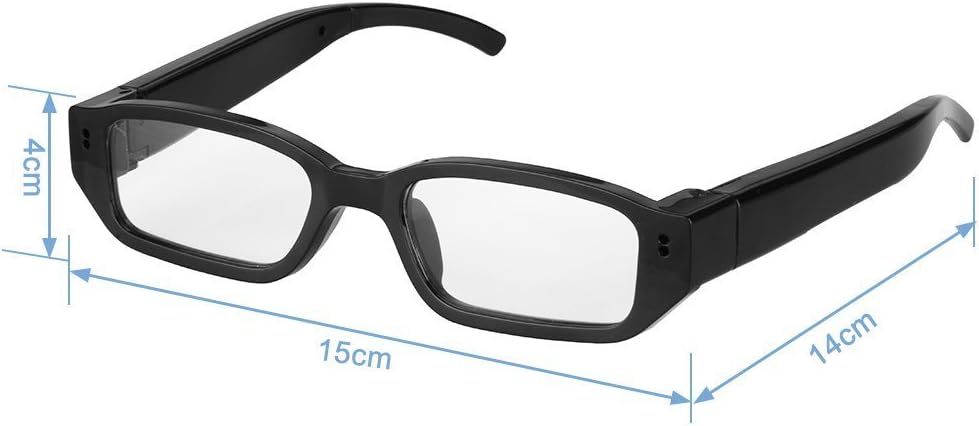
画像: 次元 view of the eyewear, indicating approximate measurements.
設定
1. バッテリーの充電
Before first use, fully charge the device. Connect the eyewear to a USB power source (e.g., computer USB port or 5V/500mAh USB adapter) using the provided USB cable. The indicator light will show charging status (specific light behavior not detailed in product info, assume standard charging indicator). A full charge typically takes 1-2 hours and provides 1-2 hours of operation.
2. メモリーカードの挿入
The device supports a Micro SD (TF) card up to 32GB (not included). Locate the TF memory slot (refer to Product Overview image). Gently insert the Micro SD card with the gold contacts facing down until it clicks into place. To remove, push the card in slightly until it springs out.
注記: Ensure the device is powered off before inserting or removing the memory card to prevent data loss or damage.
操作手順
1. 電源のオン/オフ
- 電源オン: Press and hold the ON/OFF record button (refer to Product Overview image) for approximately 2-3 seconds until the indicator light illuminates.
- 電源を切る: Press and hold the ON/OFF record button for approximately 3-5 seconds until the indicator light turns off. The device will automatically save any ongoing recording before powering down.
2. ビデオ録画
With the device powered on and a memory card inserted:
- Ensure the device is in video recording mode (indicator light status may vary, refer to full user manual for specific light patterns).
- Press the ON/OFF record button once to start video recording. The indicator light will change (e.g., blink) to signify recording is in progress.
- Press the ON/OFF record button again to stop recording. The video file will be saved to the memory card, and the indicator light will return to standby mode.
3. 写真を撮る
With the device powered on and a memory card inserted:
- Ensure the device is in photo capture mode (if applicable, some devices have separate modes or a quick press for photos).
- Press the Function button (refer to Product Overview image) once to take a photo. The indicator light may flash briefly, and the image file メモリカードに保存されます。
4. Connecting to a Computer (PC Camera / U-Disk Mode)
You can connect the eyewear to a computer to transfer files or use it as a PC camera.
- File Transfer (U-Disk Mode):
- Ensure the eyewear is powered off.
- Connect the eyewear to your computer using the USB cable.
- The computer should recognize the device as a removable disk. You can then access and transfer your video and photo files.
- PC Camera Mode:
- Connect the eyewear to your computer via USB.
- The device may automatically enter PC camera mode, or you might need to press a specific button (e.g., the Function button) while connected.
- Open a video conferencing application (e.g., Skype, Zoom) and select the "Excelvan Eyewear Camera" as your video input device.
注記: Driver installation may be required for some operating systems. If the device is not recognized, check your computer's device manager or refer to the manufacturer's webドライバー向けのサイト。
メンテナンス
- クリーニング: 付属のクリーニングクロスでレンズとフレームを優しく拭いてください。刺激の強い化学薬品や研磨剤の使用は避けてください。
- ストレージ: Store the eyewear in the black pouch when not in use to protect it from dust and scratches. Keep it in a cool, dry place away from direct sunlight and extreme temperatures.
- バッテリーのケア: バッテリーの寿命を延ばすには、バッテリーを頻繁に完全に放電させないでください。長期間使用しない場合でも、定期的に充電してください。
トラブルシューティング
- デバイスの電源が入らない:
Ensure the battery is fully charged. Connect to a power source and try again. If the issue persists, try resetting the device using the reset button (refer to Product Overview image) with a small pin.
- ビデオを録画/写真を撮ることができません:
Check if a Micro SD (TF) card is properly inserted and has sufficient free space. Ensure the card is formatted correctly (FAT32 is usually recommended). The battery might be low; charge the device.
- コンピュータがデバイスを認識しません:
Try connecting to a different USB port or another computer. Ensure the USB cable is not damaged. If prompted, install necessary drivers. Try restarting both the device and the computer.
- ビデオ/画像の品質が悪い:
Ensure the camera lens is clean and free from smudges. Record in well-lit environments. Avoid sudden movements during recording.
仕様
| 特徴 | 詳細 |
|---|---|
| ブランド | エクセルバン |
| モデル | KV7 (Reference: HD800) |
| 色 | 黒 |
| 材料 | ABSプラスチック |
| レンズ仕様 | 5.0 MP |
| ビデオ解像度 | 1280 x 720p HD |
| ビデオフォーマット | 動画 |
| 画像解像度 | 1280×720 |
| オーディオ | ステレオ |
| 録画フレームレート | 最大30fps |
| USBインターフェース | 2.0(高速) |
| メモリサポート | Max. 32 GB Micro SD (TF) card (not included) |
| 電源 | 280 mAhリチウムポリマー電池 |
| 電力持続時間 | 1~2時間 |
| 電源アダプター | DC5V / 500mAh |
| 消費電力 | <0.8W |
| Compatible Players | Windows Media Player, Real Player, Storm Codec |
| オペレーティング·システム | WinXP, Win2000, Windows Vista, Windows XP, Win7 |
| 寸法 | Approx. 15cm (width) x 14cm (arm length) x 4cm (lens height) |
| 正味重量 | 30グラム |
保証とサポート
This product comes with a standard manufacturer's warranty. For specific warranty terms, duration, and support inquiries, please refer to the warranty card included in your package or contact Excelvan customer service. Keep your purchase receipt as proof of purchase.
For technical assistance or further questions, please visit the official Excelvan webサイトをご覧いただくか、サポート チャネルにお問い合わせください。