
導入
This manual provides essential information for the setup, operation, maintenance, and troubleshooting of your Blackmagic Design URSA Mini 4K Digital Cinema Camera EF-Mount. Please read this manual thoroughly before using the camera to ensure proper functionality and to maximize its capabilities.
The URSA Mini 4K is a compact digital cinema camera featuring a Super-35mm 4K sensor, 12 stops of dynamic range, and an EF-mount for a wide range of compatible lenses. It supports recording in CinemaDNG Raw and ProRes formats to CFast 2.0 memory cards.
安全情報
カメラの損傷を防ぎ、ユーザーの安全を確保するために、次の安全上の注意事項を守ってください。
- カメラを水や過度の湿気にさらさないでください。
- Avoid extreme temperatures. Operate within specified environmental conditions.
- Use only approved power sources and accessories.
- カメラを分解したり改造したりしないでください。修理は資格のある専門家に依頼してください。
- Protect the lens and sensor from direct sunlight when not in use.
設定
開梱と初期検査
Carefully remove all components from the packaging. Verify that all items listed in the packing list are present and inspect for any visible damage.
サイドハンドルの取り付け
The included side handle attaches to the rosette on the side of the camera body. Secure it firmly for comfortable handheld operation and access to start/stop control via LANC connection.
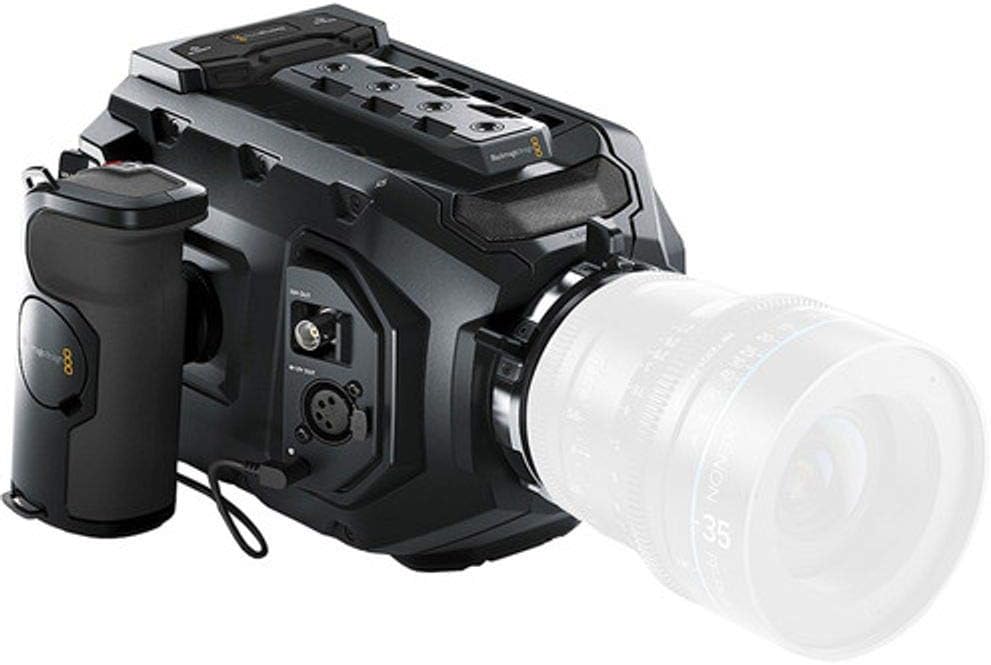
Image: The Blackmagic URSA Mini 4K camera shown with the side handle attached, providing ergonomic grip and control.
レンズの取り付け
Align the red dot on your EF-mount lens with the red dot on the camera's lens mount. Gently insert the lens and twist clockwise until it clicks into place. Ensure the lens is securely locked before operation.

Image: The Blackmagic URSA Mini 4K camera with a lens attached, ready for shooting.
カメラの電源を入れる
The URSA Mini 4K can be powered via a 4-pin XLR jack at the rear. An optional plate allows for V-Mount or Gold-Mount professional batteries. Ensure the power source provides adequate voltage と現在。
Inserting CFast 2.0 Cards
Locate the dual CFast 2.0 card slots. Insert the cards with the correct orientation until they click into place. The camera supports continuous recording by switching between cards when one is full.
操作手順
基本的な操作とインターフェース
The camera features a 5-inch fold-out touchscreen display for menu navigation and monitoring. Physical buttons provide quick access to essential functions.

Image: The Blackmagic URSA Mini 4K camera with its integrated 5-inch touchscreen monitor extended, displaying a live view.
Recording Formats and Settings
The URSA Mini 4K records in CinemaDNG Raw (uncompressed and 3:1 compressed) and ProRes (444 XQ, 444, 422 HQ, 422, 422 LT, 422 Proxy) formats. Access these settings via the touchscreen menu.
- 解決: Up to 4000 x 2160 (4K) at 60 frames per second.
- ダイナミックレンジ: 12 stops.
- ISO: 200〜12800まで調整可能です。
- ホワイトバランス: Auto and manual presets available.
オーディオ入力
The camera includes XLR audio inputs for professional microphones. Adjust audio levels and monitoring settings through the camera's interface.
メンテナンス
カメラの掃除
- カメラ本体を清掃する際は、柔らかく乾いた布を使用してください。
- For the sensor and lens, use specialized cleaning tools and solutions designed for optical components. Avoid touching the sensor directly.
- マイクロファイバークロスでタッチスクリーンを清潔に保ってください。
ファームウェアの更新
定期的にBlackmagic Designをチェックしてください website for firmware updates. Updates can improve performance, add features, and resolve issues. Follow the provided instructions carefully during the update process.
ストレージ
When not in use, store the camera in a dry, dust-free environment, preferably in a protective case. Remove batteries if storing for extended periods.
トラブルシューティング
| 問題 | 考えられる原因 | 解決 |
|---|---|---|
| カメラの電源が入りません。 | Battery depleted or improperly connected; power cable issue. | Ensure battery is charged and correctly inserted. Check power cable connections. |
| 画像が表示されていません。 | Lens cap on; display brightness too low; incorrect output settings. | Remove lens cap. Adjust display brightness. Verify video output settings. |
| Recording errors. | CFast card full, slow, or corrupted; incorrect recording format. | Use approved CFast 2.0 cards. Format cards in-camera. Select a compatible recording format. |
| Horizontal lines in footage at high ISO. | Known sensor characteristic at high ISO settings. | Avoid shooting at excessively high ISOs if possible. Check for firmware updates that may address this. |
For further assistance, refer to the official Blackmagic Design support resources or contact customer service.
仕様
| 特徴 | 詳細 |
|---|---|
| センサーサイズ | Super-35mm CMOS |
| ビデオ解像度 | Up to 4000 x 2160 (4K) at 60p |
| ダイナミックレンジ | 12 ストップ |
| レンズマウント | EF-Mount |
| 記録メディア | Dual CFast 2.0 Card Slots |
| 録音フォーマット | CinemaDNG Raw (Uncompressed/3:1), ProRes (444 XQ, 444, 422 HQ, 422, 422 LT, 422 Proxy) |
| ISO範囲 | 200-12800 |
| 画面 | 5-inch Fold-out Touchscreen |
| オーディオ入力 | XLR |
| 接続性 | 12G-SDI Output, Timecode, REF Input, USB 2.0, Wi-Fi |
| 重さ | 5ポンド(約2.27kg) |
保証情報
Blackmagic Design products typically come with a limited manufacturer's warranty. For specific details regarding the warranty period and terms for your URSA Mini 4K camera, please refer to the warranty card included with your product or visit the official Blackmagic Design webサイトでご確認ください。保証請求に備えて購入証明書を保管してください。
サポートとお問い合わせ
For technical support, product registration, or to download the latest software and manuals, please visit the official Blackmagic Design support page:
www.blackmagicdesign.com/support
You can also find community forums and FAQs on their website which may assist with common queries.