
導入
ご購入ありがとうございますasing the Soundmaster DAB500SI Portable Digital Radio. This manual provides essential information for the safe and efficient operation of your device. Please read it thoroughly before use and retain it for future reference.
製品終了view
The Soundmaster DAB500SI is a compact and versatile digital radio, offering both DAB/DAB+ and FM reception. It features a clear display, intuitive controls, and a headphone output for personal listening. Its portable design allows for use in various locations.
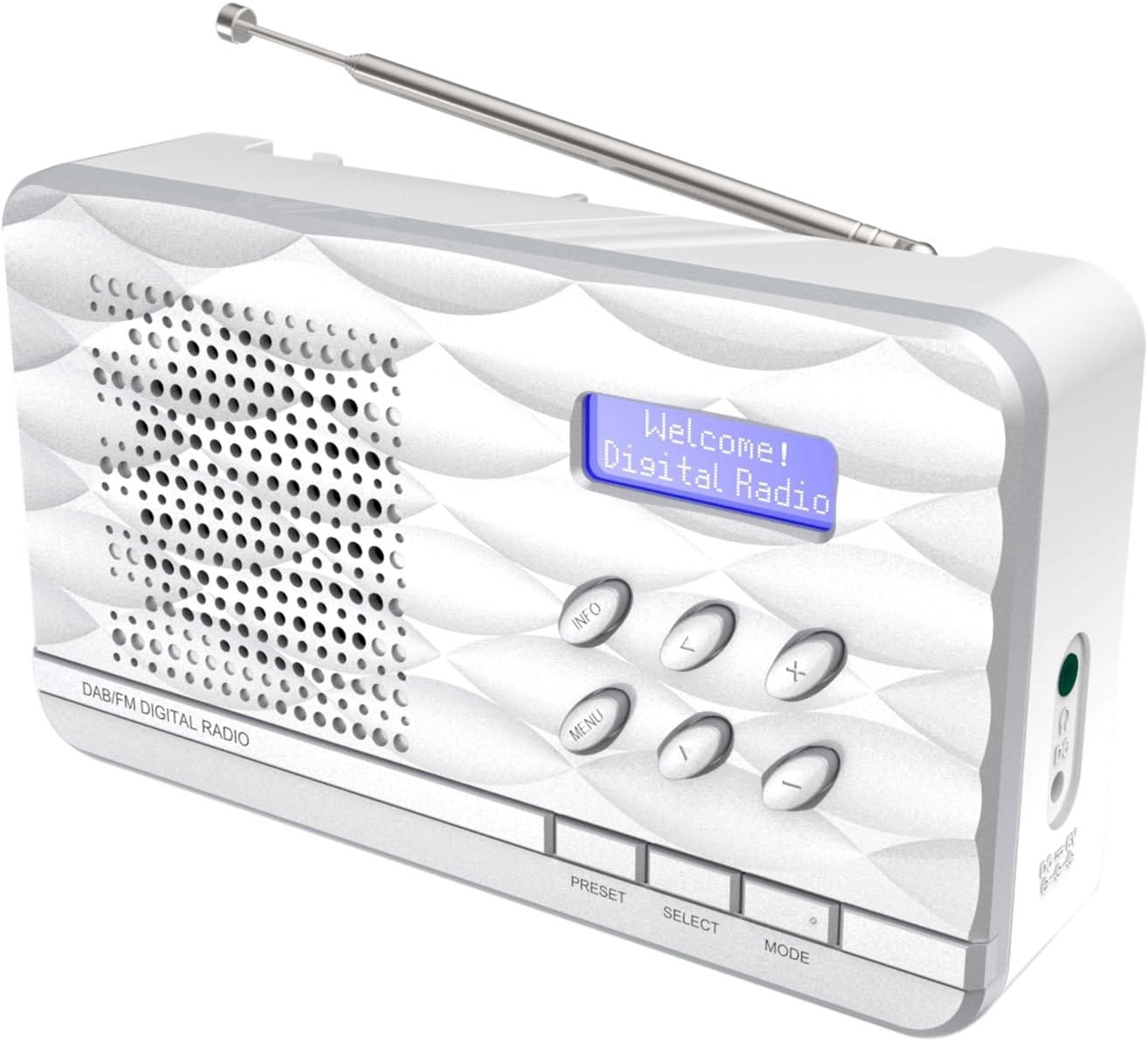
図1: Soundmaster DAB500SI Portable Digital Radio. The image shows the silver radio with its extendable antenna, front speaker grille, blue backlit display showing "Welcome! Digital Radio", and control buttons labeled INFO, MENU, PRESET, SELECT, MODE, and navigation arrows. Dimensions are indicated as 19cm (width), 11cm (height), and 7cm (depth).
設定
1. 開梱
Carefully remove the radio from its packaging. Ensure all components are present: the DAB500SI radio unit and this user manual.
2. 電源接続
The DAB500SI is powered by mains electricity. Locate the DC IN port on the side of the unit. Connect the provided power adapter to this port and then plug it into a standard wall outlet.
Alternatively, the unit can be powered by 4x AA batteries (not included) for portable use. Open the battery compartment on the rear of the unit and insert the batteries, observing correct polarity.
3. アンテナ調整
Extend the telescopic antenna fully for optimal DAB/DAB+ and FM reception. Adjust its position to achieve the best signal quality.
操作手順
1. 電源のオン/オフ
を押す 力 button (usually combined with the MODE button or a dedicated button) to turn the radio on or off.
2. モード選択(DAB/FM)
を押す モード button to switch between DAB/DAB+ and FM radio modes.
3. DAB/DAB+ラジオの操作
- 初めてのセットアップ: When first powered on in DAB mode, the radio will automatically perform a full scan for available stations. This may take a few minutes.
- ステーションの選択: 使用 左/右 navigation buttons (labeled < and > on the device) to browse through the list of available DAB stations. Press 選択 選択を確認します。
- 手動スキャン: If you move the radio to a new location or wish to update the station list, press メニュー, then navigate to "Full Scan" or "Auto Scan" and press 選択.
- 情報表示: を押す 情報 button repeatedly to cycle through various information displays such as program type, signal strength, time, date, and DLS (Dynamic Label Segment) text.
4. FMラジオの操作
- 自動スキャン: FMモードでは、 選択 button to perform an auto scan. The radio will scan and store available stations.
- 手動チューニング: 使用 左/右 navigation buttons (labeled < and > on the device) to manually tune the frequency in small increments.
- RDS Information: If available, RDS (Radio Data System) information such as station name and program type will be displayed. Press 情報 to cycle through available RDS data.
5.プリセット
The radio supports up to 20 preset stations for both DAB and FM modes.
- プリセットの保存: 希望の放送局に合わせます。 プリセット button until "Preset Store" appears on the display. Use the navigation buttons to select a preset number (1-20) and press 選択 確認します。
- プリセットの呼び出し: を押す プリセット button briefly. Use the navigation buttons to select the desired preset number and press 選択 それに合わせるために。
6. 音量コントロール
使用 +/- buttons (labeled + and - on the device) to adjust the volume level.
7. ヘッドホンの使用
Connect standard 3.5mm headphones to the headphone jack on the side of the unit for private listening. The internal speaker will be muted automatically.
メンテナンス
1. 清掃
Wipe the radio with a soft, dry cloth. Do not use abrasive cleaners, waxes, or solvents as they may damage the finish. Ensure the unit is unplugged before cleaning.
2. ストレージ
ラジオを長期間保管する場合は、液漏れを防ぐため電池を取り外してください。直射日光や極端な温度を避け、涼しく乾燥した場所に保管してください。
3. バッテリーの交換
When using batteries, replace all four AA batteries simultaneously when the low battery indicator appears or audio quality degrades. Ensure correct polarity when inserting new batteries.
トラブルシューティング
| 問題 | 考えられる原因 | 解決 |
|---|---|---|
| 電源なし | Power adapter not connected or faulty; batteries depleted or incorrectly inserted. | Check power adapter connection and wall outlet. Replace batteries, ensuring correct polarity. |
| DAB/FMの受信状態が悪い | アンテナが伸びていないか位置が適切ではないため、信号が弱い領域です。 | Fully extend and adjust the telescopic antenna. Try repositioning the radio. Perform a full scan in DAB mode. |
| スピーカーから音が出ない | 音量が低すぎます。ヘッドフォンが接続されています。 | Increase volume. Disconnect headphones if not desired. |
| Radio freezes or becomes unresponsive | 一時的なソフトウェアの不具合。 | Disconnect power for a few seconds, then reconnect. If using batteries, remove and reinsert them. |
仕様
- モデル番号: DAB500SI
- ブランド: サウンドマスター
- サポートされている無線帯域: AM, DAB, DAB+, FM
- プリセットステーション: 20(FM/DAB)
- 最大スピーカー出力: 1ワット
- 接続技術: 補助(3.5mmヘッドフォンジャック)
- 電源: Mains (AC adapter) or 4x AA Batteries (not included)
- 画面: バックライト付きLCD
- 商品の重量: 400グラム
- 寸法(約): 19 cm (幅) x 11 cm (高さ) x 7 cm (奥行き)
- 色: 銀
- 含まれるコンポーネント: Radio unit, User Manual
保証とサポート
保証情報
Please refer to the warranty card included with your product for detailed warranty terms and conditions. Keep your purchase receipt as proof of purchase for any warranty claims.
カスタマーサポート
For technical assistance, troubleshooting, or spare parts inquiries, please contact your retailer or the Soundmaster customer service department. Contact details can typically be found on the manufacturer's official webサイトまたは製品パッケージに記載されています。
Note: Spare parts availability information is not provided by the manufacturer. Software updates are not guaranteed.