
ロジクール M310
Logitech M310 ワイヤレス マウス ユーザー マニュアル
モデル: M310 (P/N: 910-003986)
導入
The Logitech M310 Wireless Mouse is designed for comfortable and reliable everyday use. Its contoured shape with soft rubber side grips ensures a comfortable fit for either hand, even during extended periods of use. Featuring advanced 2.4 GHz wireless connectivity and precise optical tracking, this mouse offers smooth and responsive cursor control. The included plug-and-forget nano-receiver is small enough to remain in your USB port, providing hassle-free connectivity.
設定
1. 電池を入れる
Locate the battery compartment on the underside of the mouse. Slide the cover open and insert one AA battery, ensuring correct polarity. The Logitech M310 is designed for an extended battery life of up to 18 months, though actual life may vary based on usage.
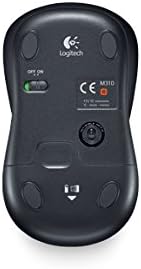
画像: 下側 view of the Logitech M310 mouse, highlighting the battery compartment and the ON/OFF switch.
2. Connect USB Nano Receiver
Remove the USB nano receiver from its storage slot within the battery compartment (if stored there) or from its packaging. Plug the receiver into an available USB port on your computer (PC, Mac, or Laptop). The mouse should automatically connect to the receiver.

Image: The Logitech M310 Wireless Mouse positioned next to its compact USB nano receiver.
3. 電源オン
Slide the ON/OFF switch on the underside of the mouse to the 'ON' position. The mouse is now ready for use.
マウスの操作
The Logitech M310 provides standard mouse functionality for seamless navigation.
- 左クリック: 左ボタンを押して項目を選択し、開きます files、または機能をアクティブ化します。
- 右クリック: 右ボタンを押すと、コンテキスト メニューまたは特定のオプションにアクセスできます。
- スクロールホイール: Roll the wheel up or down to scroll through documents or web pages. The scroll wheel can also be pressed for middle-click functionality, often used to open links in new tabs.
- 光学トラッキング: The advanced optical sensor provides smooth and precise cursor control on various surfaces, often eliminating the need for a mouse pad.
- 無線範囲: Enjoy reliable wireless connectivity with a range that allows for flexible positioning and movement.
メンテナンス
バッテリー交換
When the mouse's performance degrades or the indicator light (if present) signals low battery, replace the AA battery. Always use a fresh, high-quality AA battery for optimal performance.
クリーニング
To maintain optimal performance, periodically clean the mouse. Use a soft, lint-free cloth slightly dampened with water or a mild cleaning solution to wipe the exterior. For the optical sensor on the underside, use a dry cotton swab to gently remove any dust or debris.
ナノレシーバーの保管
The USB nano receiver can be stored inside the mouse's battery compartment when not in use or when transporting the mouse. This helps prevent loss of the small receiver.
トラブルシューティング
- マウスが反応しない:
Ensure the mouse is switched 'ON'. Check the battery and replace it if necessary. Verify that the USB nano receiver is securely plugged into a working USB port on your computer.
- カーソルの動きが不規則:
Clean the optical sensor on the underside of the mouse. Ensure you are using the mouse on a suitable surface; highly reflective or uneven surfaces can affect tracking performance. Try moving the mouse closer to the USB receiver to rule out interference.
- 接続の問題:
Unplug the USB nano receiver and plug it back into a different USB port. If possible, try the mouse with another computer to determine if the issue is with the mouse or the computer's USB ports. Ensure no other wireless devices are causing interference.
仕様
| 特徴 | 詳細 |
|---|---|
| モデル | M310 |
| 商品型番 | 910-003986 |
| 接続技術 | Wireless (2.4 GHz USB Nano Receiver) |
| 動き検出技術 | 光学 |
| 電源 | 電池駆動 |
| 電池が必要 | 1 単三 (付属) |
| 平均バッテリー寿命 | 最長18か月 |
| ハードウェアプラットフォーム | PC |
| オペレーティングシステムの互換性 | Windows、macOS、Linux、Chrome OS |
| アイテム重量 | 3.49オンス |
| 製品寸法(長さx幅x高さ) | 4.96 x 3.37 x 1.91インチ |
| 色 | Silver Grey (as per product title) |
保証とサポート
保証情報
The Logitech M310 Wireless Mouse comes with a three-year limited hardware warranty from the date of purchase. This warranty covers defects in materials and workmanship under normal use. Please retain your proof of purchase for warranty claims.
カスタマーサポート
技術的なサポート、トラブルシューティング、保証に関するお問い合わせは、ロジクールの公式サポートサイトをご覧ください。 website or contact their customer service. Detailed support resources, FAQs, and driver downloads (if applicable) are available online.
Note: Specific contact details and webサイト URLs may vary by region. Please refer to the packaging or Logitech's official web最新のサポート情報については、サイトをご覧ください。
Ask a question about this manual
Ask about setup, troubleshooting, compatibility, parts, safety, or missing instructions. Manuals+ will review the question and use this page’s manual context to help answer it.