
1. はじめに
This manual provides essential instructions for the setup, operation, maintenance, and troubleshooting of your IBM Lenovo Preferred Pro USB Wired Keyboard and Mouse Set. Please read this manual thoroughly before using the product to ensure proper functionality and longevity.
2.製品オーバーview
The IBM Lenovo Preferred Pro USB Wired Keyboard and Mouse Set offers a reliable input solution for your computer. The keyboard features a standard layout with a numeric keypad, while the mouse is a 2-button optical mouse with a scroll wheel. Both devices connect via a standard USB interface, providing plug-and-play compatibility with most operating systems.

図2.1:上 view of the IBM Lenovo Preferred Pro USB Wired Keyboard.
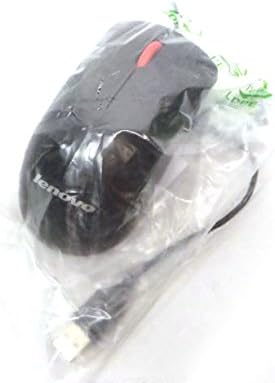
図2.2:上 view of the Lenovo USB 2-Button Optical Mouse.
主な特徴:
- USB Wired Connectivity: Ensures a stable and reliable connection.
- Plug-and-Play: No additional drivers typically required for basic functionality.
- Standard Keyboard Layout: Full-size keyboard with numeric keypad.
- Optical Mouse: Precise tracking with a scroll wheel for easy navigation.
3. セットアップ
Follow these steps to connect your keyboard and mouse to your computer.
- デバイスの開梱: キーボードとマウスをパッケージから慎重に取り出します。
- Identify USB Connectors: Locate the USB connectors at the end of the keyboard and mouse cables.
- コンピュータに接続します: Insert the USB connector of the keyboard into an available USB port on your computer. Repeat this step for the mouse.
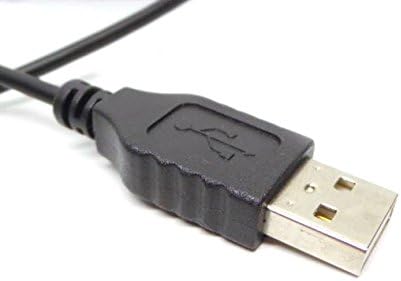
Figure 3.1: Close-up of a standard USB Type-A connector, used for connecting the keyboard and mouse.
Your computer should automatically detect and install the necessary drivers for the keyboard and mouse. No additional software installation is typically required for basic functionality.
4. 操作手順
4.1 キーボードの使用
- タイピング: テキスト入力には英数字キーを使用します。
- ファンクションキー(F1~F12): These keys perform various functions depending on the application or operating system.
- テンキー: Use the dedicated numeric keypad for efficient data entry. Ensure the "Num Lock" indicator light is on.
- 特別なキー: Utilize keys like "Print Screen", "Scroll Lock", "Pause/Break", "Insert", "Home", "Page Up", "Delete", "End", and "Page Down" for their respective functions.
4.2 マウスの使用
- 動き: Move the mouse across a flat surface to control the cursor on the screen.
- 左クリック: 左ボタンを押すと、項目を選択したり、リンクを開いたり、機能を起動したりできます。
- 右クリック: Press the right button to open context menus.
- スクロールホイール: スクロールホイールを上下に回してドキュメント間を移動したり、 web ページ。スクロールホイールは中クリックボタンとしても機能します。
5. メンテナンス
Proper care and maintenance will extend the life of your keyboard and mouse.
- クリーニング:
- Disconnect devices from the computer before cleaning.
- 柔らかくてamp cloth with a mild cleaning solution (e.g., water or isopropyl alcohol) to wipe surfaces.
- Avoid excessive moisture, especially near keycaps and optical sensors.
- 圧縮空気を使用して、キーボードのキーの間のほこりやゴミを取り除きます。
- ストレージ: デバイスは、極端な温度や直射日光を避け、清潔で乾燥した環境に保管してください。
- こぼれを避ける: 損傷を防ぐため、キーボードやマウスに液体を近づけないでください。
6。 トラブルシューティング
If you encounter issues with your keyboard or mouse, refer to the following common problems and solutions:
| 問題 | 考えられる原因 | 解決 |
|---|---|---|
| キーボード/マウスが反応しない | USB 接続が緩んでいる、USB ポートに障害がある、ドライバーに問題がある。 |
|
| キーが機能しない、または正しく入力できない | Debris under keys, software conflict, keyboard settings. |
|
| マウスカーソルが不安定または動かない | Dirty optical sensor, unsuitable surface, software issue. |
|
If the problem persists after trying these solutions, contact customer support or your reseller for further assistance.
7. 仕様
| 特徴 | 詳細 |
|---|---|
| Keyboard Model Numbers | 54Y9400, 41A5289, SK-8825, KB1021 |
| Mouse Model Numbers | 45J4888, 25011476, 45J4889, M-U0025-O |
| ブランド | IBM/レノボ |
| 色 | 黒 |
| 接続技術 | USB有線 |
| キーボードタイプ | Preferred Pro USB Wired Keyboard |
| マウスタイプ | 2-Button Black Red Scroll Wheel Optical Mouse |
| パッケージ寸法 | 22 x 10.2 x 4.7インチ(約) |
| アイテム重量 | 1ポンド(おおよそ) |
| メーカー | レノボ |
8. 保証とサポート
For warranty information, please refer to the documentation provided at the time of purchase or contact your reseller. IBM and Lenovo products typically come with a standard manufacturer's warranty.
For technical support or further inquiries, please contact the product's manufacturer or the authorized reseller from whom you purchased the item. Keep your purchase receipt and product model numbers handy for faster service.


