
導入
ご購入ありがとうございますasing the GPX 9-inch Portable DVD Player, Model PD901BDLP. This manual provides essential information for the safe and efficient operation of your device. Please read it thoroughly before use and retain it for future reference.
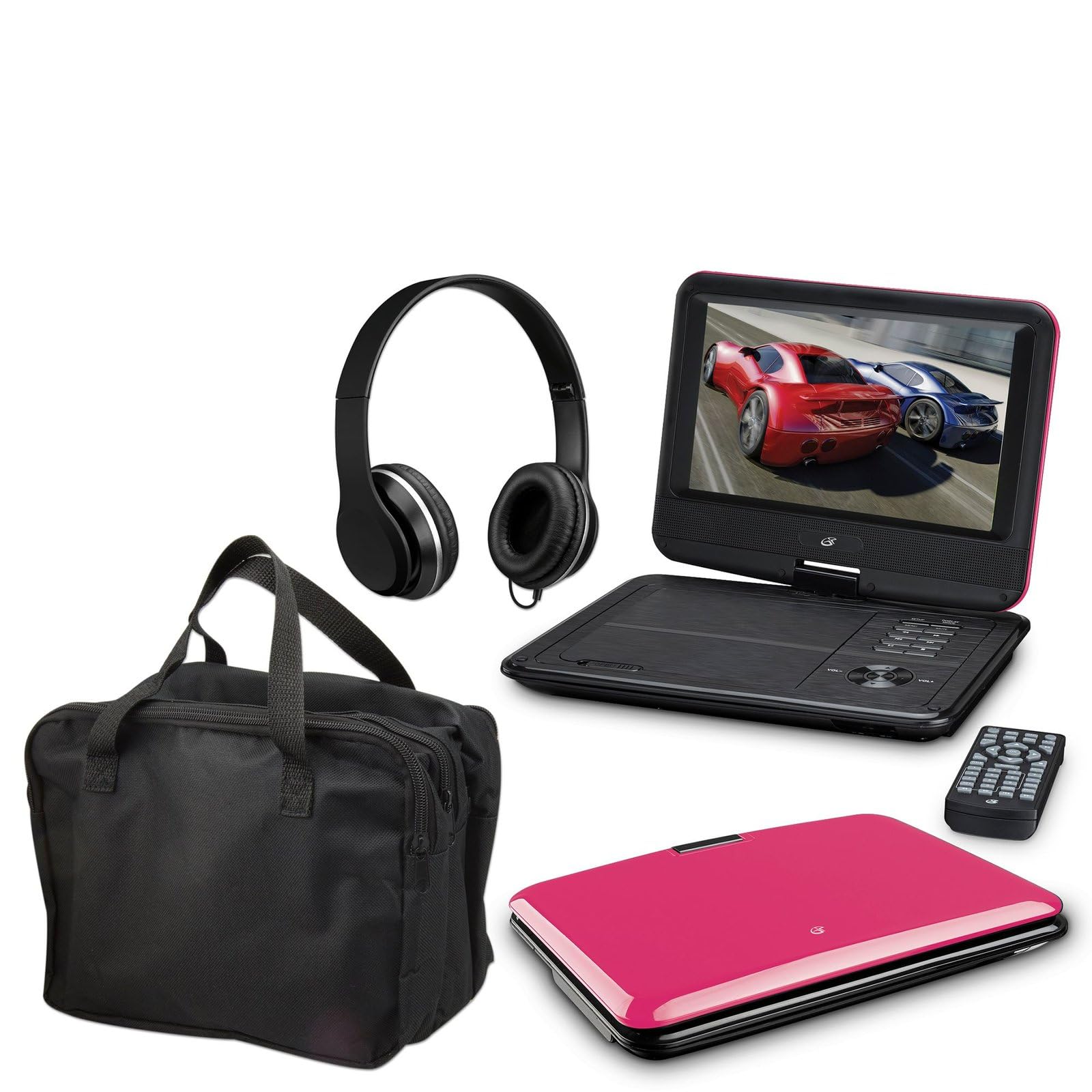
Image: The GPX 9-inch Portable DVD Player in its closed position, showcasing its vibrant pink top casing and sleek design.
パッケージ内容
以下にリストされているすべてのアイテムがパッケージに含まれていることを確認してください。
- GPX 9-inch Portable DVD Player (Model PD901BDLP)
- リモコン(単2電池XNUMX本必要、付属)
- AC/DC電源アダプター
- 12Vカーアダプター
- 3.5mm-to-RCA audio/video cable
- キャリングケース
- ヘッドフォン
- 取扱説明書(本書)
製品の特徴
- 9-inch 800x480 LCD screen
- Screen tilts and swivels for versatile view角度を変える
- Rechargeable lithium polymer battery with up to 2 hours of battery life
- 内蔵ステレオスピーカー
- プライベートリスニング用ヘッドフォンジャック
- RCA output for connection to external displays
- Supports DVD, DVD-R/RW, DVD+R/RW, CD, CD-R/RW, JPEG, MP3 formats
設定
1. バッテリーの充電
Before first use, fully charge the internal lithium polymer battery. Connect the AC/DC power adapter to the DC IN port on the DVD player and plug the other end into a standard wall outlet. The charging indicator light will illuminate. Charging typically takes approximately 3-4 hours for a full charge, providing up to 2 hours of playback.
2. リモコンの電池の取り付け
リモコン背面の電池ケースを開けてください。単4電池2本を、極性(+/-)を間違えないように入れてください。ケースをしっかりと閉めてください。
3. Connecting to a Television (Optional)
に view content on a larger screen, use the included 3.5mm-to-RCA audio/video cable. Connect the 3.5mm end to the AV OUT port on the DVD player. Connect the RCA (red, white, yellow) ends to the corresponding AV INPUT ports on your television. Select the correct AV input source on your TV.
4. Using the Car Adapter (Optional)
For in-car use, connect the 12V car adapter to the DC IN port on the DVD player and plug the other end into your vehicle's cigarette lighter socket.
操作手順
1.電源のオン/オフ
を押し続けます 力 プレーヤーまたはリモコンのボタンを押して、デバイスの電源をオンまたはオフにします。
2. DVDの挿入
- Gently open the DVD player lid.
- Place a DVD disc onto the spindle with the label side facing up.
- カチッと音がするまでディスクの中央を軽く押し下げます。
- 蓋を閉めてください。プレーヤーは自動的にディスクの読み取りを開始します。
3. 画面調整
The LCD screen can be tilted and swiveled to achieve the optimal viewing angle. Carefully adjust the screen to your preferred position.
4. 基本的な再生コントロール
- 再生/一時停止: Press to start or pause playback.
- 停止: を押すと再生が停止します。
- スキップ (<< / >>): Press to skip to the previous or next chapter/track.
- FF / REW: Press and hold to fast forward or rewind.
- ボリューム(+/-): オーディオの音量を調整します。
5. ヘッドフォンの使用
Plug the included headphones into the ヘッドホン jack for private listening. The built-in speakers will automatically mute when headphones are connected.
メンテナンス
- 画面の掃除: Use a soft, lint-free cloth to gently wipe the LCD screen. Do not use liquid cleaners or abrasive materials.
- ディスクトレイのクリーニング: ディスクトレイに埃やゴミが付着していないことを確認してください。必要に応じて、柔らかいブラシや圧縮空気を使用してください。
- バッテリーのケア: To prolong battery life, avoid fully discharging the battery frequently. If storing the player for an extended period, charge it periodically.
- ストレージ: Store the DVD player in a cool, dry place away from direct sunlight and extreme temperatures. Use the included carrying case for protection during transport.
トラブルシューティング
| 問題 | 解決 |
|---|---|
| プレーヤーの電源が入りません。 | Ensure the battery is charged or the AC/DC adapter is securely connected to a working power outlet. Check the power switch. |
| ディスクが検出されませんでした。 | Verify the disc is inserted correctly with the label side up and seated properly on the spindle. Ensure the disc is clean and free of scratches. Try a different disc. |
| 音が出ません。 | Check the volume level. Ensure headphones are not plugged in if you intend to use the built-in speakers. If connected to a TV, check the TV's volume and input settings. |
| リモコンが機能しない。 | Check and replace the AAA batteries in the remote. Ensure there are no obstructions between the remote and the player's IR sensor. |
| 画像が歪んだりぼやけたりします。 | Clean the disc. Adjust the screen angle. If connected to a TV, check the AV cable connections. |
仕様
- モデル: PD901BDLP
- 画面サイズ: 9インチ
- 表示タイプ: 液晶
- ネイティブ解像度: 800×480
- メディアタイプ: DVD, DVD-R/RW, DVD+R/RW, CD, CD-R/RW, JPEG, MP3
- バッテリー: 充電式リチウムポリマー
- バッテリー寿命: 最大2時間
- 接続性: 3.5mm AV Out, Headphone Jack, DC In
- 電源入力: AC/DC Adapter, 12V Car Adapter
- 重さ: 約1.9ポンド(0.86 kg)
- 色: ピンク
- 国際コード: 047323179044
保証とサポート
This GPX Portable DVD Player is covered by a 90日間のメーカー限定保証 ご購入日から1年間有効です。この保証は、通常の使用における材料および製造上の欠陥を対象としています。
For warranty service or technical support, please refer to the contact information provided with your product packaging or visit the official GPX webサイトでご確認ください。購入証明として購入レシートを保管してください。
詳細については、 AmazonのGPXストア.


