
1. はじめに
This manual provides detailed instructions for the installation, configuration, and operation of your iBall 300M WRB300N MIMO Wireless-N Router. Please read this manual thoroughly before using the device to ensure proper setup and optimal performance.
The iBall WRB300N is a high-performance wireless router designed for home and small office use. It complies with IEEE 802.11b/g/n standards, offering wireless speeds up to 300Mbps. It supports various connection types including PPPoE, Dynamic IP, and Static IP, and features robust security protocols such as WEP, WPA, and WPA2-PSK, along with WPS for easy secure connections.
2. パッケージ内容
パッケージに次のアイテムが含まれていることを確認してください。
- iBall 300M WRB300N Wireless-N Router
- 電源アダプター
- イーサネットケーブル
- クイックインストールガイド(付属している場合)
- Resource CD (if included)
If any item is missing or damaged, please contact iBall customer support.
3. フィジカルオーバーview
ルーターのポートとインジケーターについて理解しておきましょう。

図3.1: 前面 view of the iBall 300M WRB300N Wireless-N Router, showing the device with two external antennas and indicator lights on the front panel.
The front panel typically features LED indicators for Power, WAN, LAN (1-4), and WLAN. The rear panel includes the Power input, Power On/Off switch, WAN port, and four LAN ports.
4. セットアップ手順
4.1.ハードウェア接続
ルーターを接続するには、次の手順に従ってください。
- Ensure your modem (if applicable) is powered off.
- Connect one end of the Ethernet cable to the WAN port on the iBall router and the other end to your modem's Ethernet port or directly to your internet service provider's (ISP) wall jack.
- 電源アダプタをルーターの電源入力に接続し、電源コンセントに差し込みます。
- Press the Power On/Off switch to turn on the router.
- Wait for the Power and WAN LEDs to stabilize, indicating a successful connection.
- For wired connections, connect an Ethernet cable from one of the router's LAN ports to your computer's network adapter.
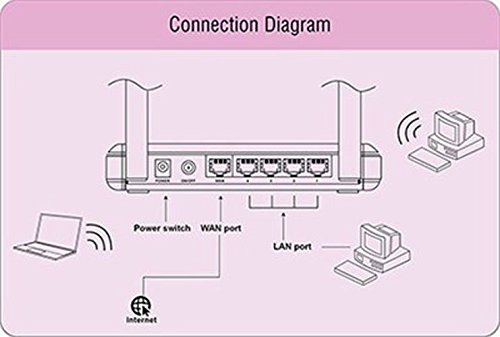
Figure 4.1: Diagram illustrating the connection points on the rear of the iBall WRB300N router, showing connections for power, WAN port to internet, and LAN ports to wired devices, alongside wireless connections to laptops and desktops.
4.2. 初期設定(Web インターフェース)
ルーターを設定するには、 webベースの管理インターフェイス:
- 開く web ルーターに接続されたコンピューター (有線または無線) 上のブラウザー (Chrome、Firefox、Edge など)。
- アドレスバーにルーターのデフォルトのIPアドレス(通常は
192.168.1.1or192.168.0.1) and press Enter. Refer to the router's label or quick installation guide for the exact IP address. - プロンプトが表示されたら、デフォルトのユーザー名とパスワードを入力します。(一般的なデフォルトは次のとおりです。
admin(ユーザー名とパスワードの両方に必要です)。 - Follow the on-screen Quick Setup Wizard to configure your internet connection type (PPPoE, Dynamic IP, or Static IP) and wireless network settings (SSID and password).
- 設定を保存し、プロンプトが表示されたらルーターを再起動します。
5. 操作手順
5.1. Wireless Security Configuration
It is crucial to secure your wireless network to prevent unauthorized access. The iBall WRB300N supports WEP, WPA, and WPA2-PSK encryption.
- ルーターにログイン web 管理インターフェース。
- Navigate to the "Wireless" or "Wireless Security" section.
- Select WPA2-PSK as the security mode for the strongest encryption.
- Enter a strong password (Pre-Shared Key) of at least 8 characters, combining letters, numbers, and symbols.
- Save the settings. All wireless devices will need to be reconnected using the new password.
5.2. WPS(Wi-Fi保護セットアップ)
WPS allows for easy and secure connection of wireless devices without manually entering the password.
- Using the WPS Button: Press the WPS button on your router (usually located on the rear or side panel). Within two minutes, press the WPS button on your wireless client device. The devices will automatically establish a secure connection.
- Using PIN: Some devices may require you to enter a PIN from the router into the client device, or vice-versa, via the router's web インタフェース。
Note: For security reasons, it is recommended to disable WPS after all devices are connected, or use it sparingly.
6. メンテナンス
定期的なメンテナンスを行うことで、ルーターの寿命が長くなり、最適なパフォーマンスが確保されます。
- ファームウェアの更新: Periodically check the iBall webファームウェアのアップデートについては、こちらのサイトをご覧ください。ファームウェアをアップデートすると、パフォーマンスの向上、機能の追加、セキュリティの脆弱性の修正などの効果が得られます。
- 物理的な清掃: Keep the router in a clean, dust-free environment. Ensure ventilation holes are not obstructed.
- 再起動: If you experience network issues, a simple restart (power cycling) of the router can often resolve them.
- バックアップ構成: ルーターの設定を定期的にバックアップしてください。 web interface. This allows for quick restoration if a factory reset is needed.
7。 トラブルシューティング
If you encounter issues with your iBall WRB300N router, refer to the following common troubleshooting steps:
- インターネットアクセスなし:
- Check all cable connections (WAN, LAN, Power).
- WAN LED が点灯し、安定していることを確認します。
- モデムとルーターを再起動します。
- Confirm your internet connection type (PPPoE, Dynamic IP, Static IP) and settings in the router's web インタフェース。
- Contact your ISP to ensure there are no service outages。
- ルーターにアクセスできません Web インタフェース:
- コンピュータがルーターに接続されていることを確認します(有線または無線)。
- Verify the router's IP address (e.g., 192.168.1.1).
- 別のものを試す web ブラウザ。
- コンピューター上のファイアウォールまたはウイルス対策ソフトウェアを一時的に無効にします。
- If you forgot the login credentials, you may need to perform a factory reset (see below).
- Poor Wireless Signal or Disconnections:
- ルータを、障害物や干渉源 (コードレス電話、電子レンジなど) から離れた中央の場所に再配置します。
- アンテナの向きを調整します。
- Check for overlapping Wi-Fi channels from neighboring networks and change your router's channel in the wireless settings.
- Ensure your wireless devices are within range.
- 工場出荷時設定へのリセット: If all else fails, you can restore the router to its factory default settings. Locate the "Reset" button (often a small pinhole button) on the router. With the router powered on, press and hold the Reset button for 5-10 seconds until the LEDs flash. The router will restart with default settings. 警告: これにより、すべてのカスタム構成が消去されます。
8. 仕様
| 特徴 | 説明 |
|---|---|
| モデル | WRB300N |
| ワイヤレス規格 | IEEE802.11b/g/n 準拠 |
| イーサネット規格 | IEEE 802.3、IEEE 802.3u |
| ワイヤレス速度 | 最大300Mbps |
| 周波数帯域 | 2.4GHz帯 |
| アンテナ | External, Dual Antenna Design |
| ポート | 1x WAN、4x LAN (10/100Mbps) |
| Internet Connection Types | PPPoE、動的IP、静的IP |
| ワイヤレスセキュリティ | WEP, WPA, WPA2-PSK |
| 特集 | WPS(Wi-Fi Protected Setup) |
| 寸法(長さx幅x高さ) | 26.2 x 16.6 x 7 cm(約) |
| 重さ | 95g(約) |
9. 保証とサポート
Your iBall 300M WRB300N MIMO Wireless-N Router comes with a 3年間保証 購入日より。
For technical assistance, warranty claims, or any other queries, please contact iBall Customer Care:
- カスタマーケア番号: 186030042255
- Please have your product model number (WRB300N) and proof of purchase ready when contacting support.