導入
The Pioneer AppRadio 4 SPH-DA120 is a 6.2-inch capacitive touchscreen smartphone receiver designed for in-dash installation. This unit integrates seamlessly with your smartphone to provide a connected driving experience, offering access to navigation, communication, and entertainment features.
主な特徴:
- 6.2-Inch capacitive touchscreen display for intuitive control.
- ハンズフリー通話とオーディオストリーミング用の Bluetooth を内蔵。
- Designed to fit double-DIN (4-inch-tall) dash openings.
- Supports Apple CarPlay (compatible with iPhone 5 or later) and AppRadio Mode functionality for both iPhone and Android phones.
- MirrorLink compatibility for screen mirroring.
- Siri Eyes Free compatible for voice control.

図1: 前面 view of the Pioneer AppRadio 4 SPH-DA120 receiver, showcasing its 6.2-inch capacitive touchscreen display.
箱の中身
パッケージには次のコンポーネントが含まれています。
- 6.2" Double-DIN In-dash AppRadio 4 Receiver with Capacitive Touchscreen
- Apple CarPlayサポート
- Built-in Bluetooth Module
- Siri Eyes Free Functionality
- Android Music Support
- Pandora Internet Radio Compatibility
- FLACオーディオ再生
- SiriusXM Ready (requires separate tuner and subscription)

Figure 2: Various cables and accessories included with the AppRadio 4, such as the wiring harness, USB cables, and GPS antenna.
セットアップとインストール
The SPH-DA120 is designed for installation in standard double-DIN dash openings. Professional installation is recommended to ensure proper wiring and functionality.
接続:
- 電源とスピーカーの接続: Use the provided wiring harness to connect to your vehicle's power, ground, and speaker wires.
- USB ポート: The unit features dual rear USB ports. The first port is primarily for Apple CarPlay and Android Auto connectivity, while the second can be used for additional media devices or charging.
- HDMI入力: Connect compatible devices via the HDMI input for video and audio playback.
- AUX入力: A rear AUX input is available for connecting external audio sources.
- Back-up Camera Input: Connect an optional back-up camera for enhanced safety.
- External GPS Antenna: For optimal navigation performance, connect the included external GPS antenna.
- 有線リモート入力: Allows connection to a vehicle's steering wheel control interface (adapter may be required).
- RCAプリアウト: Front, Rear, and Subwoofer pre-outs are provided for connecting external amplifiers。

図3:背面 view of the SPH-DA120 showing various connection ports and the included RCA cables.

図4:詳細 view of the rear input/output panel, highlighting the USB, HDMI, and RCA connections.
操作手順
タッチスクリーンインターフェイス:
The 6.2-inch capacitive touchscreen provides a responsive and intuitive user experience. Navigate through menus, select applications, and control media playback with simple taps and swipes.
Bluetooth接続:
- On the SPH-DA120, go to the Bluetooth settings menu.
- スマートフォンで Bluetooth を有効にし、利用可能なデバイスを検索します。
- Select "Pioneer SPH-DA120" from the list on your phone and confirm the pairing code.
- ペアリングすると、ハンズフリー通話やワイヤレスでのオーディオストリーミングが可能になります。
Apple CarPlay and AppRadio Mode:
Connect your compatible iPhone (iPhone 5 or later) to the primary USB port to activate Apple CarPlay. This allows you to access iPhone features like Maps, Music, Messages, and more directly from the receiver's display. For Android devices, AppRadio Mode provides similar integration for compatible applications.
Siri Eyes Free:
With a connected iPhone, activate Siri Eyes Free by pressing and holding the voice control button on the receiver or steering wheel (if connected). This allows you to use Siri's voice commands without looking at your phone or the receiver's screen, enhancing driving safety.
仕様
| 特徴 | 詳細 |
|---|---|
| 製品寸法 | 9.6 x 6.4 x 11.1インチ |
| アイテム重量 | 5.46ポンド |
| モデル番号 | SPH-DA120 |
| メーカー | 開拓 |
| 接続技術 | ブルートゥース |
| コントローラータイプ | アンドロイド |
| 特集 | RDS |
| 対応デバイス | スマートフォン、スピーカー |
| 合計HDMIポート | 1 |
| コネクタタイプ | HDMI |
| オーディオエンコーディング | ステレオ |
| オーディオ出力モード | 囲む |
| サラウンドサウンドチャンネル構成 | 4.0チャンネル |
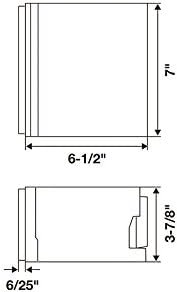
Figure 5: Diagram illustrating the dimensions of the SPH-DA120 unit.

Figure 6: Table detailing the expandability options, including HDMI input, dual rear USB, AUX input, back-up camera input, external GPS antenna, wired remote input, composite video output, composite AV input, and USB direct control for iPod/iPhone.
メンテナンス
- 画面のクリーニング: 柔らかく糸くずの出ない布でタッチスクリーンを優しく拭いてください。頑固な汚れには、軽くamp布を水または画面に安全なクリーナーで拭いてください。研磨剤や刺激の強い化学薬品の使用は避けてください。
- ソフトウェアアップデート: パイオニアを定期的にチェックする website for firmware updates to ensure optimal performance and compatibility with the latest smartphone operating systems. Follow the instructions provided with the update carefully.
- 一般的なケア: 本体をほこりやゴミから守ってください。過熱を防ぐため、本体周囲の換気を十分に行ってください。
トラブルシューティング
一般的な問題と解決策:
- 電源なし:
- すべての電源接続とヒューズを確認してください。
- 車両のイグニッションがオンになっていることを確認します。
- 音声なし:
- スピーカーの接続を確認します。
- Check volume levels on both the receiver and connected smartphone.
- 正しいオーディオ ソースが選択されていることを確認します。
- Bluetooth ペアリングの問題:
- Delete previous pairings from both the receiver and your smartphone.
- 両方のデバイスを再起動し、再度ペアリングを試みます。
- 受信機が Bluetooth ペアリング モードになっていることを確認します。
- CarPlay/AppRadio Mode Not Launching:
- Ensure your smartphone is compatible and running the latest OS version.
- Use a certified USB cable and connect to the correct USB port (USB1).
- Check if the AppRadio application is installed and updated on your smartphone.
For more complex issues, consult a qualified car audio technician or refer to the detailed troubleshooting section in the full product manual available on the Pioneer support webサイト。
保証とサポート
保証情報: This product has no warranty.
カスタマーサポート: For technical assistance, product inquiries, or service, please visit the official Pioneer website or contact their customer support line. Refer to the contact information provided on the Pioneer webあなたの地域のサイト。
オンラインリソース: Additional resources, including FAQs, software downloads, and detailed manuals, may be available on the Pioneer support webサイト。