
1. はじめに
This manual provides essential information for the installation, operation, and maintenance of your HGST Ultrastar He8 HUH728080ALE604 8TB SATA Hard Drive. The Ultrastar He8 series utilizes HelioSeal technology, replacing air with helium inside the drive to reduce turbulence and enable a seven-disk design within a standard 3.5-inch form factor. This design contributes to industry-leading capacity, improved power efficiency, and enhanced performance for enterprise environments.

Figure 1: HGST Ultrastar He8 8TB SATA Hard Drive, top view.
2. 安全情報
ドライブの損傷を防ぎ、安全な操作を確保するために、次の安全上の注意事項を守ってください。
- 静電気放電(ESD)保護: Always handle the hard drive by its edges. Wear an anti-static wrist strap or frequently touch a grounded metal object before handling the drive to discharge static electricity.
- 物理的な取り扱い: Avoid dropping or subjecting the drive to sudden impacts. Hard drives are precision instruments and can be damaged by rough handling.
- 電源: Ensure your power supply unit (PSU) provides stable and sufficient power for the drive. Incorrect voltage or unstable power can damage the drive.
- 換気: Install the drive in a well-ventilated area to prevent overheating. Excessive heat can reduce the lifespan of the drive.
3. パッケージ内容
パッケージに次のアイテムが含まれていることを確認してください。
- HGST Ultrastar He8 HUH728080ALE604 8TB SATA Hard Drive
- Documentation (this user manual, if provided in print)
Note: SATA data cables, power cables, and mounting screws are typically supplied with your computer system or enclosure and are not usually included with the bare drive.
4. セットアップ
4.1物理的な設置
- システムを準備する: Power off your computer and disconnect the power cord. Open the computer case to access the drive bays.
- ドライブをマウントします。 Slide the HGST Ultrastar He8 drive into an available 3.5-inch drive bay. Secure the drive with appropriate mounting screws on both sides to prevent vibration.
- ケーブルを接続する:
- SATA データ ケーブルの一方の端をハード ドライブの SATA ポートに接続し、もう一方の端をマザーボード上の使用可能な SATA ポートに接続します。
- 電源ユニット (PSU) からの SATA 電源ケーブルをハード ドライブの電源コネクタに接続します。
- ケースを閉じて電源を入れます: コンピュータのケースを閉じ、電源コードを再接続して、システムの電源を入れます。
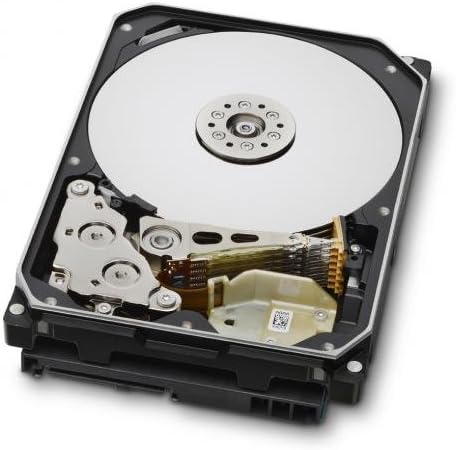
Figure 2: Internal components of the HGST Ultrastar He8, illustrating the platters and read/write head assembly.
4.2 Initial Configuration (Operating System)
After physical installation, the drive needs to be initialized, partitioned, and formatted by your operating system before it can be used for storage.
- ディスク管理にアクセスします。
- ウィンドウズ: Right-click on the Start button, then select "Disk Management."
- リナックス: 次のようなユーティリティを使用する
fdisk,gparted、 またはDisks. - MacOSの: Use "Disk Utility."
- ディスクの初期化: The new drive should appear as "Unallocated Space." You may be prompted to initialize the disk. Choose GPT (GUID Partition Table) for drives larger than 2TB.
- Create New Simple Volume (Partition): Right-click on the unallocated space and select "New Simple Volume." Follow the wizard to define the partition size, assign a drive letter, and format the volume.
- ドライブをフォーマットします。 選択してください file system (e.g., NTFS for Windows, ext4 for Linux, APFS/HFS+ for macOS). Perform a quick format for faster setup, or a full format for a more thorough check (which takes significantly longer).
5.運用
The HGST Ultrastar He8 is designed for continuous operation in enterprise environments, offering high capacity and reliable performance. Once configured, it functions like any other storage drive within your system.
- データ転送: 移行 files to and from the drive using your operating system's file explorer or command-line tools.
- パフォーマンス: The drive operates at 7200 RPM with a SATA 6Gb/s interface, providing fast data access and transfer speeds suitable for demanding applications.
- パワー管理: Ensure your operating system's power settings are configured appropriately for hard drives, especially in server environments, to optimize power consumption and drive longevity.
6. メンテナンス
Regular maintenance helps ensure the longevity and reliability of your hard drive and the data stored on it.
- データのバックアップ: Regularly back up critical data to another storage device or cloud service. No storage device is infallible.
- ドライブの状態を監視する: SMART(Self-Monitoring, Analysis and Reporting Technology)ツールを使用して、ドライブの健全性状態を監視します。多くのオペレーティングシステムやサードパーティ製ユーティリティがこの機能を提供しています。
- 環境条件: Maintain a stable operating environment. Avoid extreme temperatures, high humidity, and excessive vibrations.
- ファームウェアの更新: Periodically check the Western Digital support website for firmware updates for your specific drive model. Firmware updates can improve performance, stability, or address known issues. Exercise caution when performing firmware updates, as an interrupted update can render the drive inoperable.
7。 トラブルシューティング
If you encounter issues with your HGST Ultrastar He8 drive, consider the following troubleshooting steps:
- ドライブが検出されません:
- すべてのケーブル接続 (SATA データと電源) が安全であることを確認します。
- システムの BIOS/UEFI 設定でマザーボード上の SATA ポートが有効になっていることを確認します。
- Test the drive in a different SATA port or with different cables.
- Ensure the drive is initialized and formatted in Disk Management (Windows) or equivalent utility (Linux/macOS).
- パフォーマンスが遅い:
- ディスク リソースを消費しているバックグラウンド プロセスを確認します。
- Ensure the drive is connected to a SATA 6Gb/s port and that the necessary drivers are installed.
- 潜在的な問題がないか、SMART ツールを使用してドライブの状態を監視します。
- 熱スロットルを防ぐために十分な換気を確保してください。
- 異常な音:
- Clicking, grinding, or repetitive beeping sounds can indicate a mechanical failure. Immediately back up any accessible data and consider replacing the drive.
- A slight hum or whirring is normal for a spinning hard drive.
- データ破損:
- ディスクエラーチェックユーティリティを実行する(例:
chkdskWindowsの場合、fsckLinux の場合)。 - Ensure proper system shutdowns to prevent data loss.
- ディスクエラーチェックユーティリティを実行する(例:
8. 仕様
| 特徴 | 仕様 |
|---|---|
| モデル番号 | HUH728080ALE604, 0F23668, 0F25721 |
| 容量 | 8TB |
| インタフェース | SATA 6Gb/s (Serial ATA-600) |
| フォームファクター | 3.5インチ |
| 回転速度 | 7200 回転 |
| キャッシュ | 128MB |
| 寸法(長さx幅x高さ) | 5.79 x 4 x 1.03インチ |
| 重さ | 1.43ポンド |
| テクノロジー | HelioSeal |
| 信頼性 (MTBF) | 2+ Million Hours (typical) |
9. 保証情報
The HGST Ultrastar He8 hard drive typically comes with a 3-year seller warranty, covering defects in materials and workmanship under normal use. For specific warranty terms and conditions, please refer to the documentation provided at the time of purchase or contact your seller directly.
Standard return policies usually allow for returns or replacements within 30 days of purchase, subject to the seller's terms.
10. サポート
For further assistance, technical support, or warranty claims, please contact Western Digital customer support or visit their official webサイト:
- ウエスタンデジタルサポート Webサイト: https://support.wdc.com
- Western Digital Store: Western Digital Store on Amazon
When contacting support, please have your drive's model number (HUH728080ALE604 or 0F23668) and serial number ready.