
1. はじめに
Thank you for choosing the Xpelair C4HTR 4-inch Simply Silent Contour Extractor Fan. This fan is designed for efficient and quiet ventilation in bathrooms, kitchens, and other areas requiring moisture and odor extraction. It features a built-in humidistat and timer for automatic operation based on humidity levels and adjustable run-on time.
The C4HTR model is recognized for its extremely quiet operation, making it one of the quietest intermittent bathroom fans available. Its sleek design allows for versatile installation on walls, ceilings, or panels.

Image 1.1: The Xpelair C4HTR fan, highlighting its silent running at 16dBA at 3m (15 l/s).
2. 安全情報
設置およびご使用の前に、すべての説明書をよくお読みください。説明書に従わない場合、感電、火災、または人身傷害を引き起こす可能性があります。
- Installation must be carried out by a qualified electrician in accordance with current wiring regulations.
- Ensure the power supply is disconnected at the mains before commencing any installation, maintenance, or cleaning.
- この機器は、安全に責任を負う人物による機器の使用に関する監督または指示がない限り、身体的、感覚的、または精神的能力が低下している人、あるいは経験と知識が不足している人(子供を含む)による使用を想定していません。
- 子供が機器で遊ばないように監督する必要があります。
- Do not install the fan where it may be exposed to direct water spray.
- Ensure adequate ventilation is provided to prevent the back-flow of gases from open-flued appliances into the room.
- The fan must not be connected to a flexible ducting system that is less than 4 inches (100mm) in diameter.
3. パッケージ内容
インストールを開始する前に、すべてのコンポーネントが揃っていることを確認してください。
- Xpelair C4HTR Extractor Fan Unit
- 取り付けネジと壁プラグ
- 取扱説明書(本書)
4. インストール
The Xpelair C4HTR fan is suitable for wall, ceiling, or panel mounting. The 'Twist and Click' front cover simplifies installation and maintenance.
4.1取り付けオプション
The fan can be installed in various orientations:

Image 4.1: Visual representation of ceiling and wall mounting applications for the fan.
4.2インストールの準備
- 電源を切る: Ensure the electrical supply to the installation area is completely switched off at the consumer unit/fuse box.
- オープニングの準備: Create a circular opening of appropriate diameter (refer to specifications for exact dimensions) in the wall, ceiling, or panel.
- 個別のコンポーネント: The fan consists of a main body and a front cover. Gently twist and click to separate the front cover from the main unit for easier mounting.
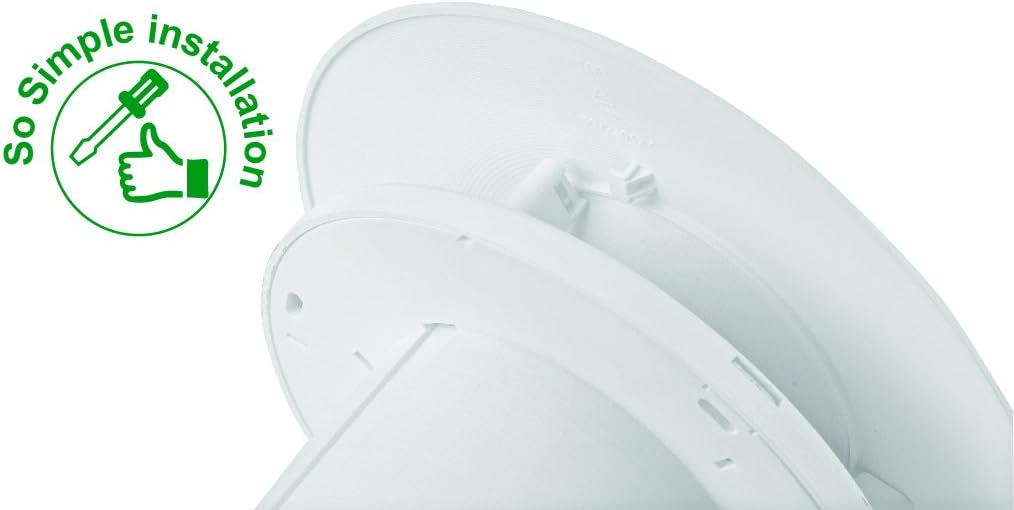
Image 4.2: The 'So Simple installation' feature, indicating ease of assembly with a screwdriver.
4.3 電気接続
The C4HTR requires a 240V electrical supply. Wiring should be performed by a qualified electrician.
- Identify the Live (L), Neutral (N), and Switched Live (T) terminals on the fan unit.
- Connect the mains Live (L) to the fan's Live terminal.
- Connect the mains Neutral (N) to the fan's Neutral terminal.
- For timer and humidistat functionality, connect a switched live supply (e.g., from a light switch) to the fan's Switched Live (T) terminal. This allows the fan to activate when the light is switched on, or to override the humidistat.
- すべての接続が安全かつ適切に絶縁されていることを確認してください。
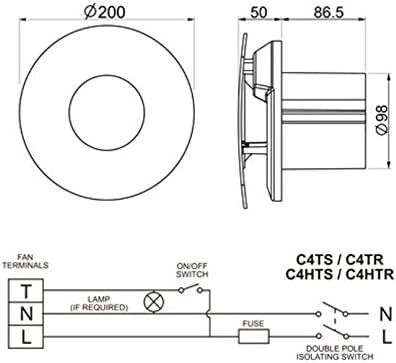
Image 4.3: Wiring diagram for C4HTR models, showing connections for Live, Neutral, and Switched Live, along with fan dimensions.
4.4 ファンの固定
- Position the main fan body into the prepared opening.
- Secure the fan body to the wall/ceiling/panel using the provided screws and wall plugs.
- Once the main body is secure and wired, reattach the front cover by aligning and twisting until it clicks into place.
5. セットアップと調整
The C4HTR fan features an adjustable humidistat and timer. These settings are typically accessed by removing the front cover.
5.1 Humidistat Adjustment
The humidistat controls when the fan activates based on the room's humidity level. It can be adjusted to suit your environment.
- Locate the humidistat adjustment dial or screw on the fan unit (usually behind the front cover).
- Turning the dial towards a higher setting (e.g., 'Max' or a higher percentage) means the fan will only activate at higher humidity levels.
- Turning the dial towards a lower setting (e.g., 'Min' or a lower percentage) means the fan will activate at lower humidity levels, running more frequently.
- Adjust incrementally and observe fan behavior over a few days to find the optimal setting for your needs.
5.2 Timer Adjustment
The timer controls how long the fan continues to run after the switched live supply is turned off (e.g., after the light is switched off) or after the humidity drops below the set point.
- Locate the timer adjustment dial or screw (often labeled 'Timer' or with time increments).
- The timer can typically be set from a few minutes up to 30 minutes.
- Turn the dial to increase or decrease the run-on time as desired.
6. 操作手順
The Xpelair C4HTR fan operates automatically based on its humidistat and timer settings, or manually via a switched live connection.
6.1 Automatic Operation (Humidistat)
- When the ambient humidity level in the room rises above the set point on the humidistat, the fan will automatically switch on.
- The fan will continue to run until the humidity level drops below the set point, after which it will run for the duration of the set timer.
6.2 Manual Operation (Switched Live)
- If connected to a switched live supply (e.g., room light switch), the fan will activate when the switch is turned on.
- When the switch is turned off, the fan will continue to run for the duration set on the timer.
6.3速度設定
The fan offers two speed settings for airflow:
- スピード1: 15 litres per second (L/s)
- スピード2: 21 litres per second (L/s)
Refer to the installation guide or consult a qualified electrician for instructions on how to select the desired speed setting, as this may involve internal wiring adjustments.

Image 6.1: The Xpelair C4HTR fan discreetly installed on a bathroom ceiling.
7. メンテナンス
Regular cleaning ensures optimal performance and longevity of your Xpelair C4HTR fan.
7.1 ファンの掃除
- 電源を切る: Always switch off the electrical supply to the fan at the mains before cleaning.
- フロントカバーを取り外します。 Gently twist and click to remove the front cover.
- Clean Cover and Impeller: Wipe the front cover and the fan impeller blades with a soft, damp cloth. A mild detergent can be used if necessary. Do not use abrasive cleaners or solvents.
- 完全に乾かす: 再組み立てする前に、すべての部品が完全に乾いていることを確認してください。
- カバーを再度取り付けます: Align the front cover and twist until it clicks securely into place.
- 電力を回復する: Switch the electrical supply back on at the mains.

Image 7.1: The Xpelair C4HTR fan, illustrating its easy-clean design with a sponge icon.
8。 トラブルシューティング
If your Xpelair C4HTR fan is not operating as expected, refer to the following common issues and solutions:
| 問題 | 考えられる原因 | 解決 |
|---|---|---|
| ファンが作動しません。 | 電源がありません。 Humidistat set too high. Timer not activated. | 主電源と回路ブレーカーを確認してください。 Adjust humidistat to a lower setting. Ensure switched live is active or humidity is high enough. |
| ファンは継続的に作動します。 | 湿度計の設定が低すぎます。 Timer set too long. Faulty humidistat/timer. | Adjust humidistat to a higher setting. Adjust timer to a shorter duration. Contact qualified electrician or support. |
| ファンはうるさいです。 | インペラの閉塞。 取り付けが緩い。 モーターの問題。 | 電源を外して障害物がないか確認してください。 ファンがしっかりと取り付けられていることを確認します。 Contact qualified electrician or support. |
| 抽出不良。 | Blocked grille/ducting. ファン速度の設定が低すぎます。 | Clean grille and check ducting for blockages. Adjust fan to higher speed setting (if applicable). |
If the problem persists after attempting these solutions, please contact Xpelair customer support or a qualified electrician.
9. 仕様
| 特徴 | 詳細 |
|---|---|
| モデル名 | C4HTR |
| ブランド | エクスペレア |
| スタイル | with hygrostat and timer |
| 色 | 白 |
| 巻tage | 240ボルト |
| 騒音レベル | 16デシベル |
| 速度の数 | 2 (15 l/s and 21 l/s) |
| 取り付けタイプ | Wall Mount, Ceiling Mount, Panel Mount |
| 制御方法 | Touch (for adjustments) |
| 製品寸法 | 0.31 x 0.31 x 0.31 inches (Note: This seems to be a placeholder or incorrect data, actual dimensions are likely larger for a 4-inch fan. Refer to Image 4.3 for diagrammatic dimensions.) |
| アイテム重量 | 0.32 ounces (Note: This seems to be a placeholder or incorrect data for a fan.) |
| 欧州連合 | 798256208287 |
Note: The provided product dimensions and item weight appear to be generic placeholder values. For accurate physical dimensions, please refer to the technical drawings or contact Xpelair directly.
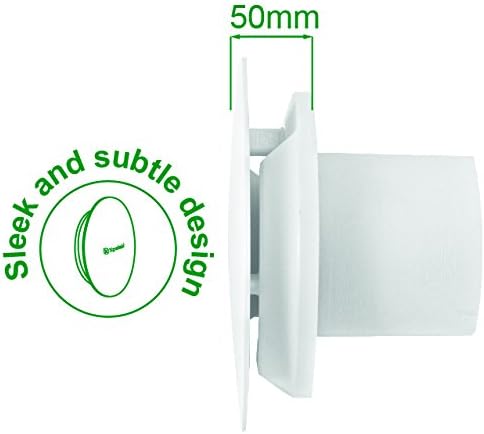
画像9.1: サイドプロfile of the fan, highlighting its sleek design and a depth of 50mm.
10. 保証とサポート
10.1 製造元の保証
The Xpelair C4HTR fan comes with a 2年間のメーカー保証 ご購入日から1年間有効です。本保証は、通常の使用状況における材料および製造上の欠陥を対象としています。保証請求の際は、購入証明書を保管してください。
保証は、不適切な取り付け、誤用、怠慢、無許可の修理、または通常の消耗によって生じた損傷には適用されません。
10.2 カスタマーサポート
For technical assistance, troubleshooting beyond this manual, or warranty claims, please contact Xpelair customer support through their official web製品を購入したサイトまたは小売店。
When contacting support, please have your product model number (C4HTR) and proof of purchase readily available.