
導入
This manual provides detailed instructions for the setup, operation, and maintenance of your iBall Tarang F5 5.1 Speakers for PC. Please read this manual thoroughly before using the product to ensure proper functionality and to prevent damage.
パッケージ内容
以下にリストされているすべてのアイテムがパッケージに含まれていることを確認してください。
- サブウーファーユニット×1
- サテライトスピーカーユニット 5 台
- リモコン x 1
- オーディオ接続ケーブル(RCA - 3.5mm、RCA - RCA)
- ユーザーマニュアル(このドキュメント)
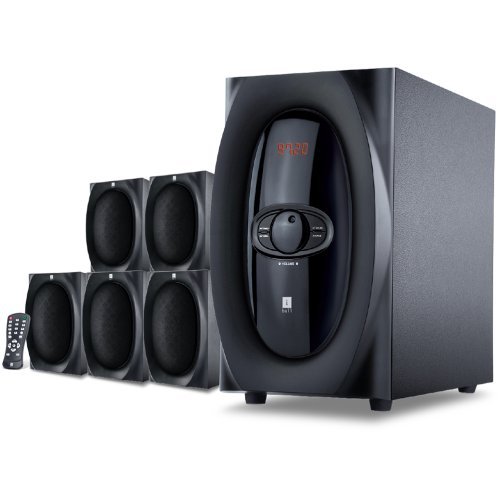
画像: 上view of the iBall Tarang F5 5.1 Speaker System, showing the subwoofer and five satellite speakers.
セットアップ手順
- スピーカーの配置: Place the subwoofer on a stable surface, preferably on the floor. Arrange the five satellite speakers around your listening area for optimal 5.1 surround sound. Typically, one center speaker, two front left/right, and two rear left/right speakers.
- サテライトスピーカーの接続: Connect each satellite speaker to the corresponding output ports on the rear panel of the subwoofer unit. Ensure correct polarity (positive to positive, negative to negative) if applicable, or match color-coded connectors.
- オーディオソースの接続:
- For PC/MP3 Player (2.1Ch or 5.1Ch input): Use the provided audio cables to connect the audio output of your device to the "Audio Input" ports on the subwoofer. For 5.1 channel input, ensure your source device supports 5.1 output and connect all relevant channels (Front L/R, Rear L/R, Center/Sub). For 2.1 channel, connect to the stereo input.
- For USB/SD/MMC Card: Insert your USB drive or SD/MMC card into the designated slot on the front panel of the subwoofer.
- 電源接続: Connect the power cord to the subwoofer unit and then plug it into a standard AC power outlet.
- 電源オン: Turn on the main power switch located on the rear or front panel of the subwoofer. The LED display should illuminate.

Image: Illustrative diagram of the subwoofer's rear panel, detailing connections for satellite speakers and various audio input sources.
操作手順
Front Panel Controls and Remote Control
The iBall Tarang F5 can be operated using the controls on the front panel of the subwoofer or via the included full-function remote control.
- 電源オン/オフ: を押す 力 button on the remote or the main power switch on the unit.
- 入力ソースの選択: を押す 入力 button on the remote or front panel to cycle through available sources: 2.1Ch, 5.1Ch, USB, SD/MMC, FM Radio. The selected source will be displayed on the LED screen.
- 音量調整: 使用 巻+ そして vol- buttons on the remote or the master volume knob on the front panel to adjust the overall volume.
- 低音/高音調整: 専用 BASS +/ベース- そして TREBLE +/トレブル- buttons on the remote control to fine-tune audio output.
- ミュート機能: を押す ミュート button on the remote to temporarily silence the audio. Press again to unmute.
USB/SD/MMC再生
When a USB drive or SD/MMC card is inserted, the system will automatically switch to the USB/SD input mode and begin playing compatible audio files. Use the remote control for playback functions:
- 再生/一時停止: を押す 再生/一時停止 ボタン。
- 次/前のトラック: 使用 次 そして 前へ ボタン。
FMラジオの操作
FMラジオ機能を使用するには:
- 入力ソースを切り替えます FM モードを使用して 入力 ボタン。
- 自動スキャン: を押し続けます 再生/一時停止 ボタン(または専用の スキャン button if available on the remote) to automatically scan and save available FM stations.
- 手動チューニング: 使用 次 そして 前へ buttons to manually tune to specific frequencies or navigate through saved stations.
メンテナンス
- クリーニング: Use a soft, dry cloth to clean the speaker surfaces. Do not use liquid cleaners, aerosols, or solvents, as these may damage the finish or internal components.
- 換気: 過熱を防ぐため、サブウーファーの通気口が塞がれていないことを確認してください。
- 配置: スピーカーを直射日光の当たる場所、熱源の近く、湿度やほこりの多い場所に置かないでください。
- 電源コード: 電源コードに損傷がないか定期的に点検してください。損傷している場合は使用を中止し、カスタマーサポートにご連絡ください。
トラブルシューティング
| 問題 | 考えられる原因 | 解決 |
|---|---|---|
| 電源なし | 電源コードが接続されていない、電源スイッチがオフになっている、電源コンセントに障害がある | Ensure power cord is securely connected. Turn on the power switch. Test the power outlet with another device. |
| 音が出ない | Incorrect input source; Volume too low; Audio cables loose/damaged; Mute function active | Select the correct input source. Increase volume. Check all audio cable connections. Deactivate mute. |
| 歪んだ音 | 音量が大きすぎる、ソースのオーディオ品質が悪い、スピーカーケーブルが緩んでいる | Reduce volume. Test with a different audio source. Check satellite speaker connections. |
| リモコンが動作しない | 電池が切れている;リモコンと本体の間に障害物がある;リモコンセンサーがブロックされている | Replace remote control batteries. Ensure clear line of sight to the subwoofer's IR sensor. |
| FM受信状態が悪い | アンテナが正しく伸びていない/配置されていない; 信号が弱いエリア | Extend and adjust the FM antenna for better reception. Try auto-scanning again. |
仕様
| 特徴 | 詳細 |
|---|---|
| ブランド | iBall |
| モデル | Tarang F5 |
| チャネル構成 | 5.1 サラウンドサウンド |
| サブウーファードライバーサイズ | 5.25インチ |
| サテライトドライバーのサイズ | 3インチ(各) |
| サブウーファーのインピーダンス | 8オーム |
| 衛星インピーダンス | 4オーム |
| 対応デバイス | Computers, MP3 Players, SD Cards |
| 接続技術 | USB, RCA (for 2.1Ch/5.1Ch input) |
| 特集 | FM Radio, USB/SD/MMC Playback, Remote Control, LED Display, Wooden Cabinets |
| 電源 | AC |
| 材料 | 木材 |
| アイテム重量 | 8キロ |
| パッケージ寸法(幅×高さ×奥行き) | 40.4 x 34.2 x 32.8 cm |
保証とサポート
Your iBall Tarang F5 5.1 Speakers are covered by a limited warranty from the date of purchase. Please refer to the warranty card included in your package for specific terms and conditions.
For technical support, service, or warranty claims, please contact iBall customer service:
- Webサイト: www.iball.co.in/support (Exampleリンク、実際のリンクは異なる場合があります)
- メールアドレス: support@iball.co.in (Exampleメール、実際のメールは異なる場合があります)
- 電話: 1800-XXX-XXXX (Example number, actual number may vary)
Please have your product model number (Tarang F5) and proof of purchase ready when contacting support.