
導入
The Nyko Media Remote for Xbox One provides convenient control over your Xbox One console and various media applications. This remote simplifies navigation and playback of streaming content and physical media, offering dedicated buttons for common functions. It also features the ability to power your Xbox One on and off, and control basic functions of your television.

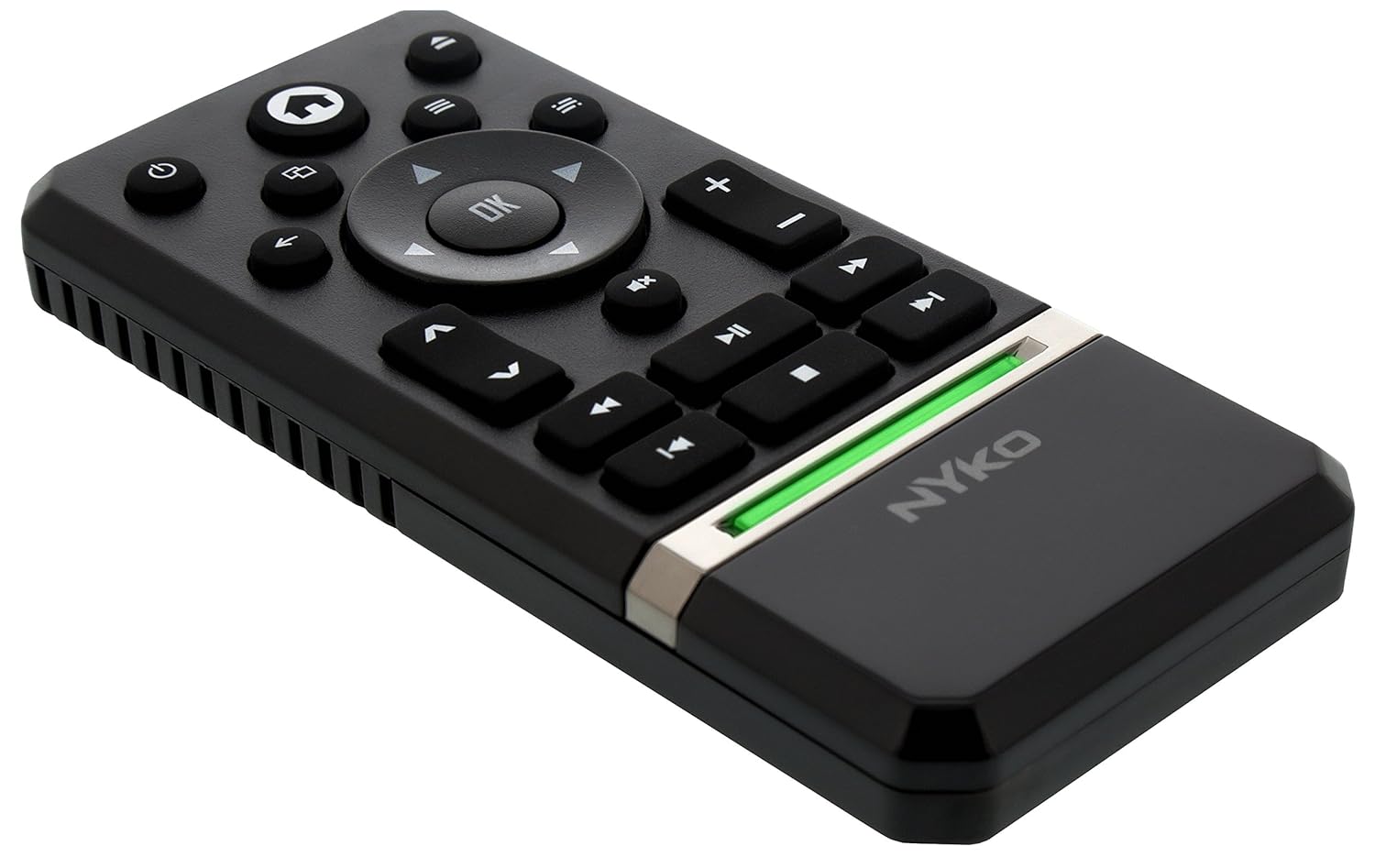
Image: Nyko Media Remote for Xbox One, front view.
パッケージ内容
- Nyko Media Remote for Xbox One (Model: 86116)
- 注意: 単4電池は付属していないため、別途購入する必要があります。

Image: Nyko Media Remote for Xbox One in its retail packaging.
設定
1. バッテリーの取り付け
- リモコンの背面にある電池ボックスを見つけます。
- 電池カバーを下方向にスライドさせて開きます。
- 電池ボックス内の指示に従って、極性 (+/-) が正しいことを確認して、単 4 電池 2 本を挿入します。
- 電池カバーをカチッと音がするまで上方にスライドさせて取り付けます。
画像: 背面 view of the remote with the battery cover removed, illustrating the AAA battery placement.
2. 初期接続
The Nyko Media Remote uses infrared (IR) technology. No manual pairing is required for the Xbox One. Simply ensure a clear line of sight between the remote's IR emitter and the Xbox One's IR receiver.
For TV control functions (volume, channels, power), your TV must be configured to respond to the Xbox One's IR signals, typically through the Xbox One's OneGuide settings. The remote sends commands to the Xbox One, which then relays them to your TV via its IR blaster (if configured) or Kinect sensor.
操作手順
The Nyko Media Remote provides comprehensive control for your Xbox One and various media applications. Refer to the diagram below for button identification and their primary functions.

画像: 正面 view of the Nyko Media Remote, displaying all control buttons.
ボタンの機能:
| ボタン | 関数 |
|---|---|
| 電源ボタン (⏻) | Powers the Xbox One console on or off. |
| ホームボタン (⌂) | Returns to the Xbox One Home screen. |
| View ボタン (🗀) | Accesses additional information or options within an app or game. |
| メニューボタン (☰) | Opens context-sensitive menus or options. |
| 方向パッド (D-Pad) | メニューとコンテンツ間を移動します。 |
| OKボタン | Confirms selections. Can also function as Play/Pause in some apps. |
| 戻るボタン (←) | 前の画面またはメニューに戻ります。 |
| OneGuide Button (📱) | Launches the Xbox OneGuide for live TV and media. |
| 音量を上げる/下げる (⏸ / ⏷) | Adjusts the television volume (requires TV setup via Xbox One). |
| ミュートボタン (🔇) | Mutes or unmutes television audio. |
| チャンネルアップ/ダウン (▲ / ▼) | Changes television channels (requires TV setup via Xbox One). |
| 高速巻き戻し (⏪) | メディアの再生を巻き戻します。 |
| 再生/一時停止 (⏯) | メディアの再生を再生または一時停止します。 |
| 早送り (⏩) | メディアの再生を早送りします。 |
| 前のトラック (⏮) | 現在のトラックまたは前のトラックの先頭にスキップします。 |
| 停止 (⏹) | メディアの再生を停止します。 |
| 次のトラック (⏭) | 次のトラックまたはチャプターにスキップします。 |
Media and App Control:
The remote is designed for seamless control of various Xbox One applications, including:
- OneGuide
- ネットフリックス
- Hulu Plus
- Amazon インスタントビデオ
- Other streaming services and Blu-ray/DVD playback
Dedicated playback buttons (Play, Pause, Fast Forward, Rewind, Stop, Skip) provide intuitive control for movies, music, and other media.
メンテナンス
バッテリー交換:
When the remote's performance diminishes or it stops responding, it is likely time to replace the batteries. Follow the "Battery Installation" steps in the Setup section to replace the two AAA batteries.
クリーニング:
To clean the remote, gently wipe it with a soft, dry cloth. Avoid using harsh chemicals, abrasive cleaners, or excessive moisture, as these can damage the remote's finish or internal components.
トラブルシューティング
- リモコンが応答しない:
- 新しい AAA 電池が正しく取り付けられていることを確認してください。
- Verify there is a clear line of sight between the remote and the Xbox One console. Obstructions can block the infrared signal.
- Move closer to the Xbox One console. The remote has a maximum effective range of approximately 9 meters (25 feet).
- TV Control (Volume, Channel, Power) Not Working:
- Confirm that your Xbox One's OneGuide settings are properly configured for your television. The remote sends commands to the Xbox One, which then controls the TV.
- Ensure any necessary IR blasters or Kinect sensors are correctly set up and positioned.
- 断続的な応答:
- This can sometimes occur due to weak batteries or environmental interference. Replace batteries and ensure a clear line of sight.
仕様
| 特徴 | 詳細 |
|---|---|
| ブランド | ニコ |
| モデル名 | メディアリモート |
| モデル番号 | 86116 |
| 接続技術 | 赤外線(IR) |
| 対応デバイス | Xbox One, Television (via Xbox One IR blaster/Kinect) |
| 電池のタイプ | 単2電池XNUMX本(別売) |
| 最大範囲 | 最大9メートル(25フィート) |
| アイテム重量 | 0.1ポンド(約45グラム) |
| 色 | ダークグレー |
| 追加機能 | Ergonomic design, dedicated media playback controls. |
保証とサポート
Nyko products are designed for quality and reliability. For specific warranty details, please refer to the documentation included with your purchase or visit the official Nyko website. The product includes warranty information in multiple languages.
カスタマーサポート:
- メールアドレス: customer.support@nyko.com
- 電話: +1-888-400-6956
- オンライン登録: www.nyko.com
- 追加情報: http://uqr.me/nykotechnologies/qr/83215

画像: 背面 view of the product packaging, detailing features and customer support contact information.