
1. はじめに
ご購入ありがとうございますasing the SAMSON MS100 Studio Monitor Stands. These professional-grade stands are designed to provide stable and isolated support for your studio monitors, ensuring optimal audio performance. The MS100 features a telescoping column for height adjustment and an adjustable vise-style speaker bracket to accommodate various monitor sizes. Please read this manual thoroughly to ensure proper setup and safe operation.
2. 安全情報
怪我や機器の損傷を防ぐために、常に次の安全上の注意事項を守ってください。
- Ensure all components are securely fastened before placing monitors on the stands.
- Do not exceed the maximum weight capacity of the stands (consult product specifications or manufacturer for specific limits).
- 転倒を防止するために、スタンドを安定した水平な面に設置してください。
- Keep children and pets away from the stands, especially during adjustment.
- Avoid placing stands in high-traffic areas where they could be accidentally knocked over.
3. パッケージ内容
パッケージに次のアイテムが含まれていることを確認してください。
- 2 x SAMSON MS100 Studio Monitor Stands (each comprising a base, telescoping column, and speaker bracket)
- Carpet spikes (typically pre-installed or included for optional attachment to the base)
- Assembly hardware (screws, washers, and any necessary tools if provided)
- 取扱説明書(本書)
4. 組み立てとセットアップ
Follow these steps to assemble and set up your MS100 Studio Monitor Stands:
- 柱をベースに取り付けます。 Securely fasten the main telescoping column to the heavy base using the provided hardware. Ensure it is tightened firmly to prevent wobbling.
- Install Carpet Spikes (Optional): If using on carpeted surfaces, ensure the carpet spikes are securely threaded into the bottom of the base. These spikes help to isolate the stand and improve stability.
- Attach the Speaker Bracket: Mount the adjustable vise-style speaker bracket to the top of the telescoping column. Ensure all screws are tightened.
- 高さの調整: Loosen the locking mechanism on the telescoping column. Adjust the column to the desired height between 30 and 50 inches (76.2 cm - 127 cm). Once the desired height is reached, securely tighten the locking mechanism.
- Place Studio Monitor: Carefully place your studio monitor onto the speaker bracket. Adjust the vise-style clamps to securely hold the monitor in place without overtightening. Ensure the monitor is centered and stable.
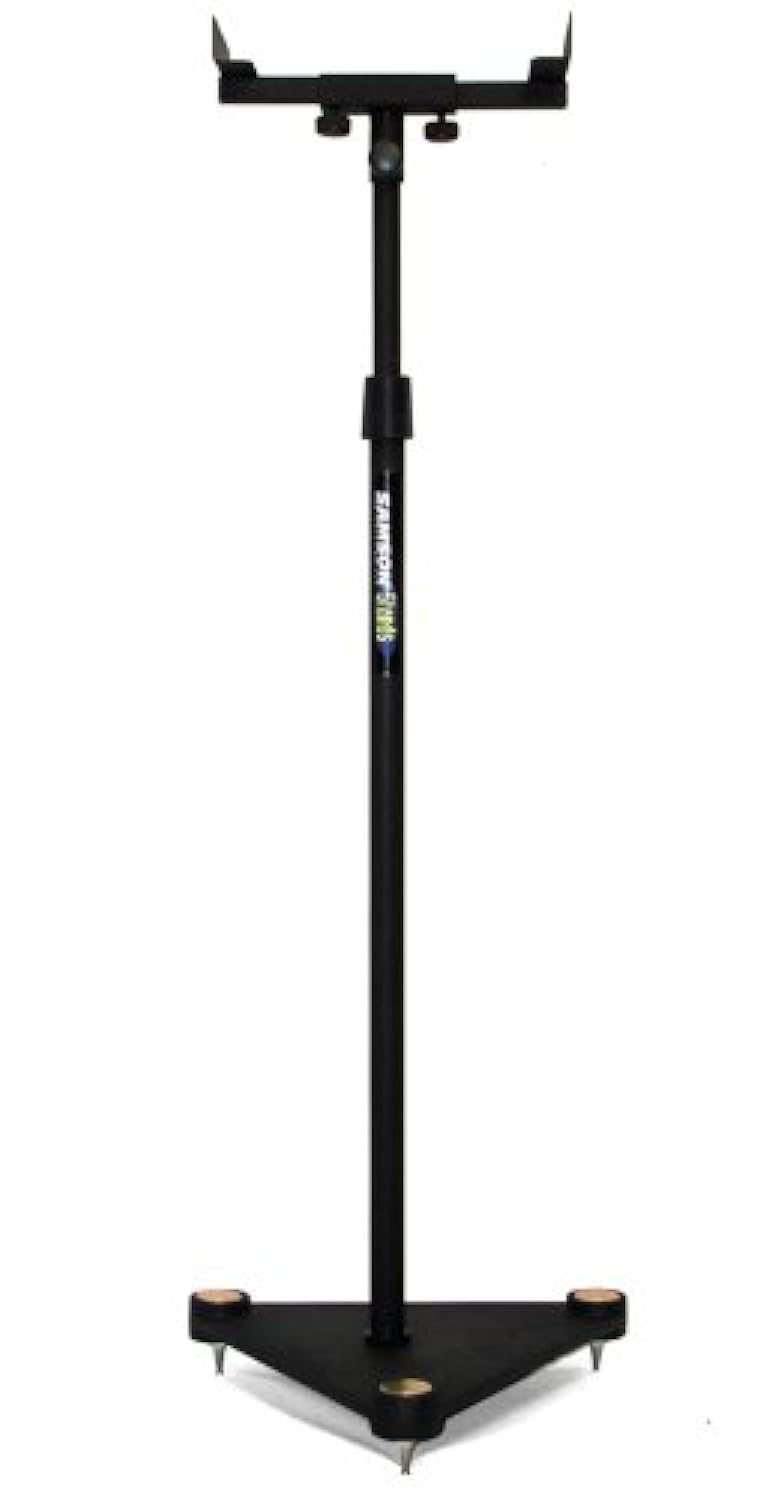
Image description: A fully assembled SAMSON MS100 Studio Monitor Stand with a studio monitor resting on its adjustable bracket. The stand is black with a heavy base, demonstrating its stable design.
5. 操作手順
Once assembled, the MS100 stands are ready for use. Position them in your studio or listening environment to achieve optimal sound staging and isolation. Ensure monitors are securely seated on the brackets and the stands are stable before use.
- モニターの配置: Place your studio monitors on the adjustable vise-style brackets. Ensure the monitors are balanced and the clamps are tightened just enough to hold them securely without causing damage.
- 高さ調整: For optimal listening, the acoustic axis of your monitors should be at ear level when you are in your primary listening position. Adjust the telescoping column as described in Section 4, Step 4, to achieve this.
- 安定性チェック: Periodically check that all connections are tight and the stands remain stable, especially after moving them or adjusting height.
6. メンテナンス
The SAMSON MS100 Studio Monitor Stands require minimal maintenance:
- クリーニング: Wipe down the stands with a soft, dry cloth to remove dust. Avoid abrasive cleaners or solvents.
- 検査: すべてのボルトと接続部がしっかりと締まっているか定期的に点検してください。必要に応じて締め直してください。
- ストレージ: If storing the stands for an extended period, ensure they are clean and dry. They can be disassembled for more compact storage if desired.
7。 トラブルシューティング
If you encounter any issues with your MS100 Studio Monitor Stands, refer to the following common solutions:
- スタンドがぐらぐらする:
- Ensure the column is securely fastened to the base.
- Verify the height adjustment locking mechanism is fully tightened.
- Check that the stand is on a level surface. Adjust carpet spikes if applicable.
- Monitor Not Secure:
- Ensure the vise-style clamps are tightened sufficiently to hold the monitor.
- Verify your monitor's dimensions are compatible with the bracket.
8. 仕様
| モデル番号 | MS100 |
| 高さ調整 | 30インチ - 50インチ (76.2 cm - 127 cm) |
| Speaker Bracket Type | Adjustable Vise-Style |
| 基本タイプ | Heavy Base with Carpet Spikes |
| Product Dimensions (single stand) | 27.4 x 15.4 x 2.7 インチ (69.6 x 39.1 x 6.9 cm) |
| Item Weight (single stand) | 1.32ポンド(0.6kg) |
注:仕様は予告なく変更される場合があります。
9. 保証情報
The SAMSON MS100 Studio Monitor Stands are covered by a 3年間の部品および作業保証 ご購入日から1年間有効です。本保証は、通常の使用における製造上の欠陥および仕上がりの品質を保証するものであり、誤用、事故、不正な改造、または不適切な取り付けによる損傷は保証の対象外となります。
For warranty service, please retain your proof of purchase and contact SAMSON customer support.
10. カスタマーサポート
If you have any questions, require technical assistance, or need to inquire about warranty service, please contact SAMSON customer support through their official web製品を購入したサイトまたは小売店にお問い合わせください。
SAMSON Official Webサイト: www.samsontech.com
Please note that specific contact details may vary by region. Refer to the official web最新情報のサイト。