
1. はじめに
The Comfast CF-WU720N is a compact 150Mbps Wireless USB Adapter designed to provide high-speed wireless connectivity for your desktop or notebook computer. It allows you to connect to a wireless network and access the internet, share files, and enjoy online gaming at speeds up to 150Mbps. This adapter is compliant with IEEE 802.11b/g/n standards and supports USB 2.0 for efficient data transfer.
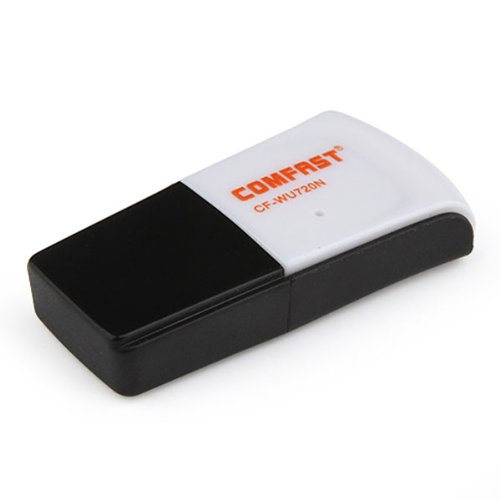
Image 1.1: The Comfast CF-WU720N Wireless USB Adapter, a compact device for wireless connectivity.
2 製品の特徴
- Meets IEEE 802.11b/g/n wireless standards.
- Supports USB 2.0 interface for broad compatibility.
- Utilizes Realtek 8191 SU chipset for reliable performance.
- Achieves wireless connection rates up to 150Mbps.
- Supports wireless roaming technology for seamless connectivity.
- Strong compatibility with various popular operating systems.
- Compact size: approximately 39 x 12 x 7mm (1.5 x 0.7 x 0.3 inches).
- Lightweight design: approximately 5g.
3. パッケージ内容
パッケージにすべてのアイテムが揃っていることを確認してください:
- 1 x Comfast CF-WU720N Wireless USB Adapter
- クイックインストールガイド x 1
- 1 x CD-ROM Driver
- 保証カード x 1

Image 3.1: The retail packaging for the Comfast CF-WU720N, showing the adapter inside.
4. セットアップとインストール
4.1. ドライバーのインストール
Before connecting the USB adapter, it is recommended to install the necessary drivers from the provided CD-ROM. This ensures proper functionality and compatibility with your operating system.
- Insert the driver CD-ROM into your computer's optical drive.
- If the installer does not launch automatically, navigate to "My Computer" or "This PC," open the CD-ROM drive, and run the setup executable (e.g., "setup.exe" or "autorun.exe").
- Follow the on-screen instructions to complete the driver installation. You may be prompted to restart your computer after installation.
- 注記: If your computer does not have an optical drive, you may need to download the latest drivers from the manufacturer's official webサイト。
4.2. USBアダプタの接続
Once the drivers are installed, you can connect the Comfast CF-WU720N Wireless USB Adapter to your computer.
- Locate an available USB 2.0 or 3.0 port on your desktop or laptop computer.
- Carefully insert the Comfast CF-WU720N adapter into the USB port. Ensure it is fully seated.
- The operating system should automatically detect the adapter and configure it using the installed drivers. A small LED indicator on the adapter may light up or blink, indicating activity.
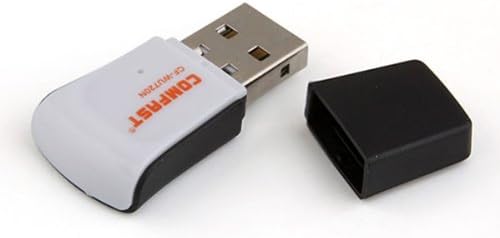
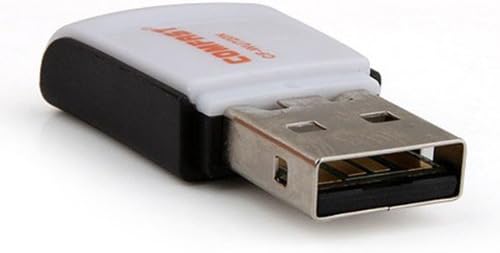
Image 4.1: The Comfast CF-WU720N adapter with its protective cap removed, revealing the USB connector. Image 4.2: A side view of the adapter, highlighting its compact design and USB interface.
5. 操作手順
After successful driver installation and adapter connection, you can now connect to a wireless network.
- ネットワーク設定にアクセスします:
- ウィンドウズ: システム トレイ (通常は右下隅) にあるワイヤレス ネットワーク アイコンをクリックします。
- MacOSの: メニューバーの Wi-Fi アイコン (通常は右上隅) をクリックします。
- リナックス: Access network settings through your desktop environment's network manager.
- ネットワークを選択してください: A list of available wireless networks (SSIDs) will appear. Select the name of your desired network.
- 接続する: 「接続」または「参加」をクリックします。ネットワークがセキュリティで保護されている場合は、ネットワークセキュリティキー(パスワード)の入力を求められます。
- 接続を確認: Once connected, the network icon will typically change to indicate a successful connection, and you should be able to access the internet.
6. メンテナンス
To ensure optimal performance and longevity of your Comfast CF-WU720N Wireless USB Adapter, follow these simple maintenance guidelines:
- 清潔に保ちます: アダプターのほこりを取り除くには、柔らかく乾いた布で優しく拭いてください。液体クリーナーや溶剤の使用は避けてください。
- USBコネクタを保護する: When not in use, keep the protective cap on the USB connector to prevent dust and damage.
- 極端な状況を避ける: アダプタを極端な温度、湿度、直射日光にさらさないでください。
- 慎重に取り扱ってください: アダプタを落としたり、強い衝撃を与えたりしないでください。
- ドライバーの更新: 定期的にメーカーの website for updated drivers to ensure the best performance and compatibility.
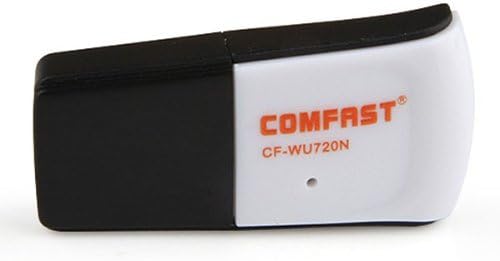
Image 6.1: The Comfast CF-WU720N adapter with its protective cap in place, ready for storage or transport.
7。 トラブルシューティング
If you encounter issues with your Comfast CF-WU720N Wireless USB Adapter, refer to the following common solutions:
| 問題 | 考えられる解決策 |
|---|---|
| アダプタが検出されません / Wi-Fi ネットワークが表示されません。 |
|
| 特定の Wi-Fi ネットワークに接続できません。 |
|
| 接続速度が遅い、または頻繁に切断される。 |
|
8. 仕様
| 特徴 | 詳細 |
|---|---|
| モデル | CF-WU720N |
| ワイヤレス規格 | IEEE802.11b/g/n 準拠 |
| インタフェース | USB2.0 について |
| チップセット | Realtek 8191 SU |
| ワイヤレス速度 | 最大150Mbps |
| 周波数範囲 | 2.4GHz帯 |
| セキュリティ機能 | WPA/WPA2, WPA-PSK/WPA2-PSK, 64/128-bit WEP |
| オペレーティングシステム | Windows XP/Vista/7/8/10, macOS, Linux (driver dependent) |
| 寸法(長さ×幅×高さ) | 約39 x 12 x 7 mm(1.5 x 0.7 x 0.3インチ) |
| 重さ | 約5g |
9. 保証とサポート
This product comes with a warranty as specified on the included Warranty Card. Please refer to the card for details regarding warranty period, terms, and conditions.
For technical support, driver updates, or further assistance, please visit the official Comfast webメーカーのウェブサイトをご覧いただくか、カスタマーサービス部門にお問い合わせください。連絡先は通常、製品のパッケージまたはメーカーのウェブサイトに記載されています。 webサイト。
保証のために購入領収書を保管してください。