
Gingko GK08B10
イチョウ GK08B10 目覚まし時計キューブ ユーザーマニュアル
Model: GK08B10
導入
The Gingko GK08B10 Alarm Clock Cube is a modern, minimalist digital alarm clock designed to display time, date, and temperature. Its unique sound-activated display feature allows the numbers to appear only when a sound is made, such as a clap or tap, providing a clean aesthetic when not in use. This manual provides comprehensive instructions for setting up, operating, and maintaining your alarm clock.
特徴
- 時刻、日付、温度を表示します。
- Sound-activated display: Activates with a clap of fingers or gentle tap.
- Automatic display shut-off when the room is silent.
- Integrated alarm function.
- アラームのスヌーズ機能。
- Compact and elegant cube design.
パッケージ内容
パッケージを開けると、次のアイテムが見つかります。
- Gingko GK08B10 Alarm Clock Cube
- USB Power Cable (Note: Wall adapter is not included and must be supplied by the user or connected to a USB port on a computer/TV.)
設定
デバイスの電源供給
The Gingko GK08B10 can be powered via the included USB cable or by AAA batteries (not included).
- USB電源: Connect the USB cable to the DC 5V port on the back of the clock and plug the other end into a USB wall adapter (not supplied) or a powered USB port on a computer or other device. This is the recommended method for continuous operation.
- バッテリー電源: Open the battery compartment on the back of the clock. Insert 3x AAA batteries, ensuring correct polarity. Battery power is suitable for portability but may result in shorter display times to conserve energy.

画像: 背面 view of the alarm clock with the battery compartment open, illustrating battery insertion.
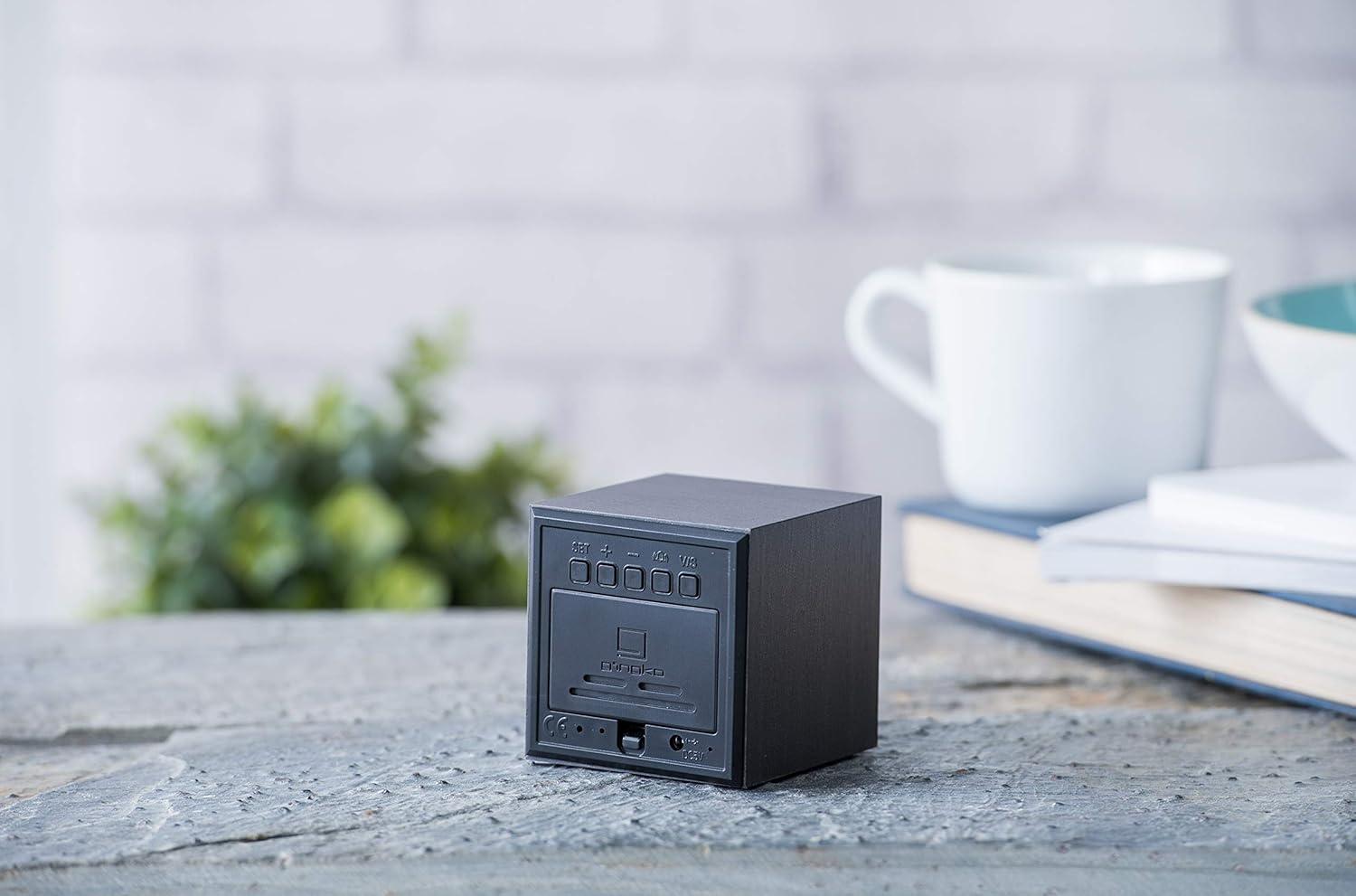
画像: 背面 view of the alarm clock, highlighting the control buttons and USB power input.
初期時刻と日付の設定
Once powered on, the display will activate. Use the buttons on the back of the clock to set the time and date.
- を押す セット ボタンを押して設定モードに入ります。
- 使用 UP そして 下 値を調整するためのボタン (例: 時間、分、年、月、日)。
- プレス セット again to confirm each setting and move to the next parameter.
- Continue until all settings (time, date, 12/24 hour format) are configured.
操作手順
ディスプレイのアクティベーション
The display is sound-activated. To view the time, date, or temperature, simply make a sound such as a clap, tap the clock gently, or speak near it. The display will illuminate for a few seconds and then turn off automatically when the room is silent to conserve energy and maintain a minimalist appearance.

Image: The alarm clock displaying the current time.

Image: The alarm clock displaying the time in a room setting.
Display Modes (Time, Date, Temperature)
The clock can cycle through displaying time, date, and temperature. Use the UP button (or a dedicated mode button if present, check manual for specific model) to switch between these display modes.

Image: The alarm clock displaying the current temperature.
アラームを設定する
アラームを設定するには:
- を押す アラーム button (if available, otherwise use セット and cycle through options).
- 使用 UP そして 下 希望のアラーム時間を設定します。
- プレス セット 確認します。
- To activate or deactivate the alarm, look for an alarm icon or a specific button (refer to the detailed instructions provided with your product for exact button functions).
スヌーズ機能
When the alarm sounds, gently tap the top of the clock or press any button (except the alarm off button) to activate the snooze function. The alarm will temporarily stop and sound again after a set interval (typically 5-9 minutes).
メンテナンス
クリーニング
To clean the clock, gently wipe the surface with a soft, dry cloth. Do not use abrasive cleaners, solvents, or spray directly onto the device, as this may damage the finish or internal components.
バッテリー交換
If using battery power, replace the AAA batteries when the display becomes dim or unresponsive. Ensure correct polarity when inserting new batteries.
トラブルシューティング
| 問題 | 考えられる原因 | 解決 |
|---|---|---|
| ディスプレイが点灯しない。 | No power, low batteries, or silent environment. | Ensure USB cable is securely connected or replace batteries. Make a sound (clap, tap) to activate the display. |
| 停電後は時刻/日付が正しくありません。 | No internal backup battery or main power disconnected. | Reconnect to USB power. If using batteries, ensure they are fresh. Reset time and date as per "Initial Time and Date Setting" section. |
| アラームは鳴りません。 | アラームが設定されていないか、無効になっています。 | Verify alarm settings and ensure the alarm function is enabled. |
| Display is too dim. | バッテリー残量が少なくなっています。 | 電池を交換するか、USB電源に接続してください。 |
仕様
- モデル番号: GK08B10
- ブランド: イチョウ
- 寸法: 6.8 x 6.8 x 6.8 cm(2.68 x 2.68 x 2.68インチ)
- 重さ: 約4.54グラム(0.16オンス)
- 表示タイプ: デジタルLED(青)
- 電源: USB cable (DC 5V) or 3x AAA batteries (not included)
- 色: 黒
- 特集: スヌーズ機能
- 原産国: 中国
保証とサポート
For warranty information or technical support, please refer to the official Gingko webご購入の際は、ウェブサイトをご覧いただくか、カスタマーサービスまで直接お問い合わせください。保証請求の際は、購入証明としてレシートを保管してください。
Official Gingko Webサイト: www.gingkodesign.com