
導入
The Maximum IRB-100 IR Bender, Model 1262, is an infrared (IR) remote control extender designed to allow you to control up to three IR-controlled devices that are out of sight or located in a cabinet. It receives IR signals from your remote control and re-transmits them via three included IR emitting probes to your target devices. This manual provides detailed instructions for setup, operation, maintenance, and troubleshooting to ensure optimal performance of your device.
設定
パッケージ内容
- 1 x Maximum IRB-100 IR Bender Main Unit
- 3 x IR Emitting Probes
- 1 x AC Adapter (230V)
- 1 x Mounting Set
電源接続
The IRB-100 can be powered using either the included 230V AC adapter or a 5V USB power source. Connect the appropriate power cable to the power input port on the main unit. Ensure the power source is stable and provides the correct voltage.
Connecting IR Emitting Probes
Connect each of the three IR emitting probes to the designated output ports on the IRB-100 main unit. These probes will transmit the IR signals to your devices. Each probe has a 2-meter cable length for flexible placement.
配置と取り付け
Position the IRB-100 main unit in a location where it can easily receive IR signals from your remote control. The unit features LED indicators to confirm signal reception. Place the IR emitting probes directly over the IR receiver window of each device you wish to control. The included mounting set can be used to secure the main unit or probes if desired, ensuring optimal signal transmission and reception.
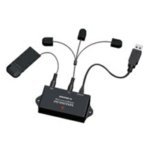
This image shows the Maximum IRB-100 IR Bender main unit, demonstrating the connection points for the power supply and the three IR emitting probes. The compact design allows for discreet placement near your entertainment system.
操作手順
基本操作
Once the IRB-100 is powered on and the IR emitting probes are correctly positioned, simply point your remote control at the main unit. The IRB-100 will receive the IR signal and instantly re-transmit it through the connected probes to control your hidden devices. The system supports controlling up to three devices simultaneously.
LEDインジケーター
The IRB-100 unit is equipped with LED indicators. These LEDs illuminate to confirm that the unit is powered on and actively receiving IR signals from your remote control. If the LEDs do not light up when a remote signal is sent, refer to the Troubleshooting section.
範囲とパフォーマンス
The IRB-100 offers a maximum reception range of 5 meters (approximately 16 feet) for your remote control. It operates within a working frequency of 433.92MHz and an IR frequency range of 30-60kHz, ensuring compatibility with a wide array of standard IR remote controls.
メンテナンス
To ensure the longevity and optimal performance of your Maximum IRB-100 IR Bender, follow these simple maintenance guidelines:
- クリーニング: Use a soft, dry cloth to clean the main unit and probes. Avoid using liquid cleaners, solvents, or abrasive materials, as these can damage the device.
- ストレージ: 長期間使用しない場合は、直射日光や極端な温度を避け、涼しく乾燥した場所に保管してください。
- 取り扱い: Handle the unit and probes with care. Avoid dropping or subjecting them to strong impacts.
トラブルシューティング
If you encounter issues with your IRB-100 IR Bender, please consult the following troubleshooting steps:
電源なし
- 電源接続を確認してください: Ensure the AC adapter or USB power cable is securely connected to the IRB-100 and the power outlet/USB port.
- 電源を確認します: Confirm that the power outlet or USB port is functional. Try plugging in another device to test it.
- ケーブルを検査します。 Check the power cable for any visible damage.
デバイスが応答しない
- プローブの配置: Ensure each IR emitting probe is positioned directly over the IR receiver window of the target device. Slight adjustments may be necessary.
- IR Bender Reception: Confirm that the IRB-100 main unit is receiving signals from your remote control (check LED indicators). Ensure there are no obstructions between your remote and the main unit.
- リモコン機能: Test your remote control with the device directly to ensure it is working correctly.
- デバイスの数: The unit supports up to 3 devices. Ensure you are not attempting to control more than this.
限られた範囲
- 障害物: Ensure there is a clear line of sight between your remote control and the IRB-100 main unit.
- 干渉: Minimize potential sources of IR interference, such as direct sunlight or strong fluorescent lighting, near the main unit.
技術仕様
| 特徴 | 詳細 |
|---|---|
| モデル番号 | 1262 |
| ブランド | 最大 |
| 製品寸法(長さ x 幅 x 高さ) | 0.79 x 3.94 x 1.77 インチ (20 x 100 x 45 mm) |
| アイテム重量 | 6.4オンス(180g) |
| 電源 | AC 230V, DC 5V (USB) |
| ACアダプター付属 | はい |
| Maximum IR Reception Range | 5メートル |
| USB 2.0 ポートの数 | 1 (for power) |
| 製品の色 | 黒 |
| 動作周波数 | 433.92MHz |
| LEDインジケーター | はい |
| インタフェース | Wireless IR |
| Mounting Set Included | はい |
| ケーブル長(プローブ) | 2メートル |
| サポートされているデバイスの数 | 3 |
| ビルトインスクリーン | いいえ |
| Frequency Range (IR) | 30-60kHz |
| 対応デバイス | IR-controlled devices |
保証情報
詳細な保証条件については、公式ウェブサイトをご覧ください。 website of Maximum or the product packaging. It is recommended to retain your proof of purchase for any potential warranty claims.
カスタマーサポート
Should you require technical assistance, have questions regarding setup or operation, or need further support, please contact Maximum customer support. Contact details, including phone numbers and email addresses, can typically be found on the manufacturer's official webサイトまたは製品ドキュメント内に記載されています。