
1. はじめに
This manual provides essential information for the safe and efficient operation, maintenance, and troubleshooting of your Siemens TE712501DE EQ. 7 Plus Aromasense automatic coffee machine. Please read all instructions carefully before using the appliance and keep this manual for future reference.
2. 安全に関する注意事項
人身傷害や機器の損傷を防ぐために、常に次の安全上の注意事項を守ってください。
- 電気安全: Ensure the appliance is connected to a properly grounded outlet. Do not immerse the appliance, cord, or plug in water or other liquids.
- 高温の表面と液体: The appliance produces hot water and steam. Exercise caution to avoid burns. Do not touch hot surfaces.
- 子どもと社会的弱者: この機器は、機器の安全な使用に関する監督または指導を受けており、関連する危険性を理解している場合、8 歳以上の子供、および身体、感覚、精神能力が低下している人、または経験と知識が不足している人でも使用できます。
- メンテナンス: Unplug the appliance before cleaning or performing any maintenance. Only use original spare parts and accessories.
- ダメージ: Do not operate the appliance if it has a damaged cord or plug, or if it has been dropped or damaged in any manner. Contact authorized service personnel.
3. セットアップ
3.1 開梱と初期清掃
Carefully remove all packaging materials. Clean the water tank, milk container, and drip tray with warm water and a mild detergent before first use. Rinse thoroughly.
3.2 Water Hardness Determination
Use the provided test strips to determine your water hardness. This information is crucial for proper descaling intervals and optimal machine performance. Refer to the display menu to enter the water hardness level.
3.3水タンクへの充填
Remove the water tank and fill it with fresh, cold tap water up to the 'MAX' mark. Reinsert the tank securely.
3.4 豆容器への充填
Open the lid of the bean container and fill it with whole coffee beans. Close the lid firmly to preserve aroma.
3.5電源接続
Plug the power cord into a suitable electrical outlet. The machine will perform an initial self-test.
4. 操作手順
4.1 電源のオン/オフ
電源ボタンを押すと、マシンの電源をオンまたはオフにできます。マシンは起動時とシャットダウン時に自動すすぎサイクルを実行します。
4.2 コーヒー飲料の準備
The EQ. 7 Plus Aromasense features a OneTouch Function for various coffee specialties.
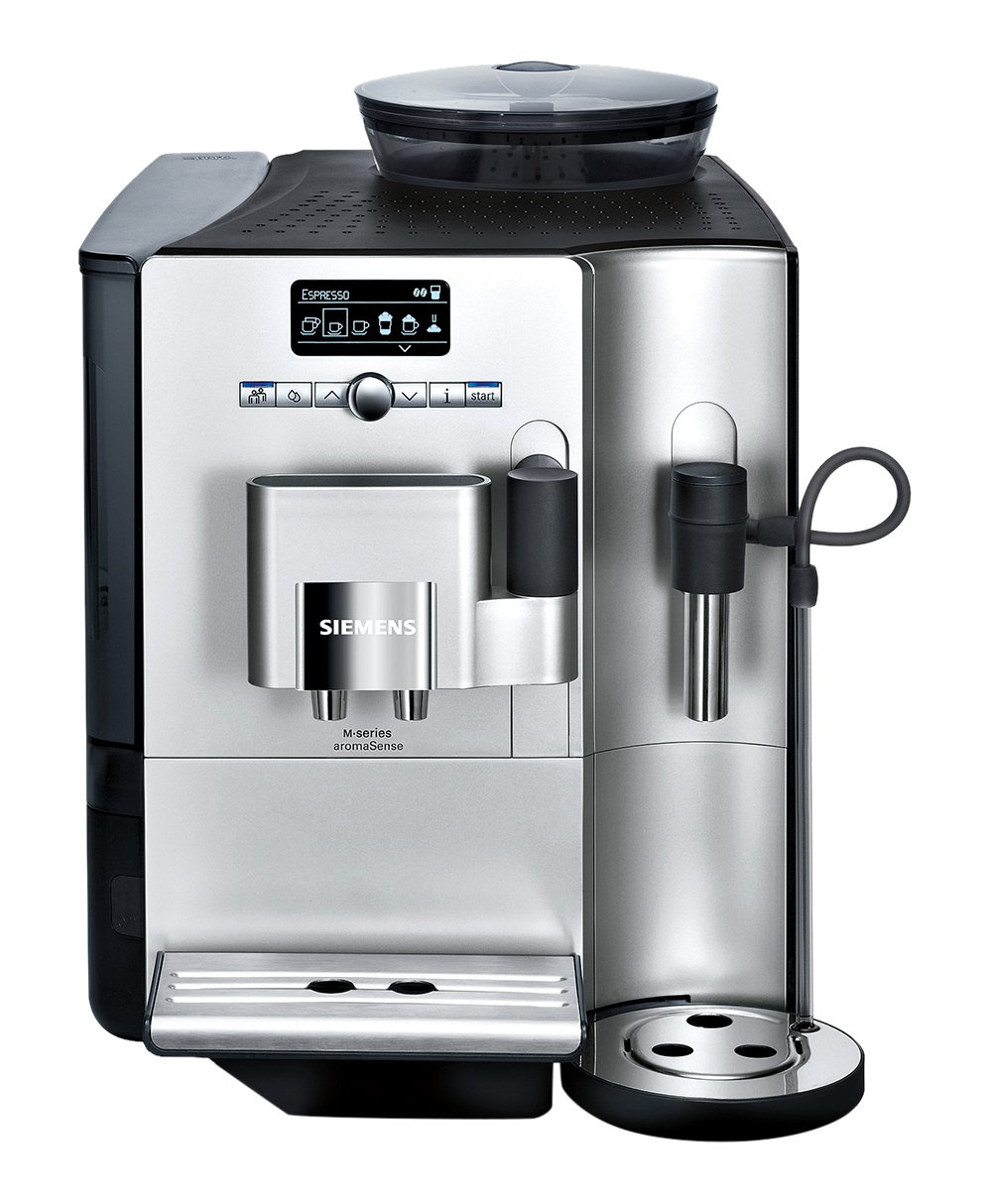
画像: The control panel showing 'ESPRESSO' selected, indicating the machine is ready to brew an espresso.
- 飲み物を選択: Use the rotary selector or arrow buttons on the control panel to navigate through the available beverages (e.g., Espresso, Coffee, Cappuccino, Latte Macchiato).
- 設定を調整する (オプション): For some beverages, you can adjust strength, temperature, or cup size using the menu options.
- 醸造を開始します: Press the start button (usually the rotary selector) to begin the brewing process.

画像: The Siemens TE712501DE machine dispensing a fresh espresso into a small white cup, showcasin醸造プロセス。
4.3 Aroma Double Shot
For an extra strong coffee with reduced bitterness, select the Aroma Double Shot function. This feature involves two grinding and brewing processes to extract maximum flavor.
4.4 Individual Coffee System
The machine allows you to store up to 6 user profiles with personal settings for your favorite beverages. This includes preferred strength, cup size, and milk foam quantity. Access this feature through the main menu.

画像: The control panel showing 'MACCHIATO' selected, with options to customize the drink, such as quantity or strength, for personalized brewing.
4.5 Coffee Sensor System
The intelligent grinder automatically adapts to different bean types, ensuring the optimal grinding degree and quantity for each preparation.
4.6 SensoFlow System
The HEATER Inside SensoFlow System ensures a consistent and ideal brewing temperature throughout the entire brewing process, guaranteeing maximum aroma extraction.

画像: The Siemens TE712501DE machine preparing a Latte Macchiato, showing the milk frother tube connected to a milk container and dispensing frothed milk into a glass.
5. メンテナンスと清掃
Regular cleaning and maintenance are essential for the longevity and optimal performance of your coffee machine.
5.1毎日の清掃
- ドリップトレイとコーヒーかす容器: 毎日空にしてすすいでください。
- Milk System (CreamCenter Cleaner): The integrated CreamCenter Cleaner function ensures easy and hygienic cleaning of the milk system after each use. Follow the on-screen prompts.
- 醸造ユニット: 抽出ユニットは毎週取り外して流水で洗い流す必要があります。
5.2スケール除去
The machine will prompt you when descaling is required. Use only descaling agents recommended by Siemens. Follow the instructions provided on the display.
5.3 清掃プログラム
Periodically run the automatic cleaning program as indicated by the machine's display. This ensures thorough cleaning of internal components.
6。 トラブルシューティング
If you encounter issues, consult the following table before contacting customer service:
| 問題 | 考えられる原因 | 解決 |
|---|---|---|
| コーヒーは出ません。 | Water tank empty, beans empty, brewing unit blocked. | Fill water tank/beans. Clean brewing unit. |
| コーヒーが薄すぎる。 | 挽き目が粗すぎるため、コーヒーの量が足りません。 | Adjust grind setting finer. Select stronger coffee strength. |
| ミルクが泡立ちません。 | Milk system dirty, milk too warm/cold. | Clean milk system thoroughly. Use cold milk (approx. 5°C). |
| Machine displays 'Descaling required'. | 体内にミネラルが蓄積します。 | Perform the descaling program as prompted. |
7. 仕様
- ブランド: シーメンス
- モデル: TE712501DE
- 容量: 2.1リットル(水タンク)
- 色: 銀
- Important Feature: 自動シャットオフ
- 材料: ステンレス鋼
8. 保証とサポート
Your Siemens TE712501DE coffee machine comes with a manufacturer's warranty. For detailed warranty terms and conditions, please refer to the warranty card included with your purchase or visit the official Siemens website. For technical support, spare parts, or service inquiries, please contact Siemens customer service in your region.