
1.製品オーバーview
The Sony a7 is a full-frame mirrorless digital camera designed for high-quality imaging in a compact and portable form factor. It features a 24.3 MP 35mm full-frame sensor, offering rich detail and a wide dynamic range. The camera incorporates a true-to-life 2.4 million dot OLED electronic viewfinder and a tilting 3.0-inch LCD for flexible framing and viewing。
主な機能は次のとおりです。
- 24.3 MP Full-Frame Sensor: Delivers high-resolution images with excellent low-light performance.
- 高速ハイブリッドAF: Combines phase-detection and contrast-detection for responsive and accurate autofocus.
- BIONZ X Image Processor: Enables high-speed continuous shooting up to 5 frames per second and 14-bit RAW output.
- E-mount Lens System: Compatible with Sony's E-mount lenses, including full-frame specific lenses.
- Wi-Fi and NFC Connectivity: Allows for easy sharing and remote control via smartphones and tablets.
- XGA OLED Tru-Finder: 明確かつ詳細な情報を提供します view あなたのシーンの。
- 3.0-inch Tilting LCD: Facilitates shooting from various angles.
- フルHDムービー録画: Captures 1920 x 1080 HD video at 24p/60i/60p.
2. 箱を開ける
パッケージ内のすべてのアイテムが揃っていることを確認します。
- Sony a7 Camera Body
- 充電式バッテリー(NP-FW50)
- AC Adapter (AC-UB10)
- マイクロUSBケーブル
- ショルダーストラップ
- ボディキャップ
- アクセサリーシューキャップ
- 接眼カップ
- 電源コード
3. カメラのコンポーネント

図3.1: フロント view of the Sony a7 camera body, showing the E-mount lens mount and full-frame sensor.
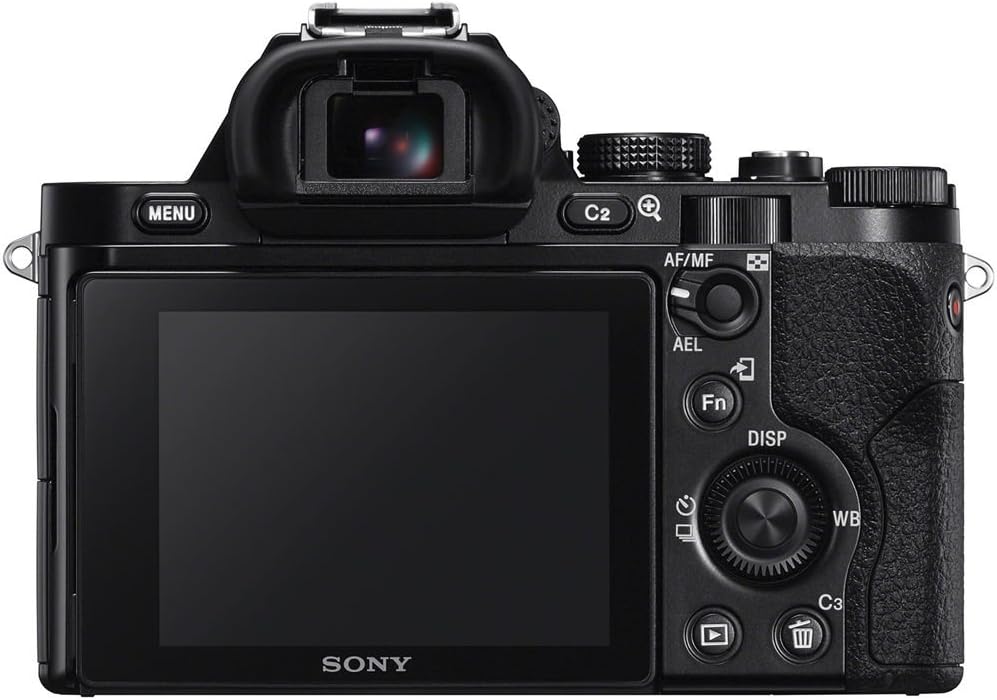
図3.2: 後方 view of the Sony a7, displaying the electronic viewfinder, LCD screen, and control buttons.

図3.3: The Sony a7 with its 3.0-inch LCD screen tilted upwards for high-angle shooting.

図3.4: The Sony a7 with its LCD screen tilted, revealing the battery and memory card compartment.

図3.5: 側 view of the Sony a7, highlighting the ergonomic grip and Wi-Fi/NFC indicators.

図3.6: トップ view of the Sony a7, showing the mode dial, exposure compensation dial, and hot shoe.
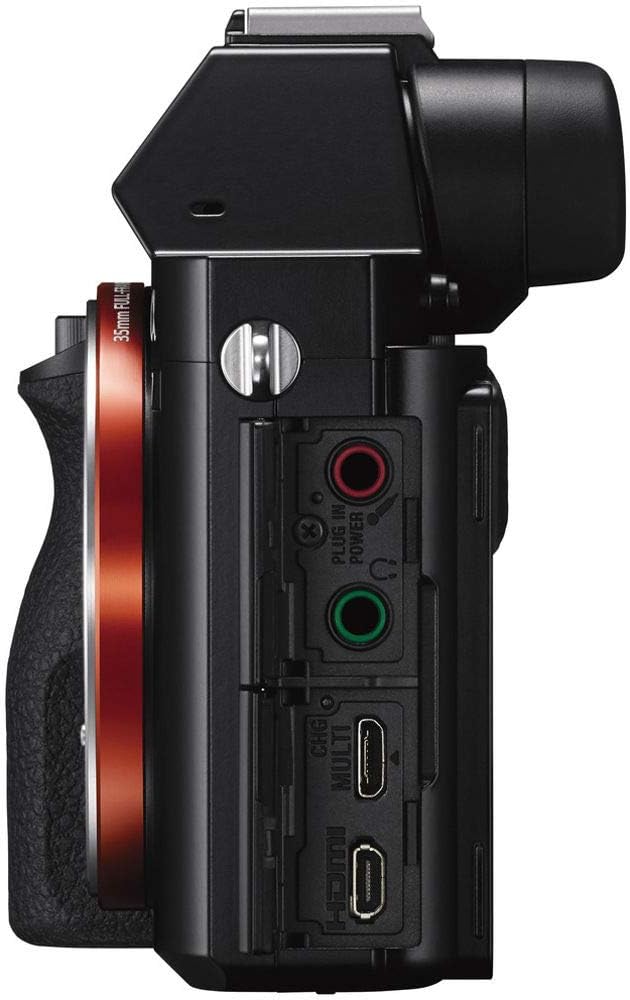
図3.7: 側 view of the Sony a7, displaying the various input/output ports including HDMI, USB, and microphone/headphone jacks.

図3.8: The Sony a7 camera held in a hand, illustrating its compact size.
4. セットアップ
4.1 バッテリーの充電
Before initial use, fully charge the supplied NP-FW50 rechargeable battery. Connect the camera to the AC adapter using the Micro USB cable, then plug the AC adapter into a power outlet. The charging indicator will illuminate during charging and turn off when complete.
4.2 バッテリーとメモリーカードの挿入
- カメラの底面にあるバッテリー/メモリカードカバーを開きます。
- Insert the NP-FW50 battery with the arrow facing inward until it locks into place.
- Insert a compatible memory card (SD/SDHC/SDXC or Memory Stick Duo/Pro Duo/Pro-HG Duo) into the slot until it clicks. Ensure the card is oriented correctly.
- カバーをしっかりと閉めてください。
4.3 レンズの取り付け
The Sony a7 uses the E-mount lens system. To attach a lens:
- カメラのボディキャップとレンズのリアキャップを外します。
- レンズの白いインデックスマークをカメラ本体の白いインデックスマークに合わせます。
- カチッと音がするまで時計回りに回してレンズを取り付けます。
To detach a lens, press the lens release button on the camera body and turn the lens counter-clockwise.
4.4 初期設定
初めて電源を入れると、カメラは日付、時刻、言語を設定するよう促します。画面の指示に従ってください。
5. カメラの操作
5.1 電源オン/オフ
To power on the camera, slide the ON/OFF switch located on the top plate. Slide it again to power off.
5.2 撮影モード
カメラ上部のモードダイヤルを回して撮影モードを選択します。
- 自動: カメラはシーンに合わせて設定を自動的に最適化します。
- P(プログラムオート): カメラは絞りとシャッタースピードを設定し、その他の設定はユーザーが制御します。
- A(絞り優先): 絞りを設定すると、カメラがシャッタースピードを設定します。
- S(シャッター優先): シャッタースピードを設定すると、カメラが絞りを設定します。
- M(マニュアル露出): 絞りとシャッタースピードの両方を制御します。
- SCN(シーンセレクション): Choose from various scene modes like Landscape, Portrait, Macro, Night Portrait, Night Scene, Sports, Sunset, Handheld Twilight, and Anti-motion Blur.
5.3 フォーカシング
The a7 features Fast Hybrid AF, combining 117 phase-detection AF points and 25 contrast-detection AF points for quick and precise focusing. Focus modes include Continuous-Servo AF (AF-C), Manual Focus (MF), and Single-Servo AF (AF-S).
- 瞳AF: This feature detects and focuses on a subject's eye, ensuring sharp portraits even with shallow depth of field. Assign it to a customizable button for quick access.
- 重点分野: Select from Wide, Zone, Center, Flexible Spot, or Expand Flexible Spot.
5.4 露出制御
Adjust exposure using the exposure compensation dial or by setting aperture and shutter speed in manual modes. Metering options include Multi, Center-weighted, and Spot.
5.5ホワイトバランス
Set the white balance to match the light source for accurate color reproduction. Options include Auto, Daylight, Flash, and custom settings.
5.6 画質設定
The camera supports both JPEG and 14-bit RAW image formats. You can select JPEG quality levels (Basic, Normal, Fine) and choose to shoot RAW, JPEG, or RAW+JPEG.
5.7 ビデオ録画
To record video, press the dedicated MOVIE button. The camera supports Full HD (1920 x 1080) recording at 24p, 60i, or 60p frame rates. Uncompressed HDMI output is available for external recorders. Video files can be saved in AVCHD or MP4 format.
5.8を使用して ViewファインダーとLCD
The XGA OLED Tru-Finder provides a high-contrast, detailed electronic view. The 3.0-inch (921k dots) Xtra Fine LCD display can be tilted up approximately 84° and down approximately 45° for flexible shooting angles. WhiteMagic technology enhances visibility in bright daylight.
5.9 接続性
- Wi-Fi/NFC: Connect to smartphones and tablets for one-touch sharing and remote control using the PlayMemories Mobile app. NFC allows for quick pairing with compatible Android devices.
- HDMI: Output video and images to an external monitor or 4K TV.
- USB: Connect to a computer for image transfer or remote camera control.
5.10 Continuous Shooting and Self-Timer
The camera can shoot continuously at up to 5 frames per second. A 10-second self-timer is also available.
6. メンテナンス
6.1 クリーニング
- カメラ本体: 柔らかく乾いた布で拭いてください。頑固な汚れには、軽く湿らせた布を使用してください。amp水または中性洗剤で洗浄してください。
- レンズ: Use a lens brush to remove dust, then a lens cleaning cloth with lens cleaning fluid. Avoid touching the glass directly.
- センサー: Due to the interchangeable lens design, the sensor can accumulate dust. Use a blower brush to gently remove dust. For persistent dust, professional cleaning is recommended. Avoid touching the sensor directly.
- LCDスクリーン: 柔らかく乾いた布を使用してください。
6.2バッテリーケア
- バッテリーを使用しないときは、涼しく乾燥した場所に保管してください。
- バッテリーの寿命を延ばすために、バッテリーを頻繁に完全に放電することは避けてください。
- カメラを長期間使用しない場合は、バッテリーを取り外してください。
7。 トラブルシューティング
This section addresses common issues. For more detailed troubleshooting, refer to the comprehensive user guide available on the Sony support webサイト。
- カメラの電源が入らない: バッテリーが完全に充電され、正しく挿入されていることを確認してください。バッテリー端子が清潔であることを確認してください。
- 画像がぼやけています: Check focus mode and focus area settings. Ensure the lens is clean. Increase shutter speed in low light or use image stabilization if available on your lens.
- LCDに画像が表示されない/viewファインダ: Check if the display mode is set correctly (e.g., automatic switching between EVF and LCD).
- Wi-Fi/NFC 接続の問題: Ensure Wi-Fi/NFC is enabled on both the camera and the smart device. Check network settings and try restarting both devices.
- 短いバッテリー寿命: Battery performance can decrease over time. Ensure you are using genuine Sony batteries. Reduce screen brightness, turn off Wi-Fi/NFC when not in use, and power off the camera between shots to conserve power.
8. 仕様
| 特徴 | 仕様 |
|---|---|
| モデル名 | Sony A7 (ILCE7/B) |
| フォトセンサー解像度 | 24.3 MP Effective, 24.7 MP Total |
| フォトセンサーサイズ | フルフレーム (35mm) |
| フォトセンサー技術 | シーモス |
| 互換性のある取り付け | ソニーEマウントフルフレーム |
| サポート File 形式 | JPEG (DCF 2.0, EXIF 2.3), RAW (ARW 2.3) |
| ビット深度 | 14 ビット |
| 画像安定化 | No (Lens-based stabilization may be available) |
| 光学ズーム | 4倍(デジタルズーム) |
| 拡張されたISO範囲 | 50 - 25600 |
| メータリングの説明 | マルチ、中央重点、スポット |
| 露出コントロール | Aperture priority, Automatic, Program, Shutter priority |
| ホワイトバランス設定 | Auto, Daylight, Flash torch |
| セルフタイマー | 10秒 |
| 画面サイズ | 3インチ |
| 表示タイプ | LCD(チルト式) |
| ディスプレイ解像度 | 921,000 dots (1,230,000 max) |
| フラッシュメモリタイプ | SD/SDHC/SDXC、メモリースティック デュオ/Pro デュオ/Pro-HG デュオ |
| 利用可能なメモリスロット | 2 |
| 書き込み速度 | 5 fps(連続撮影) |
| 最大シャッタースピード | 1/8000秒 |
| 最小シャッタースピード | 30秒 |
| 接続技術 | HDMI、NFC、USB、Wi-Fi |
| ビデオ解像度 | フルHD1080p |
| ビデオキャプチャフォーマット | MPEG-4、AVCHD |
| Viewファインダ | 電子機器(XGA OLED Tru-Finder) |
| オートフォーカス技術 | Fast Hybrid AF (Phase Detection, Contrast Detection) |
| オートフォーカスポイント | 117 (Phase Detection), 25 (Contrast Detection) |
| 電池のタイプ | リチウムイオン(NP-FW50) |
| アイテム重量 | 1.04ポンド(本体のみ) |
9. 保証とサポート
9.1 保証情報
The Sony a7 camera typically comes with a 1-year coverage for parts and 1-year coverage for labor from the date of purchase. Please retain your proof of purchase for warranty claims. This warranty covers manufacturing defects under normal use. For specific terms and conditions, refer to the warranty card included with your product or visit the official Sony support webサイト。
法的免責事項: This product is sold with a full 14-day satisfaction guarantee and a full 90-day parts and labor warranty from the seller (if purchased from a third-party seller offering this specific warranty). Please verify warranty details with your specific retailer at the time of purchase.
9.2 カスタマーサポート
さらに詳しいサポート、技術サポート、またはサービスに関するお問い合わせについては、ソニーの公式サポートをご覧ください。 website or contact Sony customer service directly. You can find contact information and detailed FAQs on their webサイト。