導入
This manual provides essential instructions for the safe and efficient use of your ONKYO RC-1000M Audio Remote Control. Please read this manual thoroughly before using the product and retain it for future reference.
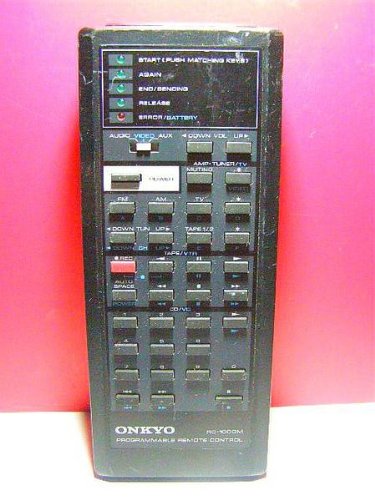
Image: The ONKYO RC-1000M Audio Remote Control, a black rectangular device with various control buttons.
設定
1. バッテリーの取り付け
- リモコンの背面にある電池ボックスのカバーを見つけます。
- カバーを下方向にスライドするか、ラッチを押して開きます。
- Insert two AAA batteries (not included), ensuring the positive (+) and negative (-) terminals align with the indicators inside the compartment.
- 電池ボックスのカバーを元に戻し、カチッと音がしてしっかりと固定されていることを確認します。
注記: 必ず新しい電池を使用し、2つの電池を同時に交換してください。古い電池と新しい電池、または異なる種類の電池を混ぜて使用しないでください。
2. 初期ペアリング(該当する場合)
The ONKYO RC-1000M is typically pre-programmed for compatible ONKYO audio devices. No manual pairing is usually required. If the remote does not respond, ensure your audio device is powered on and within range. Refer to your ONKYO audio component's manual for specific remote control compatibility and setup instructions if issues persist.
操作手順
The RC-1000M remote control provides comprehensive control over your ONKYO audio system. Point the remote control directly at the main unit's remote sensor.
- 力: Press to turn the audio component on or off.
- 入力セレクター: Use dedicated buttons (e.g., CD, TUNER, DVD) to switch between audio input sources.
- ボリューム+/-: マスターボリュームレベルを調整します。
- ミュート: 音声出力を一時的に無音にします。もう一度押すと音声が復元されます。
- PLAY/PAUSE/STOP/SKIP: Control playback functions for compatible media players (e.g., CD player, network player).
- MENU/ENTER/NAVIGATION: Access and navigate on-screen menus of your ONKYO audio component.
For detailed functions of specific buttons, refer to the instruction manual of the ONKYO audio component you are controlling.
メンテナンス
クリーニング
Wipe the remote control with a soft, dry cloth. Do not use abrasive cleaners, waxes, or solvents. Avoid spraying liquids directly onto the remote control.
バッテリー交換
If the remote control's range decreases or it becomes unresponsive, replace the batteries as described in the "Battery Installation" section. Dispose of used batteries according to local regulations.
ストレージ
When storing the remote control for extended periods, remove the batteries to prevent leakage and potential damage to the unit.
トラブルシューティング
| 問題 | 考えられる原因 | 解決 |
|---|---|---|
| Remote control does not operate. |
|
|
| Remote control operates intermittently. |
|
|
仕様
- モデル: RC-1000M
- ブランド: ONKYO
- 電源: DC 3V (AAA batteries x 2)
- 動作範囲: Approximately 7 meters (23 feet) under normal conditions.
- 寸法(概算): Not specified in product data.
- 重量(概算): Not specified in product data.
仕様は改良のため予告なく変更する場合があります。
保証とサポート
For warranty information, technical support, or service inquiries, please refer to the documentation included with your ONKYO audio component or visit the official ONKYO webサイトでご確認ください。保証請求の際は購入証明として領収書を保管してください。
ONKYO公式 Webサイト: www.onkyo.com