
1. はじめに
This manual provides instructions for the installation, programming, and operation of the Galcon 7101D 1-Station Battery Operated Irrigation Controller with a 3/4-inch waterproof valve. The 7101D controller is designed for automated operation of drip and sprinkler systems. It is completely waterproof and can be installed above or below ground, including in valve boxes or areas where it may be submerged up to 3 feet. The controller operates on a single 9V alkaline battery.
2. 安全情報
- インストールと操作の前に、すべての指示を注意深くお読みください。
- Use only a 9V alkaline battery. Do not use rechargeable batteries.
- Ensure proper sealing of the battery compartment to maintain waterproofing.
- This product is designed for use only in the USA and Canada.
- ご自身でユニットを分解したり修理したりしないでください。サポートが必要な場合は、カスタマーサポートにお問い合わせください。
3. パッケージ内容
パッケージにすべてのコンポーネントが含まれていることを確認します。
- Galcon 7101D 1-Station Battery Operated Controller
- 3/4-inch Inline Irrigation Valve
- ユーザーマニュアル(このドキュメント)
4 製品の特徴
- Controller, solenoid, and 3/4" valve integrated into one unit.
- Easy programming with 6 large buttons.
- Manual operation and rain delay functions.
- Weekly or Cyclic programming options.
- Completely waterproof and UV resistant construction.
- Designed for use in the USA and Canada.
5. セットアップとインストール
5.1 バッテリーの取り付け
- コントローラーのバッテリー収納部を見つけます。
- 電池ボックスのカバーを開きます。
- 正しい極性に注意しながら、新しい 9V アルカリ電池を 1 つ挿入します。
- 防水シールを保つために電池ケースのカバーをしっかりと閉じてください。
5.2 Controller and Valve Installation
The Galcon 7101D integrates the controller and valve into a single unit.
- Identify the water flow direction. The valve has an arrow indicating the correct flow.
- Connect the inlet side of the valve to your main water supply line.
- Connect the outlet side of the valve to your irrigation system (drip or sprinkler lines).
- 漏れを防ぐために、すべての接続がしっかりと固定されていることを確認してください。
- The unit can be installed above ground or submerged in a valve box up to 3 feet deep.

図1: Galcon 7101D Controller and Valve Assembly. This image shows the integrated controller and valve unit, highlighting its compact design.
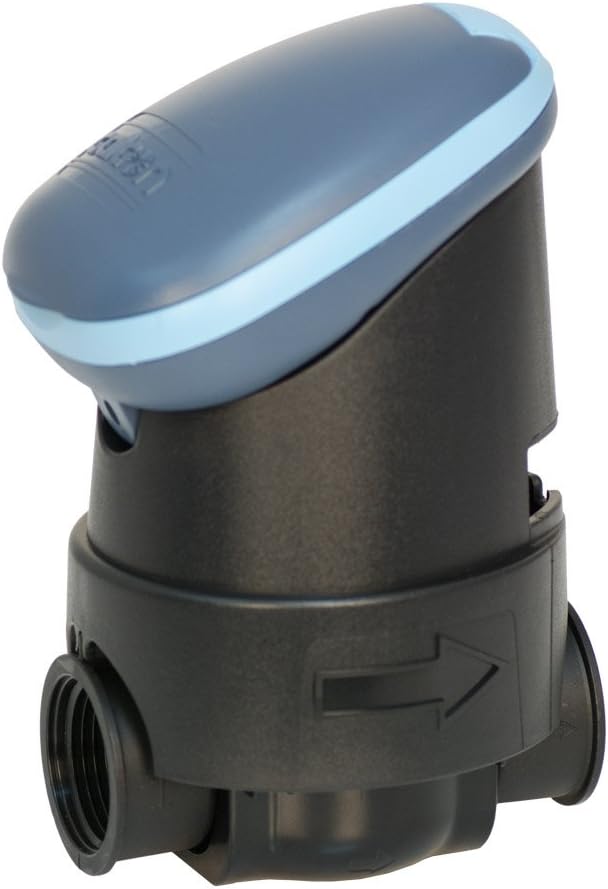
図2: Galcon 7101D Valve with Flow Direction Arrow. This image illustrates the valve component, showing the arrow indicating the correct water flow direction for installation.
6. 操作手順
The Galcon 7101D features 6 large buttons for programming and operation. Refer to the on-screen prompts for specific settings.
6.1 現在の時刻と日付の設定
Follow the on-screen instructions to set the current time and day of the week. This is crucial for accurate scheduling.
6.2 灌漑スケジュールのプログラミング
The controller supports two main programming modes:
- 毎週のプログラミング: Set specific days of the week for irrigation.
- 巡回計画法: Set an irrigation cycle (e.g., every 2 days) regardless of the day of the week.
Use the programming buttons to navigate through the menu and set:
- Start Time(s)
- Duration of watering (in minutes)
- Frequency (specific days or cycle interval)
6.3手動操作
To manually turn the water on or off, use the dedicated manual operation button. This allows for immediate watering outside of the programmed schedule.
6.4 降雨遅延機能
Activate the rain delay function to temporarily suspend irrigation for a set period (e.g., 24, 48, 72 hours) after rainfall. This conserves water and prevents overwatering.
7. メンテナンス
- バッテリー交換: Replace the 9V alkaline battery annually, or when the low battery indicator appears on the display.
- クリーニング: Clean the exterior of the controller with a damp 布で拭いてください。研磨剤や溶剤は使用しないでください。
- 冬季: In freezing climates, remove the controller and valve from the irrigation system and store indoors to prevent freeze damage.
8。 トラブルシューティング
| 問題 | 考えられる原因 | 解決 |
|---|---|---|
| コントローラーのディスプレイが空白です。 | バッテリーが切れているか、正しく取り付けられていません。 | 正しい極性を確認して、9V アルカリ電池を交換します。 |
| バルブが開閉しません。 | Low battery, incorrect programming, or debris in valve. | Check battery, verify programming, or inspect valve for obstructions. |
| 接続部から水が漏れます。 | 接続が緩んでいるか、シールが損傷しています。 | Tighten connections. If leaks persist, check for damaged O-rings or seals. |
| Irrigation does not start at scheduled time. | Incorrect time/day setting, rain delay active, or programming error. | Verify current time and day, check if rain delay is active, review 灌漑プログラム。 |
9. 仕様
- モデル: 7101D
- 部品番号: GAR6S2312P0
- バルブサイズ: 3/4インチ
- 電源: 1 x 9V Alkaline Battery (required)
- 防水等級: IP-68 (submersible up to 3 feet)
- プログラミングオプション: Weekly or Cyclic
- 寸法: 4.4 x 3.9 x 7.4インチ(製品)
- 重さ: 3.2オンス
- メーカー: Galcon USA, LTD
- 営業地域: アメリカとカナダ
10. 保証とサポート
For warranty information or technical support, please contact Galcon customer service. Refer to the product packaging or the official Galcon web現在の連絡先の詳細については、サイトをご覧ください。
注記: 製品を無許可で分解または改造すると、保証が無効になる場合があります。