
1. はじめに
ご購入ありがとうございますasing the Lexon LR98R1 Onoff LCD Alarm Clock. This manual provides detailed instructions for the proper setup, operation, and maintenance of your device. Please read this manual thoroughly before use and retain it for future reference.
The Lexon Onoff alarm clock features a unique design where flipping the clock activates or deactivates the alarm. It includes an LCD display with a blue electroluminescent backlight for clear visibility.
2. 安全情報
- デバイスを極端な温度、直射日光、高湿度にさらさないでください。
- デバイスを落としたり、強い衝撃を与えたりしないでください。
- Do not attempt to disassemble or modify the alarm clock. This will void the warranty.
- デバイスを水やその他の液体から遠ざけてください。
- 使用済みバッテリーは地域の規制に従って責任を持って廃棄してください。
- 指定された種類の電池(単4電池2本)のみを使用してください。
3. パッケージ内容
パッケージにすべてのアイテムが揃っていることを確認します。
- Lexon LR98R1 Onoff LCD Alarm Clock
- ユーザーマニュアル(このドキュメント)
注意: 単4電池は付属していないため、別途購入する必要があります。
4.製品オーバーview
Familiarize yourself with the components of your Lexon Onoff alarm clock.
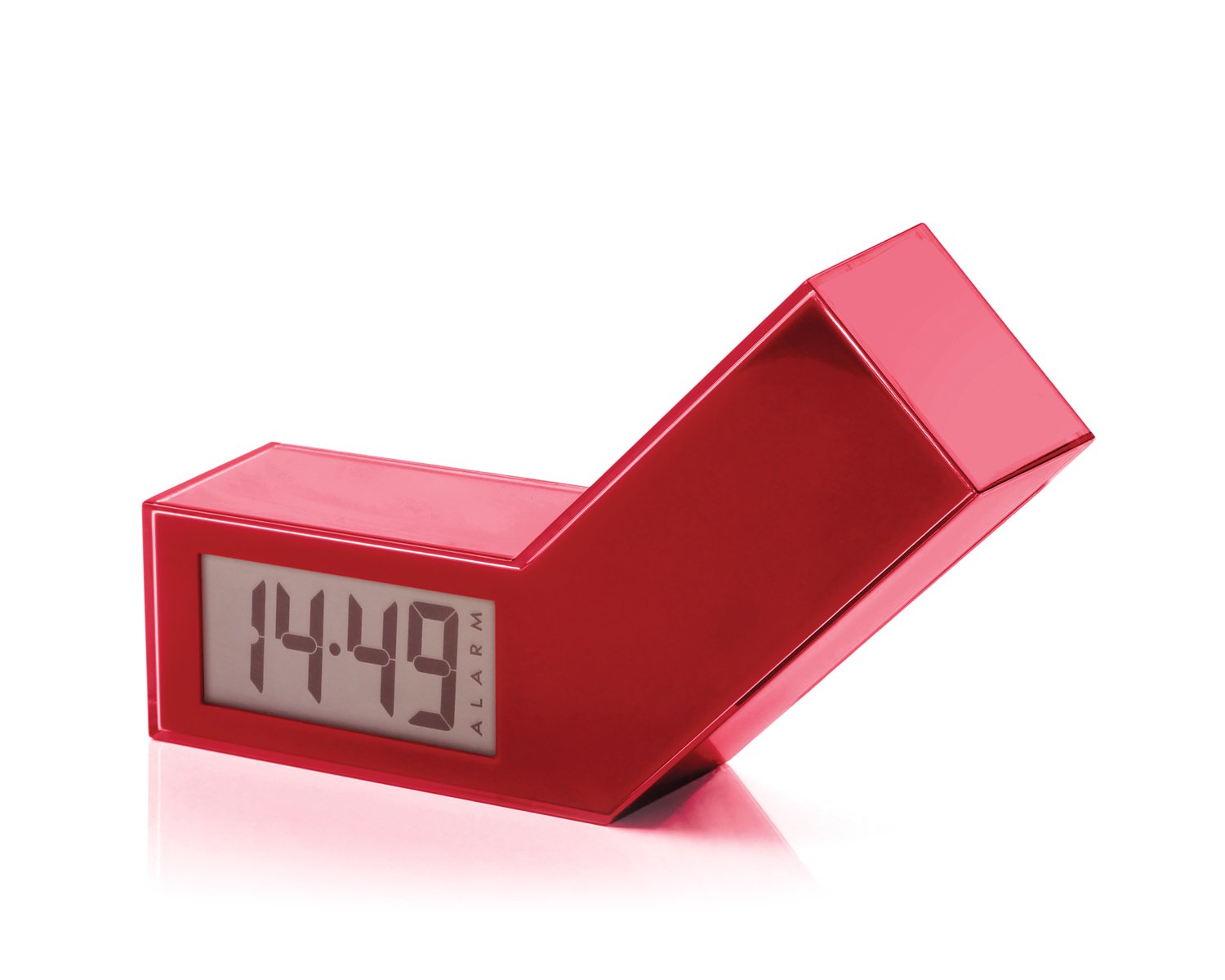
図1: 前面 view of the Lexon LR98R1 Onoff LCD Alarm Clock. The image displays the alarm clock in its red casing, with the LCD screen visible. The side labeled 'ON' is facing upwards, indicating the alarm is active. The clock has a minimalist rectangular design.
While specific button labels are not visible in the provided image, typical alarm clock controls are usually located on the back or sides. These generally include:
- 時間設定ボタン: To adjust the current time.
- アラーム設定ボタン: To adjust the alarm time.
- Hour/Minute Adjustment Buttons: To change hour and minute values.
- スヌーズ/ライトボタン: To temporarily silence the alarm or activate the backlight.
- バッテリーコンパートメント: Located on the back or bottom.
5. セットアップ
5.1 バッテリーの取り付け
- 目覚まし時計の背面または底面にある電池ボックスのカバーを見つけます。
- カバーをスライドまたは持ち上げてコンパートメントを開きます。
- 電池ボックス内の指示に従って、極性 (+ と -) が正しいことを確認して、単 4 電池 2 本を挿入します。
- 電池収納部のカバーをしっかりと取り付けてください。
Note: Batteries are not included. Please use new AAA alkaline batteries for optimal performance.
5.2初期電源オン
Once batteries are installed, the LCD display should illuminate, and the clock will typically start at a default time (e.g., 12:00 AM). You will then need to set the current time and alarm.
6. 操作手順
6.1 現在の時刻の設定
- を押し続けます 時間設定 button (or similar, refer to device markings) until the hour digits begin to flash.
- 使用 時間 そして 分 adjustment buttons to set the correct hour and minute.
- プレス 時間設定 もう一度押して確認し、時間設定モードを終了します。
6.2 アラーム時刻の設定
- を押し続けます アラームセット button (or similar) until the alarm hour digits begin to flash.
- 使用 時間 そして 分 adjustment buttons to set your desired alarm time.
- プレス アラームセット もう一度押して確定し、アラーム設定モードを終了します。
6.3 Activating/Deactivating the Alarm (Onoff Feature)
The Lexon Onoff alarm clock features a unique flip mechanism:
- に 活性化 the alarm, place the clock with the side labeled "ON" facing upwards. An alarm icon should appear on the LCD display.
- に 非アクティブ化 the alarm, flip the clock so the side labeled "オフ" is facing upwards. The alarm icon should disappear from the display.
6.4 Silencing the Alarm / Snooze Function
- アラームが鳴ったら、を押します スヌーズ/ライト button (usually a large button on top) to temporarily silence the alarm. The alarm will sound again after a few minutes (typically 5-10 minutes).
- To completely turn off the alarm for the day, flip the clock to the "オフ" position.
6.5 ディスプレイのバックライト
を押す スヌーズ/ライト button to activate the blue electroluminescent backlight for a few seconds, allowing you to view the time in low-light conditions.
7. メンテナンス
7.1 クリーニング
Wipe the surface of the alarm clock with a soft, dry cloth. Do not use abrasive cleaners, solvents, or chemical sprays, as these may damage the finish or electronic components.
7.2 電池の交換
When the display dims or the alarm function becomes unreliable, it is time to replace the batteries. Follow the battery installation steps in Section 5.1. Always replace both AAA batteries at the same time.
8。 トラブルシューティング
| 問題 | 考えられる原因 | 解決 |
|---|---|---|
| ディスプレイが空白または暗い。 | 電池が切れているか、正しく取り付けられていません。 | 正しい極性を確認して、電池を新しい AAA 電池と交換してください。 |
| アラームは鳴りません。 | Alarm is not activated (clock is in "OFF" position) or alarm time is not set. | Flip the clock to the "ON" position. Verify the alarm time is set correctly (Section 6.2). Ensure batteries are not low. |
| 時間が間違っています。 | Time was not set correctly or batteries were removed/replaced. | Reset the current time (Section 6.1). |
| バックライトが機能しません。 | 電池残量が少なくなっています。 | 電池を交換してください。 |
9. 仕様
| モデル番号 | LR98R1 |
| ブランド | レクソン |
| 表示タイプ | LCD with Blue Electroluminescent Backlight |
| 電源 | 2 x AAA電池(別売) |
| 材料 | ABS / Injected Polycarbonate |
| 寸法(長さ×幅×高さ) | 13.5 x 3.5 x 8 cm(約5.3 x 1.4 x 3.1インチ) |
| 移動タイプ | 石英 |
| 特集 | Onoff flip alarm activation/deactivation, Snooze function |
10. 保証とサポート
The Lexon LR98R1 Onoff LCD Alarm Clock comes with a 2年間のメーカー保証 購入日から。この保証は通常の使用における材料および製造上の欠陥をカバーします。
以下のものは保証の対象外となります:
- 事故、乱用、誤用、洪水、火災、地震、またはその他の外部要因によって引き起こされた損傷。
- このマニュアルに記載されている許可された使用法または意図された使用法以外で製品を操作したことにより生じた損害。
- Damage caused by service performed by anyone who is not an authorized representative of Lexon.
- Products or parts that have been modified to alter functionality or capability without the written permission of Lexon.
For warranty claims or technical support, please contact Lexon customer service through their official website or your retailer. Please have your proof of purchase and model number (LR98R1) ready.