
1. はじめに
The SPYPOINT S-SB-T Steel Security Box is designed to provide robust protection for your SPYPOINT game cameras. This armored shell safeguards your camera from environmental damage, wildlife interference, and potential theft. Its heavy-duty steel construction ensures durability in various outdoor conditions.
This manual provides essential information for the proper setup, operation, and maintenance of your S-SB-T security box.
主な特徴:
- Black steel construction for enhanced durability.
- Removable front panel for convenient camera access.
- Integrated holes for padlock and cable-lock security options.
- Designed to fit all 38-LED SPYPOINT cameras.
2. パッケージ内容
The SPYPOINT S-SB-T Steel Security Box package typically includes:
- 1 x SPYPOINT S-SB-T Steel Security Box
- (Note: Game camera, padlock, and cable-lock are sold separately.)
3. セットアップ
3.1 Installing Your Camera
- Open the Security Box: The front panel of the S-SB-T security box is removable. Gently slide or unlatch the front panel to open the box.
- カメラを挿入します: Carefully place your compatible 38-LED SPYPOINT game camera inside the security box. Ensure it fits snugly and the lens, sensors, and flash are aligned with the corresponding openings on the front panel.
- Close the Security Box: Reattach the front panel, ensuring it is securely fastened.

Figure 1: SPYPOINT S-SB-T Steel Security Box with a game camera installed. This image shows the camera securely housed within the steel box, with the lens and sensors visible through the front openings.
3.2 Securing the Box
The S-SB-T offers multiple options for securing your camera and the box itself:
- 南京錠: A dedicated hole is provided on the front of the box to install a standard padlock (not included). This secures the camera inside the box and prevents unauthorized access to the camera itself.
- Cable-Lock: Holes are present on both sides of the security box, allowing for the use of a cable-lock (not included). This enables you to secure the entire box to a tree, post, or other fixed object, preventing its removal.
- アンカー: The back panel of the security box features holes that can be used to anchor the box directly to a tree or wall using screws or bolts (not included) for a more permanent installation.
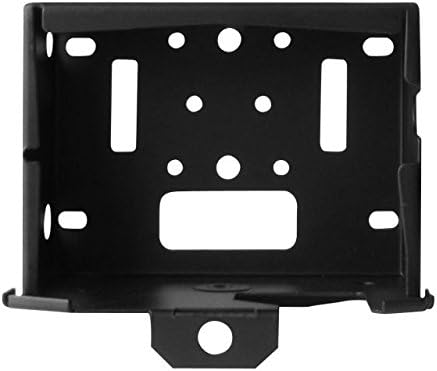
図2: 前面 view of the S-SB-T Security Box. This image clearly shows the central hole for a padlock and the side openings designed for a cable-lock, illustrating the various security points.
4. 操作
The S-SB-T security box is designed for ease of access to your camera while maintaining security. To access your camera for battery changes, SD card retrieval, or settings adjustments:
- ロック解除: If a padlock or cable-lock is in use, unlock and remove it from the security box.
- フロントパネルを取り外す: Carefully remove the front panel of the security box. This provides full access to the camera without needing to remove the entire box from its mounted location.
- Perform Camera Tasks: Once the front panel is removed, you can easily retrieve pictures, swap batteries, or adjust camera settings.
- 再保護: After completing your tasks, reattach the front panel and re-engage any security locks to ensure the camera remains protected.
5. メンテナンス
- クリーニング: Periodically wipe down the exterior of the security box with a damp cloth to remove dirt, dust, or debris. Avoid abrasive cleaners that could damage the finish.
- 検査: Regularly inspect the security box for any signs of wear, damage, or corrosion, especially if exposed to harsh weather conditions. Ensure all locking mechanisms are functioning correctly.
- 防錆: While made of steel, prolonged exposure to moisture can lead to rust. Consider applying a rust-inhibiting spray to the exterior if the box is in a particularly wet environment, ensuring not to spray into camera openings.
6。 トラブルシューティング
6.1 Difficulty Opening/Closing Front Panel
- 障害物の確認: Ensure no debris or foreign objects are preventing the panel from sliding or latching correctly.
- Verify Camera Placement: Confirm the game camera is seated properly within the box and not obstructing the panel's movement.
- 損傷の検査: Check if the panel or the box frame is bent or damaged, which might impede smooth operation.
6.2 Security Locks Not Engaging
- 南京錠: Ensure the padlock shackle is correctly aligned with the hole on the front panel. Use a padlock with an appropriate shackle diameter.
- Cable-Lock: Verify the cable-lock is threaded through both side holes and is not obstructed.
6.3 Rust Formation
- Clean and Treat: If minor rust appears, clean the affected area and apply a rust-inhibiting primer or paint.
- 再配置: If possible, consider relocating the security box to a drier environment or providing additional shelter from direct rain and moisture.
7. 仕様
| 特徴 | 詳細 |
|---|---|
| モデル番号 | S-SB-T |
| ブランド | スパイポイント |
| 材料 | 頑丈なスチール |
| 色 | 黒 |
| 互換性 | All 38-LED SPYPOINT Cameras |
| セキュリティ機能 | Padlock hole, Cable-lock holes, Rear anchoring holes |
| アクセス | 取り外し可能なフロントパネル |
| 梱包重量の目安 | 2 ポンド |
8. 保証情報
SPYPOINT products are manufactured to high-quality standards. For detailed information regarding the warranty coverage for your S-SB-T Steel Security Box, please refer to the official SPYPOINT web詳細はウェブサイトをご覧いただくか、カスタマーサポートまで直接お問い合わせください。保証条件は地域や製品によって異なる場合があります。
9. サポート
Should you require further assistance, have questions about your SPYPOINT S-SB-T Steel Security Box, or need technical support, please visit the official SPYPOINT webサイト:
Official SPYPOINT Webサイト: SPYPOINT Store
サポート ページには、役立つリソース、FAQ、連絡先情報も掲載されています。