
導入
ご購入ありがとうございますasing the Lexibook Disney Planes Portable Color Game Console JL2800PL. This console offers a collection of 120 games, including 10 Disney Planes themed games and 110 classic titles, all displayed on a vibrant 2.4-inch (6.1 cm) color LCD screen. Designed for portability, it features a 16-bit processor and a rechargeable battery for extended playtime. This manual provides essential information for safe and effective use of your new device.
重要な安全情報
安全な操作と損傷の防止のため、本製品をご使用になる前に、すべての安全に関する警告と指示をお読みください。このマニュアルは、今後の参考のために保管してください。
- This device is not suitable for children under 3 years due to small parts that may present a choking hazard.
- Do not expose the console to extreme temperatures, direct sunlight, or moisture.
- コンソールを落としたり、強い衝撃を与えたりしないでください。
- Only use the provided charging cable or a compatible charger specified by Lexibook.
- Do not attempt to open, disassemble, or modify the console. This will void the warranty and may cause damage or injury.
- If the console becomes hot, emits smoke, or produces unusual odors, immediately discontinue use and disconnect from any power source.
- Dispose of the battery and console responsibly according to local regulations.
パッケージ内容
パッケージにすべてのアイテムが揃っていることを確認してください:
- Lexibook Disney Planes Portable Color Game Console JL2800PL
- USB充電ケーブル
- ユーザーマニュアル(このドキュメント)
設定
1. 本体の充電
Before first use, fully charge the console's built-in Lithium-ion battery. Connect the supplied USB charging cable to the console's charging port and the other end to a USB power adapter (not included) or a computer's USB port. The charging indicator light will typically show red while charging and turn off or change color when fully charged. A full charge may take approximately 2-3 hours.
2.電源のオン/オフ
コンソールの電源を入れるには、 力 button for a few seconds until the screen illuminates. To power off, press and hold the 力 画面がオフになるまでもう一度ボタンを押します。
操作手順
コンソールのレイアウトとコントロール
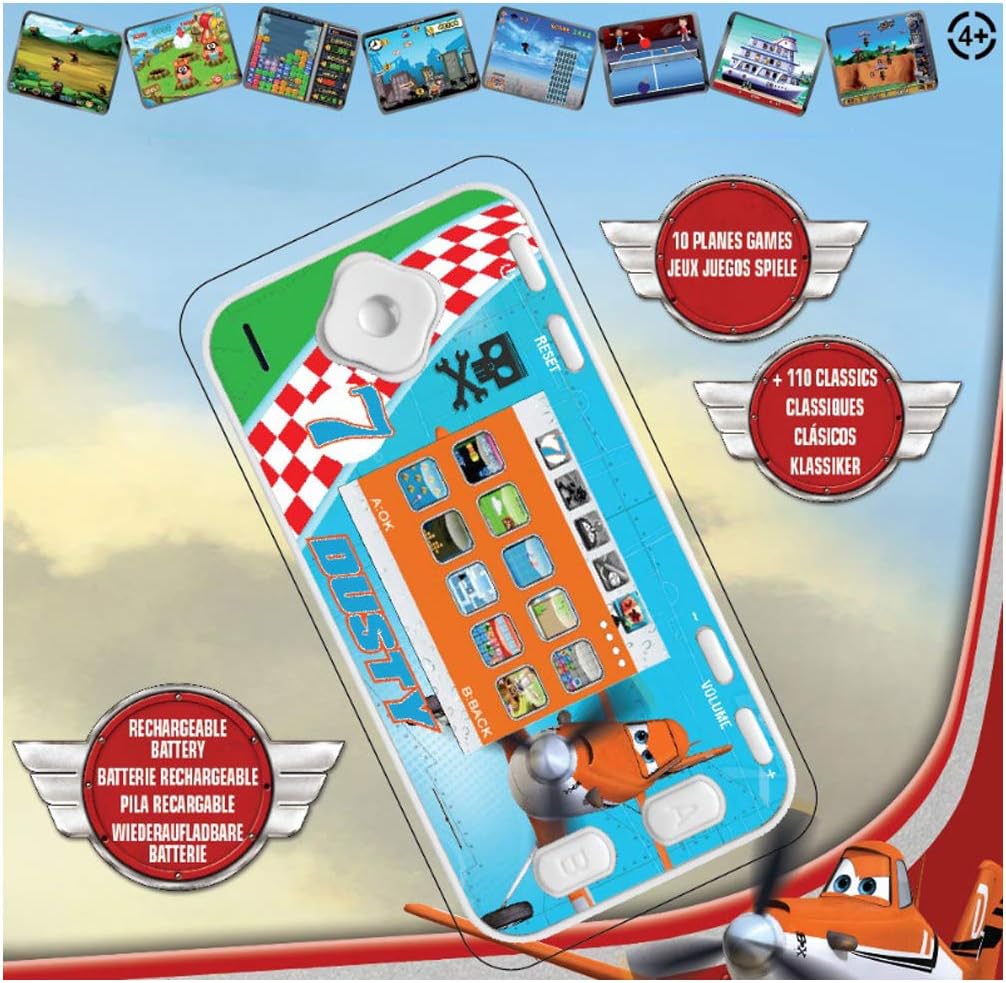
The console features a D-pad for movement, A/B/C/D action buttons, Start/Pause, Select, Reset, and Volume controls. Familiarize yourself with the button layout for optimal gameplay.
- Dパッド(方向パッド): Used for moving characters or navigating menus (Up, Down, Left, Right).
- Action Buttons (A, B, C, D): Perform in-game actions such as jumping, shooting, or confirming selections. Functions vary by game.
- 開始/一時停止ボタン: Starts a game or pauses gameplay.
- 選択ボタン: Used for various in-game options or menu selections.
- リセットボタン: Resets the console to the main menu. Use a thin object like a paperclip to press the recessed reset button.
- 音量コントロール: Adjusts the sound level of the console.
Navigating Menus and Selecting Games
Once powered on, the console will display the main menu. Use the Dパッド to scroll through the available game categories or individual games. Press the A button (or equivalent action button) to select a game and begin playing.
ゲームプレイ
Each game has its own specific controls and objectives. Refer to the on-screen instructions within each game, if available, to understand how to play. The console includes 10 Disney Planes games and 110 classic games covering action, sports, racing, and more.
メンテナンス
コンソールのクリーニング
To clean the console, gently wipe the surface with a soft, dry cloth. Do not use liquid cleaners, solvents, or abrasive materials, as these can damage the finish or internal components. Ensure no moisture enters the console's ports or openings.
バッテリーのケアと保管
To prolong battery life, avoid fully discharging the console frequently. If storing the console for an extended period, charge it to approximately 50% before storage and recharge it every few months. Store the console in a cool, dry place away from direct sunlight and extreme temperatures.
トラブルシューティング
| 問題 | 考えられる原因 | 解決 |
|---|---|---|
| コンソールがオンになりません。 | 電池が消耗しています。 | Charge the console using the provided USB cable. Ensure the charging indicator light is active. |
| 画面が空白またはフリーズします。 | ソフトウェアの不具合または一時的なエラー。 | 凹んだ部分を押す リセット button using a thin object (e.g., paperclip). If the issue persists, ensure the battery is charged. |
| 音が出ない、または音量が低い。 | Volume is turned down or muted. | 調整する 音量 control on the console. |
| Console not charging. | ケーブル、電源、または充電ポートに障害があります。 | Try a different USB cable or power adapter. Ensure the charging cable is securely connected to both the console and the power source. |
仕様
- モデル番号: JL2800PL
- ブランド: レキシブック
- 画面サイズ: 2.4インチ(6.1 cm)
- 表示タイプ: LCDカラー
- プロセッサ: 16ビット
- ゲーム数: 120 (10 Disney Planes + 110 Classic)
- 電池のタイプ: リチウムイオン(充電式)1個
- 電源: 電池駆動
- コントローラタイプ: ボタンコントロール
- 製品寸法: 長さ12.1 x 幅6.1 x 高さ1.3センチメートル
- 材料: プラスチック
- 推奨年齢: 3歳以上

保証情報
This Lexibook product is covered by a manufacturer's warranty for a period of 2年 ご購入日から1年間有効です。本保証は、通常の使用における材料および製造上の欠陥を対象としています。誤用、事故、不正な改造、または通常の摩耗や損耗による損傷は保証の対象外となります。保証請求の際は、購入証明書を保管してください。
カスタマーサポート
If you encounter any issues not covered in the troubleshooting section or require further assistance, please contact Lexibook customer support. You can find contact information on the official Lexibook webサイトまたは小売店を通じてご購入いただけます。
For more information, visit the official Lexibook webサイト: www.lexibook.com