
導入
This manual provides detailed instructions for the installation, operation, and maintenance of your VTech VTCS6619 DECT 6.0 Expandable Speakerphone with Caller ID. Please read this manual thoroughly before using your new telephone system to ensure proper functionality and to take full advantagその機能のe。
パッケージ内容
パッケージに次のアイテムが含まれていることを確認してください。
- Cordless Phone with Caller ID/Call Waiting
- 電話機本体
- AC電源アダプター
- 電話回線コード
- 端末用充電式バッテリー
- ハンドセットカバー
設定
Follow these steps to set up your VTech VTCS6619 telephone system.
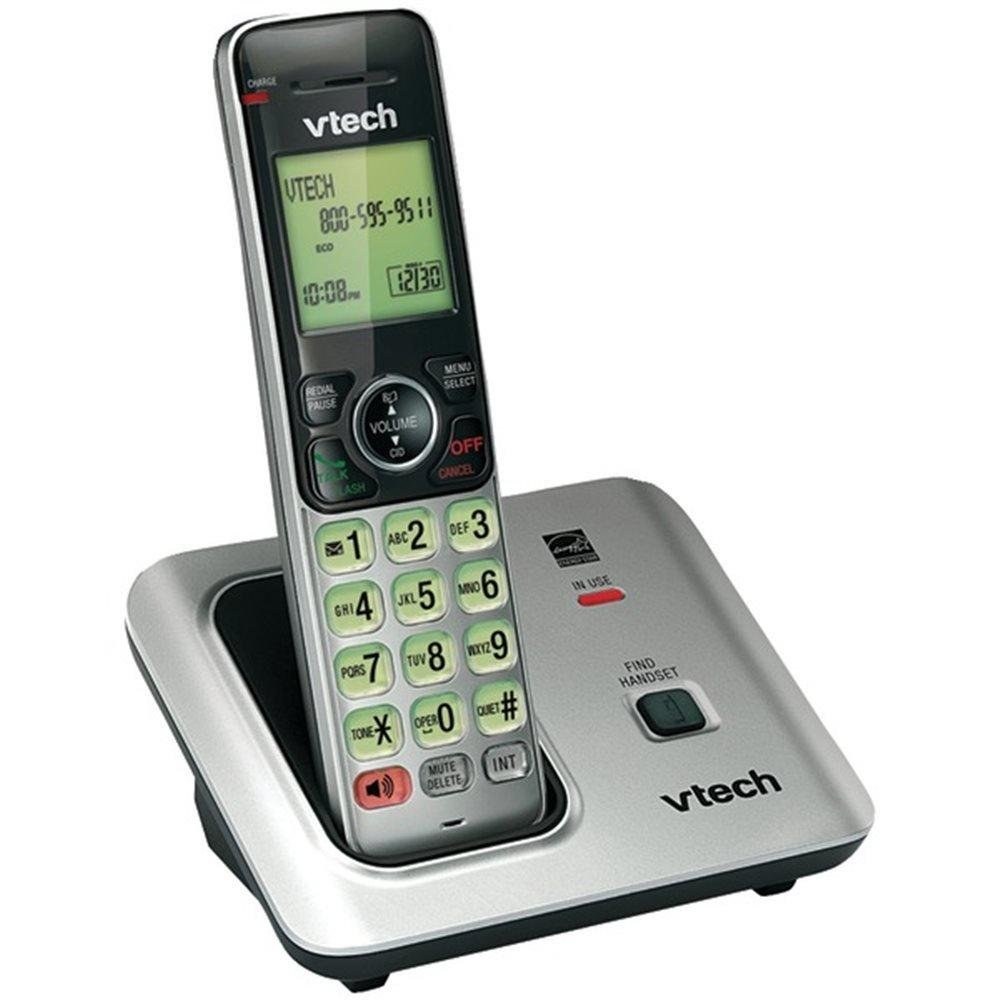
Image: The VTech VTCS6619 DECT 6.0 Cordless Speakerphone with Caller ID, showing the black handset and base unit.
1. バッテリーの取り付け
- 受話器の背面にある電池ボックスのカバーを開きます。
- バッテリーパックのプラグをコンパートメント内のジャックにしっかりと接続します。
- バッテリー パックをラベルを上にして置き、配線をコンパートメント内にきちんと収納します。
- 電池ボックスのカバーを閉じます。
2. ベースユニットの接続
- AC 電源アダプタの小さい方の端を、電話機のベースの背面にある電源ジャックに差し込みます。
- Plug the large end of the AC power adapter into a wall outlet not controlled by a wall switch.
- 電話回線コードの一方の端を、電話機ベースの背面にある TEL LINE ジャックに差し込みます。
- 電話回線コードのもう一方の端を壁の電話ジャックに差し込みます。
3. 携帯電話の充電
Once the battery is installed and the base unit is connected, place the handset on the telephone base. The CHARGE light on the handset will illuminate, indicating that the battery is charging. Allow the handset to charge for at least 10 hours before initial use.
操作手順
This section details the basic functions and features of your VTech VTCS6619 phone.
通話の発信と受信
- 電話をかけるには: プレス トーク/フラッシュ or スピーカー、電話番号をダイヤルします。
- 電話に出るには: 電話が鳴ったら、を押します トーク/フラッシュ or スピーカー.
- 通話を終了するには: プレス オフ/クリア または受話器を電話機の台座に戻します。
スピーカーフォン機能
通話中にスピーカーフォンを起動するには、 スピーカー button. Press it again to switch back to the handset earpiece.
発信者IDとキャッチホン
The phone displays the caller's name and number (if available) before you answer. If you subscribe to Call Waiting service, the phone will alert you to an incoming call while you are on another call. Press フラッシュ 通話を切り替えます。
電話会議
The VTech VTCS6619 supports 3-way conference calls. While on a call, you can add a third party by pressing the フラッシュ button, dialing the new number, and then pressing フラッシュ again to connect all parties.
デジタル応答システム
The integrated digital answering system records incoming messages when you are unavailable. Access messages by pressing the 再生/停止 button on the base or through the handset menu. Refer to the full user guide for detailed instructions on setting up your outgoing message and managing messages.
メンテナンス
Proper care ensures the longevity of your telephone system.
クリーニング
Clean the telephone and base unit with a soft, damp 布で拭いてください。クリーニングスプレーや液体クリーナーは、仕上げや電気部品を損傷する可能性があるため、使用しないでください。
バッテリーケア
To maintain optimal battery performance, avoid exposing the handset to extreme temperatures. If the phone will not be used for an extended period, remove the battery to prevent leakage.
トラブルシューティング
If you experience any issues with your phone, refer to the following common problems and solutions:
| 問題 | 解決 |
|---|---|
| 発信音なし | 電話回線コードがベースユニットと壁のジャックの両方にしっかりと差し込まれていることを確認してください。AC電源アダプタが正しく接続されていることを確認してください。 |
| 音質が悪い | Move the handset closer to the base unit. Check for interference from other electronic devices. Ensure the battery is fully charged. |
| 端末が充電されない | Verify the handset is correctly placed on the base unit. Clean the charging contacts on both the handset and base with a dry cloth. Check the power connection to the base unit. |
| 発信者番号が表示されない | Ensure you have subscribed to Caller ID service from your telephone service provider. The feature may not work if the caller has blocked their number. |
仕様
- ブランド: VTech
- モデル: VTCS6619
- 電話の種類: コードレス
- 色: 黒
- 電池の数: 単1電池XNUMX本が必要(付属)
- 材料: プラスチック
- 電源: 電池駆動
- ダイヤラーのタイプ: トーン
- 商品の寸法 (長さ x 幅 x 高さ): 6.9 x 5.2 x 6.7インチ
- 応答システムのタイプ: デジタル
- 商品の重量: 1ポンド
- 対応デバイス: VTech CS6619 handsets, basic answering machines
- 電話会議機能: 3ウェイ
- 複数行の操作: 単線操作
- 電話待機時間: 7200 minutes
- 発信者番号: はい
保証とサポート
Your VTech VTCS6619 telephone system is covered by a 1年間の限定保証 from the date of purchase. This warranty covers defects in material and workmanship under normal use. For warranty service or technical support, please refer to the contact information provided in your product packaging or visit the official VTech webカスタマー サービスの詳細については、サイトをご覧ください。
保証請求のための購入証明として購入レシートを保管してください。