
導入
The Galcon 9001 is a reliable, battery-powered irrigation timer designed for automatic watering of gardens and plants. This manual provides comprehensive instructions for the proper installation, programming, operation, and maintenance of your irrigation timer to ensure efficient water management.
特徴
- 9V電池1個で動作します。
- Offers full programming capabilities with up to 4 watering cycles per day.
- Includes a weekly program allowing selection of specific irrigation days.
- Features a direct button for suspending irrigation or initiating manual watering.
- Designed for outdoor installation.
設定
1. バッテリーの取り付け
The timer requires one 9V alkaline battery for operation. Locate the battery compartment on the unit, open it, insert a fresh 9V battery, ensuring correct polarity, and then securely close the compartment. The display should activate upon successful battery installation.
2. Connecting to the Tap
Connect the Galcon 9001 timer directly to a standard outdoor tap. The unit features a 3/4 inch female connection. Ensure the connection is hand-tightened securely to prevent leaks. A removable sleeve is included for ease of installation and removal.
3.配置
Install the timer outdoors in a location that is easily accessible and protected from direct, prolonged sunlight and extreme weather conditions. This helps to extend the lifespan of the unit.
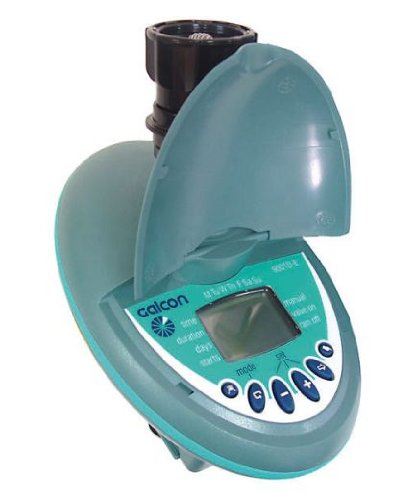
画像: The Galcon 9001 irrigation timer shown connected to an outdoor tap, ready for operation. This image illustrates the typical installation setup.
操作手順
1. Initial Time and Day Setting
After battery installation, the display will prompt you to set the current time and day. Use the designated buttons (refer to the unit's interface for specific button labels) to adjust these settings accurately.
2. Programming Watering Cycles
The Galcon 9001 allows for up to 4 distinct watering cycles per day. Navigate to the programming mode and for each cycle, set the desired start time, the duration of watering, and the frequency (e.g., specific days of the week).
3. Weekly Program Selection
In the weekly program settings, you can select the specific days on which the programmed irrigation cycles should run. This allows for flexible scheduling based on plant needs and weather conditions.
4. Manual Mode and Suspension
A direct button on the unit allows for immediate manual watering, overriding the programmed schedule. Pressing this button can also be used to temporarily suspend any ongoing or upcoming irrigation programs.
メンテナンス
1. バッテリーの交換
It is recommended to replace the 9V battery annually, or immediately when a low battery indicator appears on the display. Timely battery replacement ensures uninterrupted operation.
2. 清掃
Clean the exterior of the timer periodically with a soft, damp cloth. Avoid using abrasive cleaners or solvents, as these can damage the unit's casing またはディスプレイ。
3. 冬季対策
Before the first frost, disconnect the Galcon 9001 timer from the tap and drain any remaining water. Store the unit indoors in a dry, frost-free location to prevent damage from freezing water expansion.
トラブルシューティング
- 水流なし: Ensure the tap is fully open, check the water pressure, and verify that the timer's program is active. Confirm the battery level is sufficient.
- ディスプレイが動作しない: Check the battery installation for correct polarity and ensure the battery is charged. Replace the 9V battery if necessary.
- 散水時間が間違っている場合: Review all programming settings, including start times, watering durations, and selected irrigation days, to ensure they match your desired schedule.
- 接続部のリーク: Ensure the timer is securely tightened to the tap. Check the rubber washer inside the connector for proper seating and condition.
仕様
| ブランド | ガルコン |
| モデル | 9001 |
| 電源 | 1 x 9 Volt Battery |
| 表示タイプ | LCDまたはLED |
| 接続サイズ | 3/4 inch Female (with removable sleeve) |
| 重さ | 約300グラム |
| インストール | 屋外 |
保証とサポート
For detailed warranty information, technical assistance, or customer support, please refer to the official Galcon website or contact Galcon customer service directly. It is advisable to retain your purchase receipt as proof of purchase for any warranty claims.