
1. はじめに
The Lorex LW2731AC1 is an add-on wireless camera designed to expand your existing Lorex 7-Inch LCD Wireless Home Monitoring System. This camera provides additional surveillance capabilities, allowing you to monitor more areas of your home or property. It features day and night viewing, two-way audio communication, and a secure digital wireless signal for reliable performance.
This manual provides essential information for the proper installation, operation, and maintenance of your LW2731AC1 add-on camera.
2. パッケージ内容
パッケージにすべてのコンポーネントが含まれていることを確認します。
- 1 x Indoor/Outdoor Wireless Camera (LW2731AC1)
- カメラ用電源アダプター x 1
3 製品の特徴
The LW2731AC1 camera is equipped with several features to enhance your monitoring experience:
- VGA (640 x 480) Resolution Sensor: 鮮明なビデオ映像を提供tage.
- 52度 View角度: Offers a focused field of view for specific areas.
- 40フィート赤外線ナイトビジョン: Enables monitoring in low-light or complete darkness, with black and white video.
- IRカットフィルター: Ensures accurate color reproduction during daylight conditions.
- Advanced Day/Night Mode: Automatically switches between color (day) and black and white (night) modes for optimal clarity.
- Passive Infrared (PIR) Motion Detection: Detects movement to trigger recording or alerts.
- 双方向オーディオ: Built-in microphone and speaker allow for listening and speaking through the camera.
- Secure Digital Wireless Signal: Utilizes Frequency Hopping Spread Spectrum (FHSS) technology for private and secure video and audio transmission.
- 耐候性設計: Suitable for both indoor and outdoor installation. For outdoor use, install under shelter to protect from direct exposure to rain or snow.

図3.1: 正面を斜めにした view of the Lorex LW2731AC1 Add-on Camera, showing the lens, IR LEDs, and antenna.

図3.2: 前面のクローズアップ view of the camera, highlighting the lens, infrared LEDs, and the motion sensor below.
4. セットアップ
4.1物理的な設置
- 場所を選択: Select a suitable location for your camera. Consider the desired viewing area, proximity to a power outlet, and wireless signal strength to your Lorex 7-Inch LCD monitor. For outdoor use, ensure the camera is installed under shelter to protect it from direct weather exposure.
- カメラを取り付ける: Use the provided mounting hardware to securely attach the camera to a wall or ceiling. Adjust the camera's angle to cover the desired area.
- 接続電源: Plug the camera's power adapter into the camera and then into a standard electrical outlet. The camera requires a local power outlet for operation.
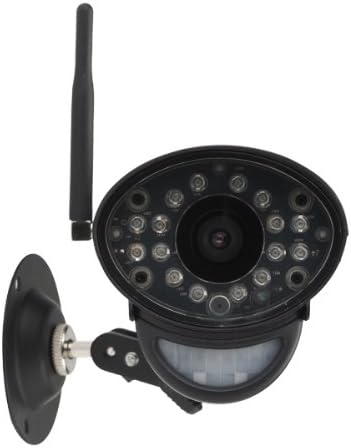
図4.1: 前面 view of the camera with its adjustable mounting bracket, ready for installation.
4.2 Pairing with Your Monitoring System
To integrate the LW2731AC1 add-on camera with your Lorex 7-Inch LCD monitoring system, follow the pairing instructions provided with your main monitoring system. Typically, this involves:
- Access the menu on your Lorex 7-Inch LCD monitor.
- Navigate to the 'Camera Pairing' or 'Add Camera' section.
- Select an unused channel for the new camera.
- Follow the on-screen prompts, which usually instruct you to press a 'Pair' or 'Sync' button on the back of the camera within a specified timeframe (e.g., 30 seconds).
- Once successfully paired, the camera's video feed will appear on the selected channel of your monitor.
Note: Refer to your Lorex 7-Inch LCD monitoring system's manual for specific pairing instructions, as steps may vary slightly by model.
5. 操作
Once paired, the LW2731AC1 camera operates in conjunction with your Lorex 7-Inch LCD monitoring system. Refer to your main system's manual for detailed instructions on:
- Viewingモード: How to switch between single camera view, scan mode (automatic switching), and quad split-screen mode (if supported by your monitor).
- 動き検出設定: Adjusting sensitivity and recording triggers for the camera's passive infrared motion sensor.
- 双方向オーディオ: Using the talk-back function to communicate through the camera.
- 録音と再生: Managing video recordings stored on your monitoring system's SD card.
The camera's digital wireless signal ensures a private and secure connection, minimizing interference and unauthorized access to your video feed.
6. メンテナンス
6.1 カメラのクリーニング
To maintain optimal image quality, periodically clean the camera lens and housing:
- 清掃する前にカメラの電源がオフになっていることを確認してください。
- Use a soft, lint-free cloth to gently wipe the lens. If necessary, damp布に水または中性レンズ洗浄液を少し含ませて拭きます。
- Wipe the camera housing with a soft, damp 布で拭いてください。刺激の強い化学薬品や研磨剤入りの洗剤は使用しないでください。
6.2 環境への配慮
While the camera is weather-resistant, extreme conditions can affect its performance and lifespan:
- Avoid installing the camera in direct sunlight for prolonged periods, as this can cause overheating.
- Protect the camera from direct exposure to heavy rain, snow, or hail. Install under an overhang or eave when used outdoors.
- Ensure the power adapter is protected from moisture.
7。 トラブルシューティング
If you encounter issues with your LW2731AC1 add-on camera, consider the following common solutions:
- ビデオ信号なし:
- Ensure the camera is powered on and its power adapter is securely connected to a working outlet.
- Verify the camera is within range of your Lorex 7-Inch LCD monitor. Obstructions like thick walls or multiple floors can reduce wireless range.
- Attempt to re-pair the camera with your monitoring system (refer to Section 4.2).
- Check for sources of interference (e.g., other wireless devices, microwaves) near the camera or monitor.
- 画質が悪い:
- Clean the camera lens (refer to Section 6.1).
- 日中は監視対象エリアに十分な照明があることを確認してください。
- For night vision, ensure there are no obstructions directly in front of the camera's IR LEDs.
- 動き検出が機能しない:
- Check the motion detection settings on your Lorex 7-Inch LCD monitor to ensure it is enabled and sensitivity is appropriately set.
- Ensure the camera's motion sensor is not obstructed.
- 双方向オーディオの問題:
- Verify the volume settings on your Lorex 7-Inch LCD monitor.
- カメラのマイクやスピーカーを遮る物理的な障害物がないことを確認してください。
If problems persist, consult the support section of the Lorex website or contact Lorex customer support for further assistance.
8. 仕様
| 特徴 | 仕様 |
|---|---|
| モデル番号 | LW2731AC1 |
| ビデオキャプチャ解像度 | 640×480(VGA) |
| 分野 View | 52度 |
| 暗視範囲 | 最大40フィート(12メートル) |
| 接続技術 | ワイヤレス(FHSS) |
| 電源 | コード式電気 |
| オーディオ | 双方向オーディオ(内蔵マイクとスピーカー) |
| モーション検出 | パッシブ赤外線(PIR) |
| 屋内/屋外での使用 | Indoor, Outdoor (Weather-Resistant) |
| 寸法(長さ×幅×高さ) | 9.6 x 3.6 x 3.4 インチ (24.4 x 9.1 x 8.6 cm) |
| アイテム重量 | 1.05ポンド(0.48kg) |
| 色 | 黒 |
| 国際保護格付け | IP67 |
9. 保証とサポート
For information regarding product warranty, technical support, and additional resources, please visit the official Lorex website. You can typically find FAQs, software downloads, and contact information for customer service there.
Webサイト: www.lorex.com