
1. はじめに
The MFJ-4115 is a compact switching power supply designed to provide stable 13.8 VDC output with a continuous current of 15 Amps(17 Amps surge). It features over-voltage and over-current protection systems, a quiet fan, and super regulation. This manual provides essential information for the safe and efficient operation of your MFJ-4115 power supply.
安全情報
- Always ensure proper ventilation around the unit. Do not block air vents.
- ユニットを湿気や極端な温度にさらさないでください。
- 接続やメンテナンスを行う前に、電源を切ってください。
- すべての接続が確実に行われ、正しい極性が守られていることを確認してください。
2 製品の特徴
- 出力巻tage: 13.8VDC
- 出力電流: 15 Amps 連続、17 Amps surge
- 入力ボリュームtage: AC 90 to 130 Volts
- 保護システム: オーバーボリュームtageおよび過電流保護
- 指標: Load fault indicator
- 追加機能: Automatic shut-down, quiet fan, super regulation
- コンパクトな寸法: 約3.75インチ(幅)×2.25インチ(高さ)×7.75インチ(奥行き)
- 重さ: 約5.89ポンド
- 接続: One set of 5-way binding post connections
3. セットアップ
Follow these steps to set up your MFJ-4115 Switching Power Supply:
- 開梱して検査する: Carefully remove the power supply from its packaging. Inspect the unit for any visible damage.
- 配置: Place the power supply on a stable, flat surface that allows for adequate ventilation. Ensure the fan vents are not obstructed.
- デバイスの接続: Connect your device (e.g., radio equipment) to the 5-way binding post connections on the front of the power supply. Ensure correct polarity: the red terminal is positive (+), and the black terminal is negative (-). Tighten the connections securely.
- AC 電源を接続します。 Connect the provided AC power cord to the AC input receptacle on the rear of the power supply. Then, plug the other end of the AC power cord into a standard AC wall outlet (90-130V AC).
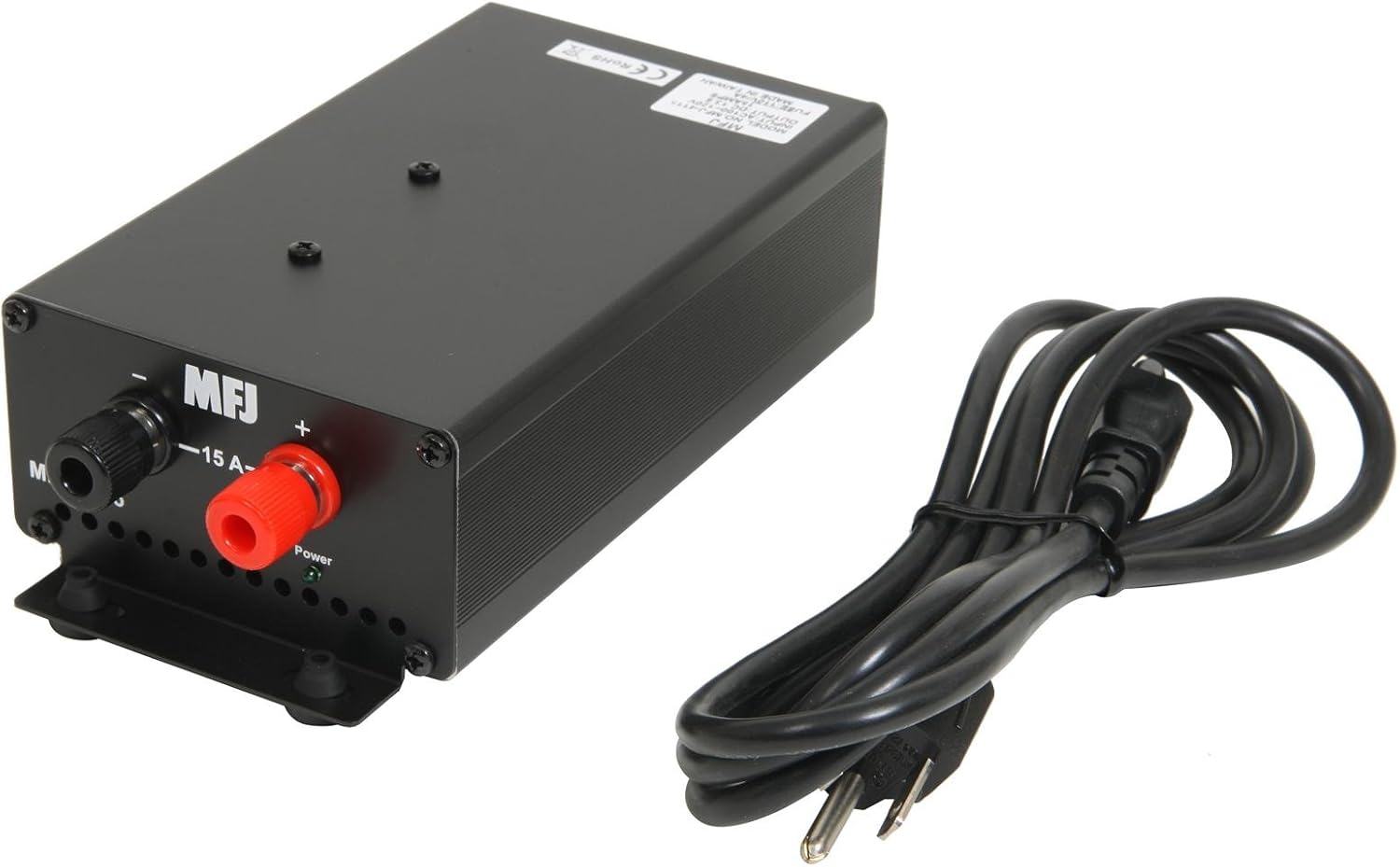
図1: 前面 view showing the 5-way binding posts for device connection and the included power cord.

図2:背面 view illustrating the AC power input, power switch, and cooling fan for ventilation.
4. 操作手順
Once the power supply is properly set up and connected:
- 電源オン: Locate the power switch on the rear of the unit (refer to Figure 2) and switch it to the 'ON' position.
- モニター操作: The power supply will now provide 13.8 VDC to your connected device. Observe the load fault indicator. If it illuminates or the unit automatically shuts down, refer to the Troubleshooting section.
- 電源を切る: To turn off the power supply, switch the power switch to the 'OFF' position. For extended periods of non-use, it is recommended to unplug the AC power cord from the wall outlet.
5. メンテナンス
適切なメンテナンスにより、電源装置の寿命が長くなり、信頼性の高い動作が保証されます。
- クリーニング: 本体を清潔に保ち、ほこりを取り除いてください。清掃には柔らかく乾いた布を使用してください。液体洗剤や溶剤は使用しないでください。
- 換気: Regularly check that the fan vents are clear of obstructions to ensure proper airflow and cooling.
- ファンの騒音: The internal cooling fan may produce some noise, especially upon startup or in colder environments. This is often normal and may subside after a short period of operation. If excessive or persistent noise occurs, ensure proper ventilation.
6。 トラブルシューティング
If you encounter issues with your MFJ-4115 power supply, refer to the following common problems and solutions:
- ユニットの電源が入らない:
- Check that the AC power cord is securely plugged into both the power supply and the wall outlet.
- Ensure the power switch on the rear of the unit is in the 'ON' position.
- 壁のコンセントから電力が供給されていることを確認してください。
- Load Fault Indicator Active / Automatic Shut-down:
- This indicates an over-current or over-voltage condition. Immediately disconnect the load from the power supply.
- Verify that the connected device's current draw does not exceed the power supply's continuous rating of 15 Amps or surge rating of 17 Amps.
- Check for any short circuits in the connected device or its wiring.
- If the issue persists with a known good load within specifications, the power supply may require service.
- 騒音を出すファン:
- A slight fan noise, especially at startup or in cold conditions, is normal. It should quiet down after a short operating period.
- Ensure the unit has adequate ventilation and the fan vents are not blocked.
- If the noise is excessive or persistent, and not related to startup or cold, contact customer support.
7. 仕様
| 仕様 | 価値 |
|---|---|
| モデル番号 | 4115 |
| 出力巻tage | 13.8VDC |
| 連続電流 | 15 Amps |
| サージ電流 | 17 Amps |
| 入力ボリュームtage | AC 90~130 ボルト |
| ワットtage | 207ワット |
| 製品寸法(長さ x 幅 x 高さ) | 7.75 x 3.75 x 2.25インチ |
| アイテム重量 | 5.89ポンド |
| 冷却方法 | Air (with 1 fan) |
| コネクタタイプ | 5方向バインディングポスト |
8. 保証とサポート
For warranty information, technical assistance, or service inquiries regarding your MFJ-4115 Switching Power Supply, please contact MFJ customer service directly. Refer to the official MFJ web最新の連絡先情報および保証条件については、当社の Web サイトまたは製品パッケージをご覧ください。