
導入
D-Link DGS-1210-52は52ポートのギガビット Web Smart Switch designed for small and medium-sized businesses. It integrates D-Link Green 3.0 technology and complies with IEEE 802.3az Energy Efficient Ethernet standards. This switch offers advanced Layer 2 features, IPv6 management, and comprehensive security functions to ensure network protection and efficient operation. This manual provides essential information for setting up, operating, maintaining, and troubleshooting your DGS-1210-52 switch.
箱の中身
パッケージに次のアイテムが含まれていることを確認してください。
- D-Link DGS-1210-52 52ポート ギガビット Web スマートスイッチ
- Power Cord and Retainer
- ラックマウントキット
- ゴム足
- クイックインストールガイド
製品の特徴
The DGS-1210-52 switch offers a robust set of features for enhanced network performance and security:
- 48 ギガビット ポート: Provides high-speed connectivity for a wide range of network devices.
- 4 Gigabit Optical SFP Ports: Enables high-speed uplinks and long-distance fiber connectivity, enhancing network flexibility and scalability.
- 高度なトラフィック管理: Includes bandwidth control, Quality of Service (QoS), VLAN support, Port Mirroring, Link Aggregation Control Protocol (LACP), Spanning Tree Protocol, and IGMP Snooping to optimize network performance.
- 包括的なセキュリティ: Features Access Control List (ACL), 802.1X port-based authentication, RADIUS support, ARP Spoofing Prevention, and D-Link Safeguard Engine.
- ONVIF対応監視モード: Streamlines IP surveillance network deployment and management by automatically detecting ONVIF-compliant devices and optimizing video traffic.
- エネルギー効率の高い操作: Complies with IEEE 802.3az Energy Efficient Ethernet standard and features a fan-less design for silent running and reduced power consumption.
- NDAA準拠: Meets strict regulatory standards for government and high-security enterprise projects.

図1:以上view of DGS-1210-52 features.
セットアップ手順
Follow these steps to set up your DGS-1210-52 switch:
- 物理的な配置: Place the switch on a stable, flat surface or mount it in a standard 19-inch equipment rack using the provided rack-mount kit. Ensure adequate ventilation around the device.
- 接続電源: Connect the power cord to the switch's power inlet and then to a suitable power outlet. Use the power cord retainer to secure the connection.
- ネットワークデバイスを接続する: Connect your network devices (e.g., computers, servers, printers, IP cameras) to the 48 Gigabit Ethernet ports using standard Ethernet cables. For high-speed uplinks or fiber connections, use the 4 Gigabit SFP ports with compatible SFP transceivers.
- 初期設定(Web-based Management):
- スイッチ上の任意のイーサネット ポートにコンピューターを直接接続します。
- コンピュータの IP アドレスをスイッチのデフォルト IP アドレスと同じサブネットに設定します (デフォルト IP についてはクイック インストール ガイドを参照してください)。
- 開く web ブラウザでスイッチのデフォルトの IP アドレスを入力します。
- Log in using the default credentials (refer to the Quick Installation Guide).
- Once logged in, you can configure various network settings, including IP address, VLANs, QoS, and security features.
- Surveillance Mode Activation: If deploying an IP surveillance network, navigate to the Surveillance Mode section in the web user interface. Activating this mode will automatically detect ONVIF-compliant devices and segment them into a dedicated Auto Surveillance VLAN for optimized video traffic management.
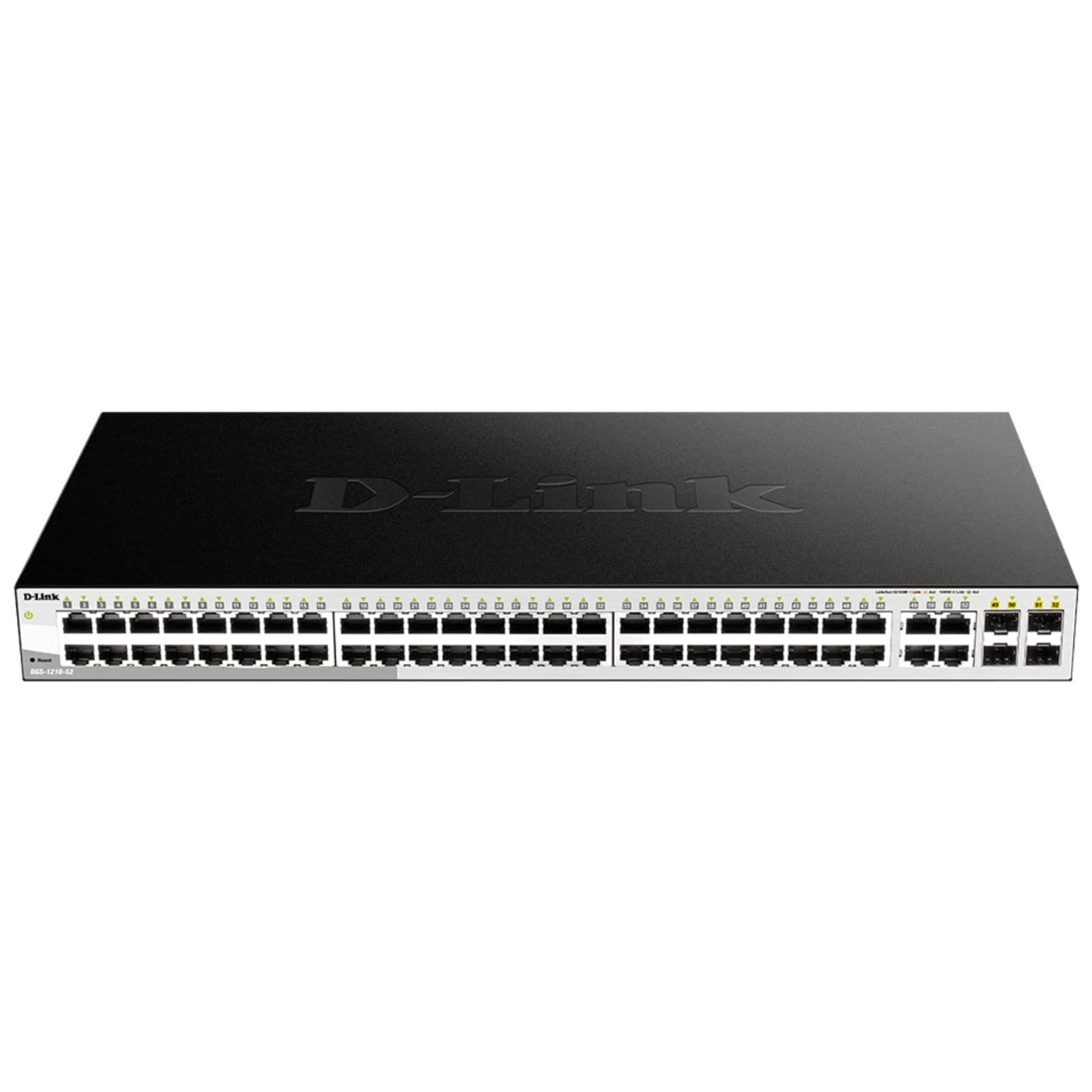
Figure 2: Front panel of the DGS-1210-52 switch showing Ethernet and SFP ports.

Figure 3: Rear panel of the DGS-1210-52 switch.
操作手順
The DGS-1210-52 switch provides extensive management capabilities through its intuitive webベースのインターフェース。
ネットワーク管理
- VLAN 構成: Create and manage Virtual Local Area Networks (VLANs) to segment your network, improving security and performance.
- サービス品質 (QoS): Prioritize critical network traffic (e.g., VoIP, video streaming) to ensure consistent performance.
- リンクアグリゲーション(LACP): 複数の物理リンクを 1 つの論理リンクに結合して、帯域幅を増やし、リンクの冗長性を実現します。
- スパニングツリープロトコル(STP): ネットワーク ループを防止し、ネットワークの安定性を確保します。
- IGMPスヌーピング: マルチキャスト トラフィック配信を最適化します。特に IPTV アプリケーションに役立ちます。
- 静的ルーティング: Configure static routes for basic Layer 3 functionality, directing traffic between different IP subnets.
セキュリティ機能
- アクセス制御リスト (ACL): Filter network traffic based on MAC or IP addresses, port numbers, and other criteria to enhance security.
- 802.1X Authentication: Authenticate network clients through external RADIUS servers for secure network access.
- ARPスプーフィング防止: Protect against malicious intruders sending fake ARP messages.
- D-Link セーフガード エンジン: Protects the switch from traffic flooding caused by virus attacks.
- DHCP Server Screening: Blocks rogue DHCP server packets from user ports to prevent unauthorized IP assignment.
Nuclias Connect Management (Optional)
The DGS-1210-52 can be optionally managed via D-Link's Nuclias Connect software. This free software provides scalable, flexible control and insightful reporting for up to 1,500 D-Link access points and DGS-1210 Smart Switches, offering centralized management for your network infrastructure.

Figure 4: Nuclias Connect for centralized network management.
メンテナンス
Proper maintenance ensures the longevity and optimal performance of your DGS-1210-52 switch.
- エネルギー効率: The switch's compliance with IEEE 802.3az Energy Efficient Ethernet helps reduce power consumption during periods of low network utilization.
- サイレント操作: The fan-less design eliminates noise and reduces potential points of failure, contributing to a longer lifespan.
- 設定の保存: Always save the running configuration to the switch's non-volatile memory (NVRAM) after making changes. Changes take effect immediately but will be lost upon reboot or power cycle if not explicitly saved.
- ファームウェアの更新: D-Linkサポートを定期的にチェックする webスイッチに最新の機能とセキュリティ強化が適用されるように、ファームウェア アップデートのサイトにアクセスしてください。
- 環境条件: Operate the switch within the specified temperature range (23 to 122 Degrees Fahrenheit) and ensure proper airflow to prevent overheating.
トラブルシューティング
If you encounter issues with your DGS-1210-52 switch, consider the following:
- 電源なし: 電源コードがスイッチと電源コンセントの両方にしっかりと接続されていることを確認してください。電源コンセントが正常に機能していることを確認してください。
- リンクライトなし: Check the Ethernet cable connections between the switch and the connected device. Try a different cable or port. Ensure the connected device is powered on and functioning correctly.
- ネットワークパフォーマンスの問題:
- ループバック検出: The switch features loopback detection to identify and resolve network loops that can cause performance degradation. Check the switch logs for loop detection events.
- ケーブル診断: Use the cable diagnostics feature in the web interface to test the integrity of connected Ethernet cables.
- Verify QoS settings are correctly configured if specific traffic types are experiencing issues.
- アクセス Web インタフェース: Ensure your computer's IP address is in the same subnet as the switch. Clear your browser's cache or try a different browser. If the password is unknown, a factory reset may be required (refer to the Quick Installation Guide for reset procedures).
- 工場出荷時設定へのリセット: If configuration issues persist or you forget the password, perform a factory reset. This will revert all settings to their default values. Consult the Quick Installation Guide for specific instructions on performing a factory reset.
仕様
| 特徴 | 仕様 |
|---|---|
| ブランド | Dリンク |
| モデル番号 | DGS-1210-52 |
| ポート数 | 52 (48 Gigabit Ethernet, 4 Gigabit SFP) |
| インタフェース | RJ45、SFP |
| データ転送速度 | 104ギガビット/秒(スイッチング容量) |
| スイッチタイプ | Metal, Smart Managed Layer 2+ |
| レイヤー数 | 2 |
| ケース素材の種類 | 金属 |
| 商品の寸法 (長さ x 幅 x 高さ) | 長さ17.25インチ x 幅8.21インチ x 高さ1.73インチ |
| アイテム重量 | 7.65 ポンド |
| 巻tage | 120ボルト |
| 現在の評価 | 0.01 Amps |
| 動作温度 | 華氏23~122度(摂氏-5~50度) |
| 対応デバイス | Desktop, Laptop, Printer, Router |
保証情報
The D-Link DGS-1210-52 switch is backed by a 限定生涯保証. This warranty provides long-term confidence in the quality and reliability of your network infrastructure. For detailed terms and conditions, please refer to the warranty documentation included with your product or visit the official D-Link webサイト。
サポート
For technical assistance, product documentation, or further information, please visit the official D-Link support website. You can also find resources related to Nuclias Connect management software and other D-Link business solutions.
D-Link is a business solutions provider with over 35 years of experience in networking, committed to providing reliable and secure products.
製品ビデオ
ビデオ1: オーバーview of D-Link Gigabit Smart Managed and Surveillance Switches, highlighting their features and applications.