
HAND Precision Automatic Numbering Machine ZS209 User Manual
モデル: ZS209
1. はじめに
The HAND Precision Automatic Numbering Machine ZS209 is a heavy-duty, self-inking device designed for efficient sequential numbering operations. Crafted with a one-piece hardened steel frame and finished in high-polish chrome, this machine features all-metal interior construction for reliable, long-term use. It is ideal for document identification, date and number stamping, serial number stamping, inspection stamping, and ticket stamping。
This machine includes 9 die-cast metal wheels with 5mm digit size and offers 8 movement settings for versatile numbering patterns. Each unit comes with two dry inking pads and a bottle of black ink.
2.製品オーバーview
Familiarize yourself with the components of your numbering machine.
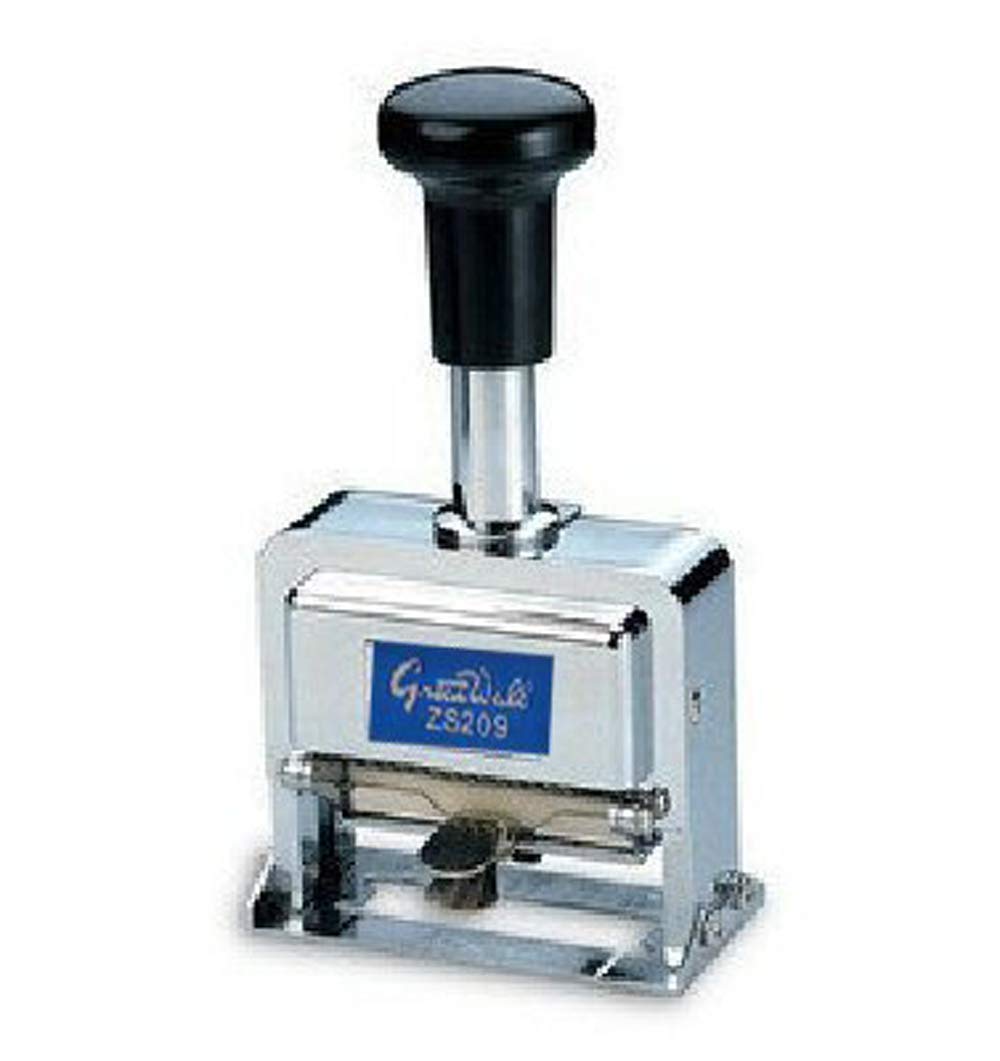
画像2.1:正面 view of the HAND Precision Automatic Numbering Machine ZS209, showing the handle, chrome body, and numbering wheels.
The machine features a sturdy handle for operation, a robust metal housing, and visible numbering wheels for setting the desired sequence. The ink pad is located internally, accessible for replacement.
3. セットアップ
Before first use, ensure the ink pad is properly installed and inked.
- マシンを開梱します: Carefully remove the numbering machine and accessories (ink, stylus, extra pads) from the packaging.
- Install/Ink the Pad: The machine typically comes with a dry ink pad. To ink it, apply a small amount of the provided black ink evenly onto the dry pad. Do not over-saturate. Allow a few minutes for the ink to absorb.
- パッドを挿入します: Open the machine's base or side compartment (refer to specific model design if different) and insert the inked pad. Ensure it sits securely.
- Test Impression: Make a few test impressions on scrap paper to ensure even ink distribution and clear numbering.
4. 操作手順
This numbering machine offers various settings for different numbering requirements.
4.1 Setting the Number
Use the included stylus to adjust the numbering wheels. Each wheel can be rotated to display the desired digit. Ensure all wheels are aligned correctly for a clear impression.

画像4.1: 詳細 view of the numbering machine, highlighting the wheels and adjustment area.
4.2 Movement Settings
The machine features 8 movement settings, controlled by a small lever or dial (location may vary slightly by unit, typically on the side or base). These settings determine how the number advances after each impression.
- 連続した: Advances the number by one digit with each impression (e.g., 001, 002, 003...).
- 繰り返す: Stamps the same number repeatedly without advancing.
- 2 x Repeat: Stamps the same number twice, then advances (e.g., 001, 001, 002, 002...).
- 3 x Repeat: Stamps the same number three times, then advances.
- 4 x Repeat: Stamps the same number four times, then advances.
- 5 x Repeat: Stamps the same number five times, then advances.
- 6 x Repeat: Stamps the same number six times, then advances.
- 12 x Repeat: Stamps the same number twelve times, then advances.
To change the setting, locate the movement lever/dial and slide or rotate it to the desired position. Test the setting on scrap paper before use on important documents.
4.3 Making an Impression
- Place the document on a flat, stable surface.
- Position the numbering machine over the desired stampingエリア。
- Press down firmly and evenly on the handle until the impression is made.
- Lift the machine straight up to avoid smudging.
5. メンテナンス
Proper maintenance ensures the longevity and performance of your numbering machine.
- Ink Pad Replacement: When impressions become faint, replace the ink pad with a new one or re-ink the existing dry pad. Ensure you use ink specifically designed for numbering machines to prevent damage to the rubber components.
- クリーニング: Periodically clean the numbering wheels with a soft, lint-free cloth to remove any accumulated ink or dust. A small brush can be used for hard-to-reach areas. Avoid using harsh chemicals or solvents.
- ストレージ: 機械は直射日光や極端な温度を避け、清潔で乾燥した場所に保管してください。
6。 トラブルシューティング
発生する可能性のある一般的な問題に対する解決策は次のとおりです。
- Faint Impressions:
- Check if the ink pad is dry. Re-ink or replace the pad.
- Ensure you are pressing down firmly and evenly.
- Smudged Impressions:
- Lift the machine straight up after making an impression.
- Avoid over-inking the pad.
- Number Not Advancing:
- Check the movement setting. Ensure it is set to 'Consecutive' or a 'Repeat' setting that allows advancement.
- Clean the internal mechanism if debris is obstructing movement.
- Digits Not Clear/Misaligned:
- Ensure the numbering wheels are properly aligned using the stylus.
- Clean any ink buildup on the numbering wheels.
7. 仕様
| 特徴 | 詳細 |
|---|---|
| モデル | ZS209 |
| ホイールの数 | 9 (die-cast metal) |
| 桁サイズ | 5mm |
| Movement Settings | Consecutive, Repeat, 2x Repeat, 3x Repeat, 4x Repeat, 5x Repeat, 6x Repeat, 12x Repeat |
| 材料 | Hardened Steel Frame, All-metal interior |
| アイテム重量 | 1.05ポンド(約0.48kg) |
| 製品寸法 | 2.76 x 1.46 x 5.51 インチ (7 x 3.7 x 14 cm) |
| 付属アクセサリ | 2 Dry Ink Pads, Black Ink Bottle, Stylus |
8. 保証とサポート
保証情報やテクニカルサポートについては、ご購入時に付属のマニュアルをご参照いただくか、販売店にお問い合わせください。保証請求の際に必要となるため、購入証明書は保管してください。