
1. はじめに
The Canon Speedlite 155A is a compact automatic flash unit designed to provide supplementary lighting for your photography. It features two automatic flash ranges and a manual mode, utilizing thyristorized circuitry for efficient power consumption and extended battery life. This manual provides comprehensive instructions for the proper setup, operation, maintenance, and troubleshooting of your Speedlite 155A.
2. 安全情報
- Always ensure the flash unit is securely mounted to the camera's hot shoe to prevent accidental detachment.
- Do not expose the Speedlite 155A to water, high humidity, or extreme temperatures.
- ユニットを子供の手の届かない場所に保管してください。
- Use only the recommended battery types (4 AA batteries) and ensure correct polarity during installation.
- 一時的な視力障害を引き起こす可能性があるため、特に近距離ではフラッシュが目に直接当たらないようにしてください。
- Do not attempt to disassemble or repair the unit yourself. Refer to qualified service personnel for repairs.
3. パッケージ内容
パッケージに次のアイテムが含まれていることを確認してください。
- Canon Speedlite 155A Flash Unit
- 保護ケース
4.製品オーバーview
The Canon Speedlite 155A is designed for ease of use and reliable performance. Familiarize yourself with its main components:

画像1: フロント view of the Canon Speedlite 155A. This image displays the flash head, light sensor, and the main body of the unit.
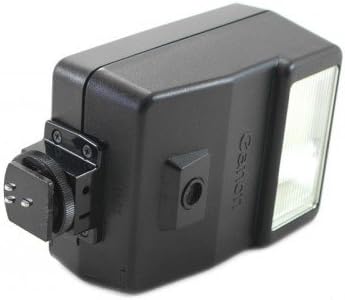
画像2: 側 view of the Canon Speedlite 155A. This image highlights the power switch, mode selector, and the battery compartment cover.
- フラッシュヘッド: Emits the light for illumination.
- 光センサー: Detects ambient light for automatic exposure control.
- 電源スイッチ: Turns the flash unit on and off.
- モードセレクター: Allows selection between automatic (A1, A2) and manual (M) flash modes.
- バッテリーコンパートメント: Houses the 4 AA batteries required for operation.
- ホットシューマウント: Connects the flash unit to the camera's hot shoe for communication and secure attachment.
5. セットアップ
5.1. バッテリーの取り付け
- Locate the battery compartment cover on the side or rear of the Speedlite 155A.
- カバーをスライドまたはラッチを外して開きます。
- Insert four (4) AA batteries, ensuring that the positive (+) and negative (-) terminals align with the markings inside the compartment.
- 電池ケースのカバーをカチッと音がするまでしっかりと閉じます。
5.2. カメラへの取り付け
- Ensure both the camera and the Speedlite 155A are turned off.
- Slide the hot shoe mount of the Speedlite 155A into your camera's hot shoe slot.
- Push the flash unit forward until it is fully seated and locked into position. Some cameras or flashes may have a locking mechanism; ensure it is engaged.
6. 操作手順
6.1. 電源のオン/オフ
To turn the Speedlite 155A on, slide the power switch to the 'ON' position. To turn it off, slide the switch to 'OFF'. A ready lamp フラッシュが充電され、発射できる状態になると点灯します。
6.2. Automatic Flash Modes (A1, A2)
The Speedlite 155A offers two automatic flash ranges, typically labeled A1 and A2, which correspond to different aperture settings or subject distances. Consult your camera's manual or the flash's guide for specific aperture recommendations for each mode.
- Set the mode selector switch on the flash to either A1 or A2.
- Set your camera's aperture to the corresponding f-stop for the selected automatic mode.
- The flash will automatically adjust its output based on the light reflected from the subject, ensuring correct exposure.
6.3. マニュアル発光モード(M)
In manual mode, the flash fires at full power, providing consistent light output. This mode offers greater creative control but requires manual adjustment of camera settings.
- Set the mode selector switch on the flash to 'M'.
- Adjust your camera's aperture, shutter speed, and ISO settings to achieve the desired exposure, considering the flash's guide number and your subject distance.
7. メンテナンス
7.1. 清掃
- Use a soft, dry cloth to gently wipe the exterior of the flash unit.
- 頑固な汚れには、軽くampen the cloth with water. Do not use solvents, alcohol, or abrasive cleaners.
- Keep the flash tube and light sensor free of dust and fingerprints for optimal performance.
7.2. バッテリーのお手入れ
- Remove batteries from the unit if it will not be used for an extended period (e.g., one month or more) to prevent battery leakage and potential damage.
- Always use fresh, high-quality batteries for optimal flash recycling times and number of flashes.
7.3. ストレージ
Store the Speedlite 155A in its protective case in a cool, dry place, away from direct sunlight and extreme temperatures. Avoid storing it in areas with high humidity.
8。 トラブルシューティング
| 問題 | 考えられる原因 | 解決 |
|---|---|---|
| フラッシュが点灯しない | 電池残量が少ないか切れている 電池の挿入が間違っている Flash not powered on Flash not securely mounted Dirty hot shoe contacts | 電池を交換する 正しい極性で電池を入れ直してください Turn flash power switch to 'ON' Ensure flash is fully seated and locked on hot shoe Clean camera and flash hot shoe contacts with a dry cloth |
| 露出が不適切(暗すぎる/明るすぎる) | Incorrect automatic mode selected Camera aperture not matched to auto mode Subject too far/close for selected mode Flash sensor obstructed Incorrect manual settings | Select appropriate A1/A2 mode Set camera aperture to recommended f-stop Adjust shooting distance or mode Ensure flash sensor is clear Adjust camera aperture, shutter speed, ISO in manual mode |
| Long recycling time | バッテリー残量が少ない Using non-rechargeable batteries repeatedly | 新しい電池と交換してください Consider using NiCd rechargeable batteries for faster recycling |
9. 仕様
| 特徴 | 仕様 |
|---|---|
| モデル番号 | 155A |
| ガイドナンバー | 56 (at ISO 100, meters) |
| リサイクル時間 | Approx. 7 seconds (Alkaline-Manganese) Approx. 5 seconds (NiCd) |
| フラッシュカバレッジ | 35mm lens angle |
| フラッシュの数 | 300 or more (Alkaline) 90 or more (NiCd) |
| 電源 | 単三電池4本 |
| マウントタイプ | ホットシューマウント |
| 重さ | 8.48オンス(約240g) |
| メーカー | キヤノン |
10. 保証とサポート
10.1. 保証情報
Please refer to the warranty card or documentation included with your original purchase for detailed information regarding the warranty period, terms, and conditions for your Canon Speedlite 155A. Keep your proof of purchase for warranty claims.
10.2. カスタマーサポート
For further assistance, technical support, or service inquiries, please contact Canon customer support. You can also visit the official Canon web製品情報、FAQ、サービス センターの所在地については、こちらのサイトをご覧ください。
キヤノン公式ストア: Amazonのキヤノンストア