
1. はじめに
This manual provides detailed instructions for the safe and effective installation, operation, and maintenance of the ICM Controls ICM280C OEM Furnace Control Board. This board is designed as a direct replacement for specific Goodman furnace models, ensuring proper control of the furnace's fan and other critical functions. Please read this manual thoroughly before proceeding with installation or operation.
2. 安全情報
警告: 不適切な設置、調整、改造、サービス、またはメンテナンスは、物的損害、傷害、または死亡を引き起こす可能性があります。この機器を設置またはサービスする前に、これらの手順をよくお読みください。
- Always disconnect all power to the furnace unit before installing or servicing the control board. Failure to do so can result in electrical shock, fire, or death.
- 設置およびサービスは、資格のある設置業者またはサービス代理店が行う必要があります。
- すべての配線接続が安全であり、地域および国の電気規格に準拠していることを確認してください。
- 配線や部品が損傷している状態で炉を操作しないでください。
- 設置作業中は、安全メガネや手袋などの適切な個人用保護具 (PPE) を着用してください。
3.製品オーバーview
The ICM Controls ICM280C is an Original Equipment Manufacturer (OEM) replacement control board specifically designed for Goodman furnace systems. It manages the operational sequence of the furnace, including ignition, fan control, and safety monitoring. This board ensures reliable and efficient performance of your heating system.
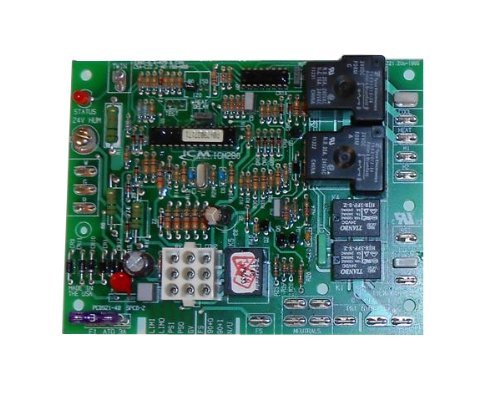
Figure 1: ICM Controls ICM280C OEM Furnace Control Board. This image shows the front view of the control board with various terminals and components.
4. セットアップとインストール
This section outlines the steps for safely replacing your existing furnace control board with the ICM Controls ICM280C.
4.1. インストール前のチェック
- Verify that the ICM280C board is the correct replacement for your specific Goodman furnace model. Refer to your furnace's documentation.
- Gather necessary tools: screwdriver set, wire strippers, multimeter (optional for diagnostics), and safety glasses.
- Take clear photographs of the existing wiring connections on your old control board before disconnecting anything. This will serve as a crucial reference during re-installation.
4.2. インストール手順
- 電源を切る: Locate the main power switch for your furnace and turn it OFF. Additionally, turn off the circuit breaker supplying power to the furnace at your electrical panel. Verify power is off using a multimeter if available.
- アクセス制御ボード: Open the furnace access panel(s) to expose the existing control board.
- 配線を外す: Carefully disconnect all wires from the old control board. Refer to your photographs taken in step 4.1. Ensure each wire is noted for its original connection point.
- 古いボードを削除します。 古いコントロール ボードを取り付けブラケットからネジまたはクリップで外します。
- 新しいボードをインストールします: Position the ICM Controls ICM280C board in the same location as the old board and secure it using the original screws or clips.
- 配線を再接続します: Carefully reconnect all wires to the corresponding terminals on the new ICM280C board. Use your photographs as a guide. Double-check every connection for accuracy and tightness.
- Close Access Panels: Once all wiring is secure and verified, close and secure the furnace access panel(s).
- 電力を回復する: Turn on the circuit breaker for the furnace, then turn on the main power switch for the furnace unit.
5. 操作手順
After successful installation and power restoration, the ICM Controls ICM280C board will initiate the furnace's normal operating sequence. The board is designed to automatically manage the furnace's functions based on thermostat calls for heat or fan operation.
- 初期パワーアップ: Upon first power-up, the board will perform a self-diagnostic check. Refer to your furnace's specific manual for expected diagnostic LED patterns (if applicable) during this phase.
- 通常操作: When the thermostat calls for heat, the control board will sequence the ignition process, monitor flame presence, and activate the circulating fan at the appropriate time. When the thermostat calls for fan-only operation, the board will activate the fan.
- 安全機能: The board continuously monitors various safety sensors within the furnace. If a fault is detected (e.g., overheating, flame failure), the board will shut down the furnace and typically display a diagnostic code via an LED.
6. メンテナンス
The ICM Controls ICM280C Furnace Control Board is a sealed electronic component and generally requires no routine maintenance. However, it is recommended to:
- Ensure the furnace area remains clean and free of dust and debris, which can accumulate on electronic components over time.
- During annual furnace servicing by a qualified technician, the control board and its connections should be visually inspected for any signs of wear, corrosion, or damage.
- 液体や研磨材を使用してボードを清掃しないでください。
7。 トラブルシューティング
If your furnace is not operating correctly after installing the ICM280C board, consider the following troubleshooting steps. Always disconnect power before inspecting internal components.
- 炉への電力供給なし:
- Check if the furnace power switch is ON.
- Check if the circuit breaker for the furnace is tripped.
- Verify all main power connections to the control board are secure.
- Furnace Not Igniting / No Heat:
- Ensure the thermostat is set to "Heat" and the temperature is above the ambient room temperature.
- Check for diagnostic fault codes displayed by an LED on the control board. Refer to your furnace's specific manual for the meaning of these codes.
- Verify gas supply is on.
- ファンが正しく動作しない:
- If the fan runs continuously, check the thermostat setting (e.g., "Fan ON" instead of "Auto").
- If the fan does not run when it should, check for diagnostic codes.
- Ensure all fan motor wiring connections to the control board are secure.
- 一般的な故障: If the board displays a persistent fault code or the furnace exhibits unusual behavior, it may indicate a more complex issue. In such cases, it is strongly recommended to contact a qualified HVAC technician for diagnosis and repair.
8. 仕様
| 部品番号 | ICM:280-C |
| モデル | ICM6C |
| 互換性 | OEM replacement for Goodman furnace control boards |
| ASIN | B009PAX89G |
| 商品パッケージ数量 | 1 |
| 初回利用可能日 | 30年2012月XNUMX日 |
9. 保証とサポート
For specific warranty information regarding the ICM Controls ICM280C OEM Furnace Control Board, please refer to the documentation provided with your purchase or contact ICM Controls directly. Warranty terms typically cover manufacturing defects for a specified period.
For technical support or further assistance, please contact the retailer from whom the product was purchased or visit the official ICM Controls website for their customer support resources.